
Broken vpn client

I'm unable to import valid wireguard .conf to the client (tested on pc), after manually adding the info and enabling the client i lose access to the routers webUI (it still responds to ping) nothing routes through the actual vpn though. I tested an .ovpn before that and it wouldnt even import the file
- Copy Link
- Subscribe
- Bookmark
- Report Inappropriate Content

Hi,
In your case, please check if the following article helps.
Archer MR600 & TL-MR6400 Fails to Connect to OpenVPN or WireGuard VPN as Client
Best Regards
- Copy Link
- Report Inappropriate Content
Hi,
In your case, please check if the following article helps.
Archer MR600 & TL-MR6400 Fails to Connect to OpenVPN or WireGuard VPN as Client
Best Regards
- Copy Link
- Report Inappropriate Content
Hi! I tried the beta FW and am able to upload both wg and ovpn files now, the wg never connects though and the ovpn while connected does not actually route anything through the vpn
- Copy Link
- Report Inappropriate Content
Hi,
The information in your previous reply is unclear. Please confirm whether the information below about your case is correct. If not, please describe the phenomenon you are experiencing in detail.
--After your Archer MR600 V3.0 upgrade to the firmware v1.3.0 0.9.1 Build 260522 Rel.39772 in this thread, you can upload the .ovpn file to the router when configuring the WireGuard and OpenVPN client. However, the WireGuard VPN never connects; the OpenVPN connection is established, but the VPN does not work.
If so, please provide the following information for further analysis.
1. Please send us a screenshot of the router's web UI > Advanced > Status page.
2. Please send us a screenshot of the router's web UI > Advanced > System Tools > Firmware Upgrade page.
3. When you try to connect the VPN server directly on your PC rather than on the router, can you connect successfully with the same .ovpn file?
Best Regards
- Copy Link
- Report Inappropriate Content
Solla-topee wrote
Hi,
The information in your previous reply is unclear. Please confirm whether the information below about your case is correct. If not, please describe the phenomenon you are experiencing in detail.
--After your Archer MR600 V3.0 upgrade to the firmware v1.3.0 0.9.1 Build 260522 Rel.39772 in this thread, you can upload the .ovpn file to the router when configuring the WireGuard and OpenVPN client. However, the WireGuard VPN never connects; the OpenVPN connection is established, but the VPN does not work.
If so, please provide the following information for further analysis.
1. Please send us a screenshot of the router's web UI > Advanced > Status page.
2. Please send us a screenshot of the router's web UI > Advanced > System Tools > Firmware Upgrade page.
3. When you try to connect the VPN server directly on your PC rather than on the router, can you connect successfully with the same .ovpn file?
Best Regards
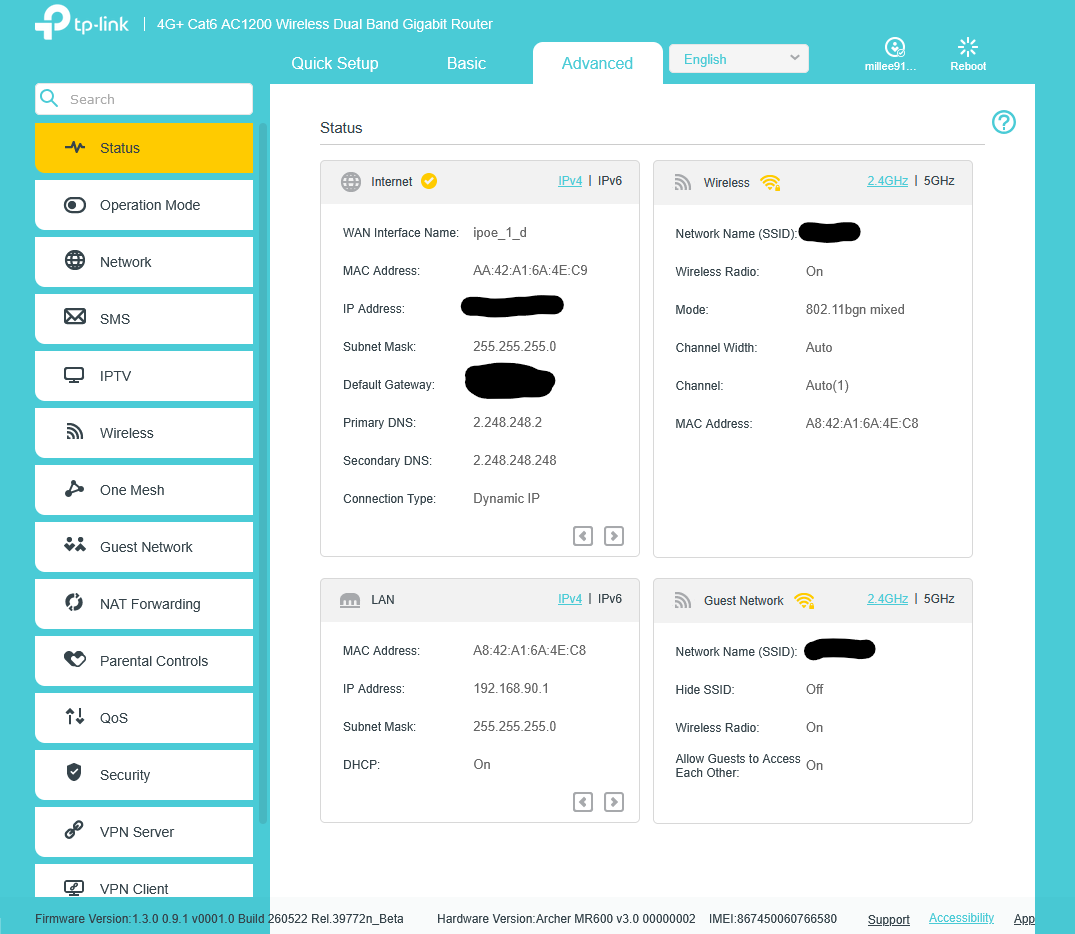
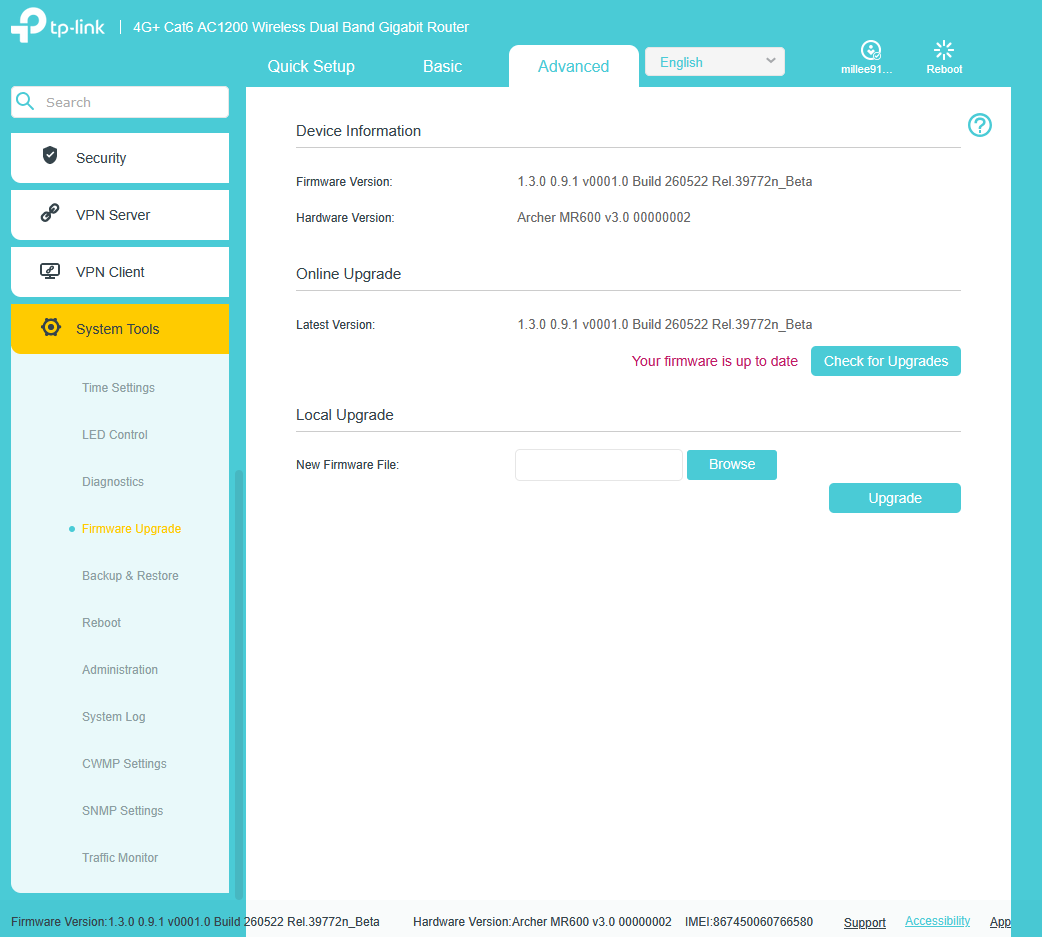
Yes exactly, the .ovpn works on my computer and correctly routes the traffic through the VPN, when I upload it to the router how ever, it says it is connected but no traffic is routed through it and my public IP stays the same when checking
- Copy Link
- Report Inappropriate Content
Hi,
I have escalated your case to our tech team, and they will contact you via email to assist you further. Please wait patiently.
Best Regards
- Copy Link
- Report Inappropriate Content
Solla-topee wrote
Hi,
I have escalated your case to our tech team, and they will contact you via email to assist you further. Please wait patiently.Best Regards
I'm embarrassed to admit that I added the wrong device while trying!
Both .ovpn and .conf works now with the beta fw, thank you for your help!
- Copy Link
- Report Inappropriate Content
@Millee91 Glad to hear that your case is resolved~
- Copy Link
- Report Inappropriate Content

Hi, I own a TL-MR6500v V3, which has the same issue: the VPN client won't connect despite following all the official TP-Link procedures. I'd like to know if there's an official beta version for this model that fixes the problem. Thanks.
- Copy Link
- Report Inappropriate Content
Hi,
We currently do not have a beta firmware for the TL-MR6500v. In your situation, please confirm the following information for further analysis.
1. What's the firmware version of your router?
2. What VPN Client have you configured on the router? Please describe the phenomenon you are experiencing when setting up the VPN feature.
3. Please list the troubleshooting you did.
Best Regards
- Copy Link
- Report Inappropriate Content
Thanks for the quick reply.
Let me explain better, I own two TP-Link routers:
I have the MR600 I use at home and the MR6500v I use at work. For the MR600, I followed the instructions in this thread and was able to easily connect the VPN client using the beta firmware you recommended. The MR6500v suffers from the same problem: it can't connect despite following the official instructions.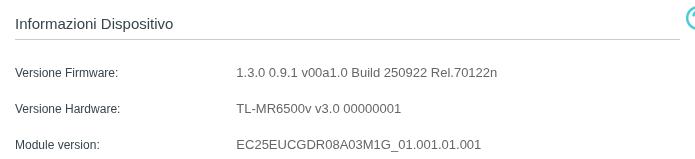
The .ovpn file is from ProtonVPN, which when fed to the MR600 with beta firmware worked immediately, but with the official firmware it wouldn't connect. The MR6500v with the same file doesn't connect.
- Copy Link
- Report Inappropriate Content
Information
Helpful: 0
Views: 288
Replies: 10
Voters 0
No one has voted for it yet.