C500 Camera Won’t Accept Firmware Update or Reset
 This thread has been locked for further replies. You can start a new thread to share your ideas or ask questions.
Hi everyone,
I have two C500 cameras. One is working as intended, but the other refuses to accept the latest firmware update (from about 2 months ago). Here’s what I’ve tried so far:
-
Automatic and manual firmware update modes
-
Removing the SD card
-
Enabling diagnostic mode
-
Having the cam literraly on the WiFi router
-
...
In every case, it stays stuck on "Firmware updating." After waiting anywhere from a few hours to days, I end up unplugging and replugging it, which just returns the camera to its previous state.
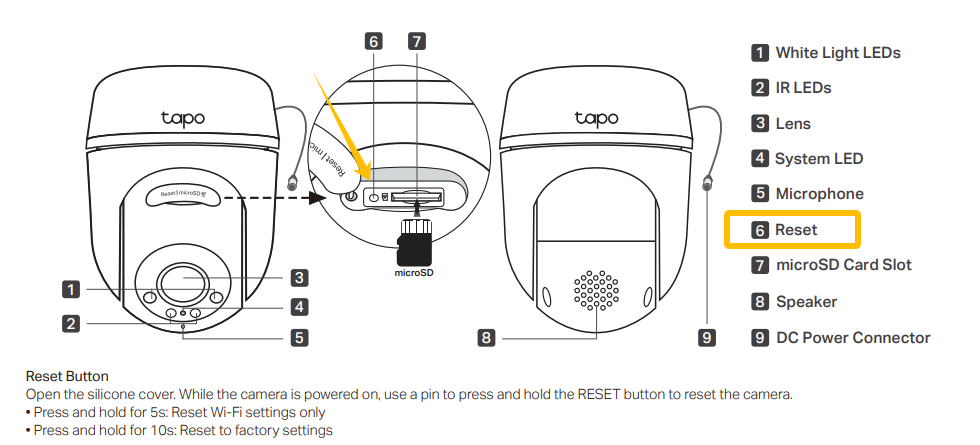
According to the support site, my next option was to reset the camera. However, pressing the reset button for more than 10 seconds does nothing—no lights, no reset, no response.
I also tried disabling WiFi on my router. This made the LED blink red, but I still couldn't reset the camera.
The support site’s last suggestion was to remove the camera from the app. I did this, but it didn’t change anything. Pressing the reset button for 5 or 10 seconds, unplugging/replugging with or without WiFi—none of it made a difference.
Now, since I removed the camera from the app, I can’t add it back because there’s no “add via IP” option, and I can’t get it into initial setup mode. The camera is still working (responds to ping and streams via RTSP), but I’m stuck.
My basic observations:
-
The reset button appears to be faulty (hardware or software)
-
The camera software may also be faulty, since it won’t accept the firmware update
Any advice or support would be greatly appreciated!
Thanks in advance!