
Solution Tapo Camera/Doorbell Video Feed Failure on Tapo H200 Hub: Live View & Recording Unavailable


This Article Applies To
Tapo cameras or doorbells that are linked with the Tapo H200:
- Sub-devices of the Tapo H200
- Stored videos on the Tapo H200
Description
Some users may experience interruptions in live video feed or playback of recorded videos for Tapo cameras or doorbells connected to a Tapo H200 hub. The app may repeatedly prompt to “Tap to Refresh” without successfully loading the stream.
In certain instances, the detection function on the affected device may also be temporarily inactive.
Workaround
The R&D team has developed new firmware to address this issue. Before the official release, beta firmware is available for testing.
How to Apply Beta Firmware
1. Find the Mac address of your Tapo H200: Open the Tapo app and navigate to the smart hub's Device Settings page > Device Info.
2. Send a private message to @Wayne-TP with the format below:
[Forum 845832] + Mac address of your Tapo H200
**For users from the United States, send your request to forumsupport.usa@tp-link.com with:
1. A brief summary of the product issue you encountered, along with your request for beta firmware. *You may also include a link to this community post for the support team’s reference.
2. The Mac address of your Tapo H200.
Before the Upgrade
(1) Please be sure you have read the Beta Test Agreement before upgrading the Pre-release firmware!
(2) How to update firmware of Tapo smart devices
(3) Firmware downgrade is not supported. When a new official version is released, updating it will overwrite the beta version.
- Copy Link
- Subscribe
- Bookmark
- Report Inappropriate Content
Beta firmware has been sent to your device, you may check it 30 minutes later in the Tapo app and perform the update.
- Copy Link
- Report Inappropriate Content

Thank you, just updated.
So i cant see the clips that were taken before the update, is that correct?
I will check tomorrow if I can see the clips of today, because that was my issue, I couldnt see video recorded 1 or 2 day before.
Edit:
I formated the sd card to start with a clean slate.
Since updating the firmware to beta 1.7.1. build 20260515 rel61602, still the issue that older videos from yesterday are not visible, It looks like it is always happening with the transition to a new day. Also got alot of interuption since midnight between the D235 and H200. So it wont save new recordings a lot of the time. So the question is: whats next? Really dont want to buy the h500 because its overkill for my situation.
- Copy Link
- Report Inappropriate Content
WindOfRage wrote
Thank you, just updated.
So i cant see the clips that were taken before the update, is that correct?
I will check tomorrow if I can see the clips of today, because that was my issue, I couldnt see video recorded 1 or 2 day before.
Edit:
I formated the sd card to start with a clean slate.
Since updating the firmware to beta 1.7.1. build 20260515 rel61602, still the issue that older videos from yesterday are not visible, It looks like it is always happening with the transition to a new day. Also got alot of interuption since midnight between the D235 and H200. So it wont save new recordings a lot of the time. So the question is: whats next? Really dont want to buy the h500 because its overkill for my situation.
If the videos weren't recorded at all, this firmware won't magically regenerate them.
When you watched the video, did you use the calendar to switch to the correct date? Also, please make sure you’re viewing the SD card section, not videos stored in the cloud.
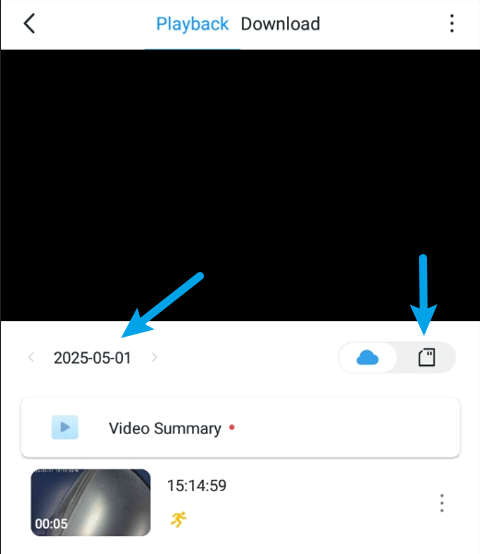
Additionally, what size SD card do you have? If it’s not very big and your doorbell records frequently (with 24/7 recording or lots of detections), it can get full quickly. If loop recording is enabled, older footage gets overwritten by new recordings once the card is full.
- Copy Link
- Report Inappropriate Content
I understand that they wont magically regenerate if they werent recorded at al. But they were recorded, but after midnight i couldnt see them anymore. Yes i switched the calendar to the correct date. And yes it was on the SD card section.
I have a 128GB SD card, even with 24/7 recording that is not full in 2 or 3 days of recording.
It was working for a day, but then it happened again. It wasnt showing any of the recording footage 24/7 or detection clips, just nothing.
- Copy Link
- Report Inappropriate Content
WindOfRage wrote
I understand that they wont magically regenerate if they werent recorded at al. But they were recorded, but after midnight i couldnt see them anymore. Yes i switched the calendar to the correct date. And yes it was on the SD card section.
I have a 128GB SD card, even with 24/7 recording that is not full in 2 or 3 days of recording.
It was working for a day, but then it happened again. It wasnt showing any of the recording footage 24/7 or detection clips, just nothing.
Have you tried using a different SD card to see if that resolves the issue? This is often a useful step for problems like this.
If the problem continues, i recommend reaching out to our support for further assistance. Contact Technical Support
To help them provide the most efficient follow-up, please provide as many details as possible in your email, such as:
- A detailed description of the problem and the troubleshooting steps you’ve already tried.
- Your device information (Model, MAC address, hardware and firmware versions).
- Screenshots of your doorbell’s recording settings page.
- Screenshots of the video playback page from two different days, showing that videos were available on one day but missing the next.
- Copy Link
- Report Inappropriate Content

Hi @Wayne-TP ! My Tapo C420 cannot relay live preview. these are connected to my H200. The firmware version of H200 is 1.6.1 Build 20251230 rel. 64168
- Copy Link
- Report Inappropriate Content
Beta firmware has been sent to your device. You may check it 30 minutes later in the Tapo app and perform the update.
- Copy Link
- Report Inappropriate Content

- Copy Link
- Report Inappropriate Content
Information
Helpful: 0
Views: 6754
Replies: 78
Voters 0
No one has voted for it yet.