
Archer VR2100v shows incorrect online connections state

Archer VR2100v shows incorrect online connections state

Archer VR2100v shows incorrect online connections state
2025-12-10 09:33:52 - last edited 2026-01-08 11:40:09
Model: Archer VR2100v  
Hardware Version: V1
Firmware Version: 1.18.0 0.9.1 v009e.0 Build 241018 Rel.43535n

Hello everyone,


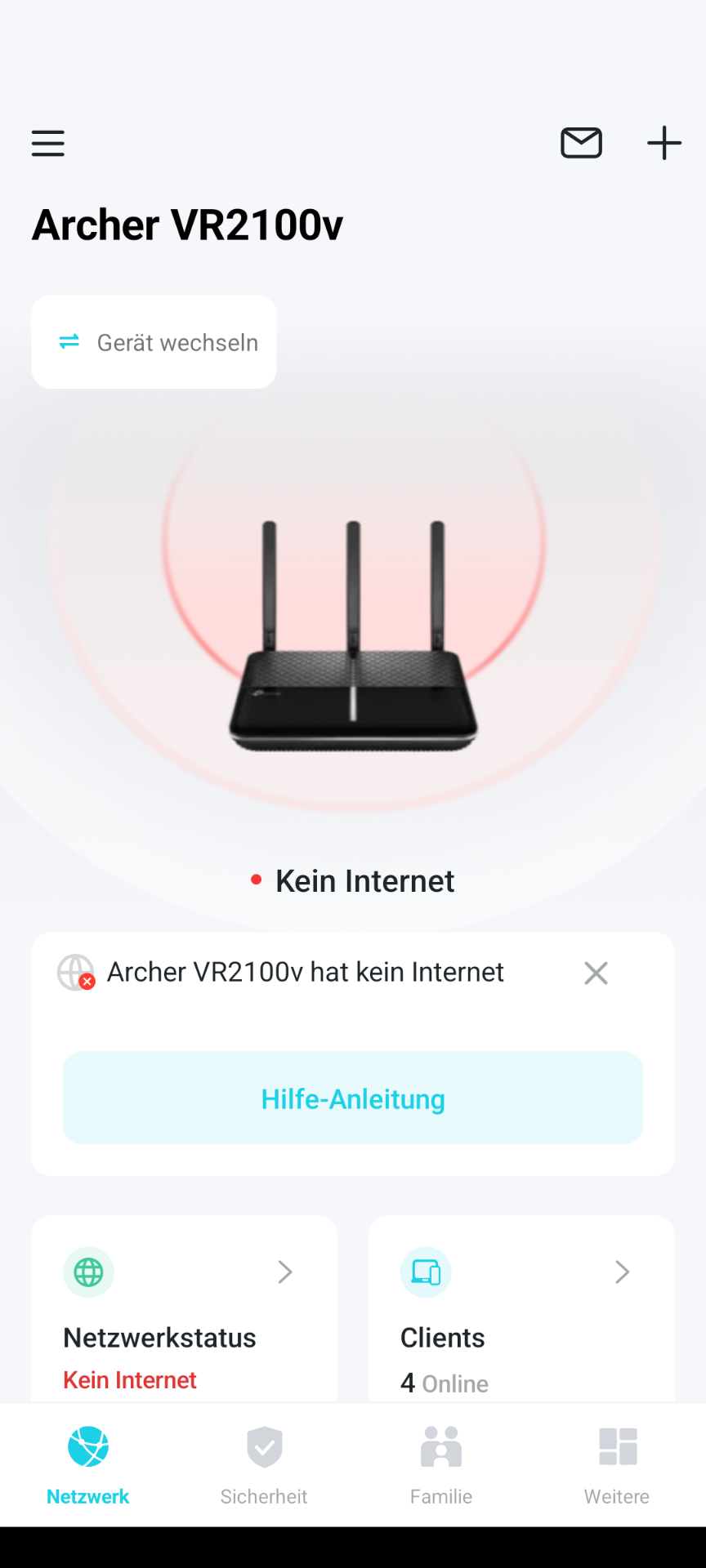
I’m using a TP-Link Archer VR2100v router, and the app always shows that there is no internet connection. However, this is incorrect, because I’m using the device as a modem and all my hardware — whether it’s my home office PC or my private Raspberry Pi — is online and working perfectly. My firmware is up to date, and the provider settings are stored correctly.


What could be the cause of this?


Kind regards,


amarradi 
 

0
0
#1
1 Accepted Solution
Re:Archer VR2100v shows incorrect online connections state -Solution
2025-12-12 02:17:36 - last edited 2026-01-08 11:40:09

Hello @amarradi ,

Welcome to our community.


Have you checked the network status on the web interface of Archer VR2100v? Is it online? Here are some troubleshooting steps that may help:
    1. Make sure the phone is connected to the main network of the TP-Link device , not the guest network or other networks.
    2. To upgrade the TP-Link devices' firmware to the latest version, you may log in to the TP-Link web management interface to check for updates.
    3. Turn off any VPN application on your phone.
    4. Turn off the mobile/cellular data on the phone. 
    5. Reboot the TP-Link device. 
    6. Close the Tether app completely (kill it in the background) and reopen it.
    7. For iOS devices, please enable "Local Network Access" permission for the Tether APP (Settings > Tether APP > enable Local Network Access).
 

Welcome to Community! Get the latest posts: △New Firmware for Archer GE550/GE650 V1 Introduces AI-QoS, EasyMesh IoT Expansion, and More! △New Firmware Releases for Archer BE805 V1/BE450 V1 to Support VPN Merge, New ECO Mode, and More! More posts, please see: △ Get the Ongoing Pre-release Firmware for Wi-Fi Routers Here— Subscribe for Updates! Urgent problems with your Wi-Fi Router, Range Extender, or DSL Modem? Please reach out via private Messages or @Joesph-TP in your new thread directly. Click Or ☆Recommended Solution if the post/answer helps.
Recommended Solution
0
0
#2
1 Reply
Re:Archer VR2100v shows incorrect online connections state -Solution
2025-12-12 02:17:36 - last edited 2026-01-08 11:40:09

Hello @amarradi ,

Welcome to our community.


Have you checked the network status on the web interface of Archer VR2100v? Is it online? Here are some troubleshooting steps that may help:
    1. Make sure the phone is connected to the main network of the TP-Link device , not the guest network or other networks.
    2. To upgrade the TP-Link devices' firmware to the latest version, you may log in to the TP-Link web management interface to check for updates.
    3. Turn off any VPN application on your phone.
    4. Turn off the mobile/cellular data on the phone. 
    5. Reboot the TP-Link device. 
    6. Close the Tether app completely (kill it in the background) and reopen it.
    7. For iOS devices, please enable "Local Network Access" permission for the Tether APP (Settings > Tether APP > enable Local Network Access).
 

Welcome to Community! Get the latest posts: △New Firmware for Archer GE550/GE650 V1 Introduces AI-QoS, EasyMesh IoT Expansion, and More! △New Firmware Releases for Archer BE805 V1/BE450 V1 to Support VPN Merge, New ECO Mode, and More! More posts, please see: △ Get the Ongoing Pre-release Firmware for Wi-Fi Routers Here— Subscribe for Updates! Urgent problems with your Wi-Fi Router, Range Extender, or DSL Modem? Please reach out via private Messages or @Joesph-TP in your new thread directly. Click Or ☆Recommended Solution if the post/answer helps.
Recommended Solution
0
0
#2

