@Wayne-TP
Hi, thanks for the support. I managed to get it to work but I'm facing a lot of issues
I have two c120 cameras next to each other connected to the hub and wifi. Both were working flawless but after a few days both started dropping connections (blinking red), 1 of them was rare and managable. The other was very frequently dropping connections with large gaps in the playback.
I've already tried resetting the network to 2.4ghz. rebooting the devices but it keeps dropping. I bought a third tp c120 to replace the 2nd one and it's working fine again. The problematic device is also running fine now after moving it around. But I suspect over time it's going to start dropping connections again.
I have a few questions
1) why is dropping connections when other devices are working fine
2) why is it not properly connecting to my hub h500 if the wifi is dropping?
3) I have SD card installed in all of them, shouldn't it at least record to the SD card if the wifi drops? It fails to properly record to the SD card as well resulting in large gaps in the recording.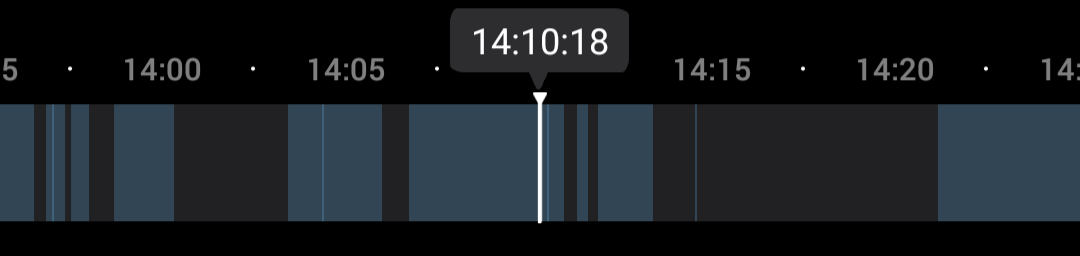
Its been a pretty frustrating experience especially since I bought the hub and SD cards to avoid such situations from happening but yet I'm still seeing dropping connections and issues. Please help. Thanks.
Edit: can we also please support it such that the recording goes to the SD card first and then transfers over via WiFi to the hub? Wouldn't that be a much more secure method having two backups. I don't think this solves the underlying issue with the product losing connectivity over time but I think it can improve the effectiveness of the products by a lot.



