C120 + H500 not working well

C120 + H500 not working well

C120 + H500 not working well
3 weeks ago
Model: Tapo H500  
Hardware Version: V1
Firmware Version: 1.3.8

Hi,

I just bought 2 x C120 and 1 x H500. The C120 is working great. I have Micro SD card enabled and with continuous recording it's working great. When I pair it with the H500 however I am having so many issues. I can't view the recording, it keeps saying "network error, try again later". I've connected it directly to my wifi 7 router and the wifi is fast. They are all located relatively nearby so there can't be any wifi or range issues. Both C120 take up only 1gb of space and don't seem to be performing continuous recording. Screen mirroring works fine from the H500 to my TV via hdmi. Continuosu recording also works fine with the SD card. It only seems to break down when I connect it to the hub. It's extremely frustrating. Anybody have any advice or tips?

  0      
  0      
#1
Options
3 Reply
Re:C120 + H500 not working well
3 weeks ago

  @Humbertooo 


Ensure the Tapo app is updated. (What's the current version?) You may try to delete and reinstall it. 


Try to power cycle the hub. How is your hub connected to router, via WiFi or ethernet? Besides the two Tapo C120, do you have other Tapo cameras or doorbell? How many devices are connected to the H500?

CES 2026 Meet TP-Link AI Assistant and More New Products!
  0  
  0  
#2
Options
Re:C120 + H500 not working well
Friday - last edited Friday

  @Wayne-TP 


Hi, thanks for the support. I managed to get it to work but I'm facing a lot of issues


I have two c120 cameras next to each other connected to the hub and wifi. Both were working flawless but after a few days both started dropping connections (blinking red), 1 of them was rare and managable. The other was very frequently dropping connections with large gaps in the playback.


I've already tried resetting the network to 2.4ghz. rebooting the devices but it keeps dropping. I bought a third tp c120 to replace the 2nd one and it's working fine again. The problematic device is also running fine now after moving it around. But I suspect over time it's going to start dropping connections again.


I have a few questions

1) why is dropping connections when other devices are working fine


2) why is it not properly connecting to my hub h500 if the wifi is dropping?


3) I have SD card installed in all of them, shouldn't it at least record to the SD card if the wifi drops? It fails to properly record to the SD card as well resulting in large gaps in the recording.
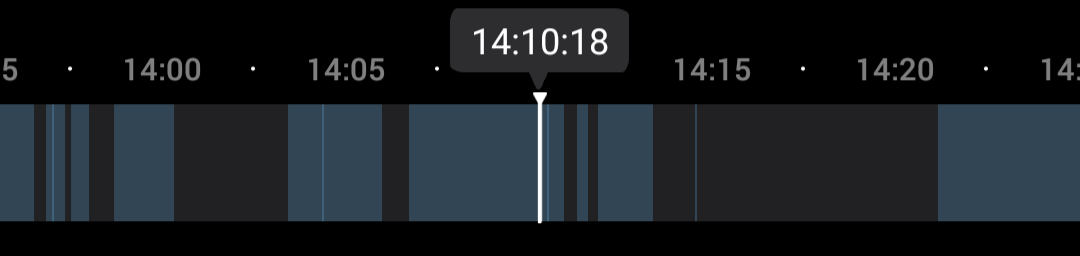
Its been a pretty frustrating experience especially since I bought the hub and SD cards to avoid such situations from happening but yet I'm still seeing dropping connections and issues. Please help. Thanks.


Edit: can we also please support it such that the recording goes to the SD card first and then transfers over via WiFi to the hub? Wouldn't that be a much more secure method having two backups. I don't think this solves the underlying issue with the product losing connectivity over time but I think it can improve the effectiveness of the products by a lot.


  0  
  0  
#3
Options
Re:C120 + H500 not working well
Yesterday

  @Humbertooo 


Have you enabled the WiFi backup feature? Could you check the signal when the camera is in that spot where it keeps dropping? Let us know what the strength is when you put it there. How to check and improve the network connection stability of Tapo&Kasa smart devices

CES 2026 Meet TP-Link AI Assistant and More New Products!
  0  
  0  
#4
Options
