
Tapo CS560WS no high quality stream in Surveliance stataion from Synlogy

Hello,
Tapo C560WS exposes only the lowest-resolution (1280x720) stream to Surveillance Station from Synology via ONVIF- other, high res modes do not work. I bought this camera to be able to use a 4K stream through ONVIF. The Synlogy support team informed me that this is an ONVIF issue with the camera. The other Tapo camera works correctly.
- Copy Link
- Subscribe
- Bookmark
- Report Inappropriate Content


Hi,
Please confirm the following information for the reported phenomenon.
1. When you try to stream the camera at high resolution via ONVIF to Synology, what phenomenon will occur in the third-party app? Such as displaying a black page or an error message.
2. Please try to stream the camera at high resolution with the third-party app Agent DVR or VLC and check if you can establish the connection successfully: How to view Tapo camera on PC/NAS/NVR through RTSP/Onvif Protocol
3. Please send me (@Solla-topee) your camera's MAC address via a private message.
Best Regards
- Copy Link
- Report Inappropriate Content
Hi,
Please confirm the following information for the reported phenomenon.
1. When you try to stream the camera at high resolution via ONVIF to Synology, what phenomenon will occur in the third-party app? Such as displaying a black page or an error message.
2. Please try to stream the camera at high resolution with the third-party app Agent DVR or VLC and check if you can establish the connection successfully: How to view Tapo camera on PC/NAS/NVR through RTSP/Onvif Protocol
3. Please send me (@Solla-topee) your camera's MAC address via a private message.
Best Regards
- Copy Link
- Report Inappropriate Content
1. It shows a black screen with the information:
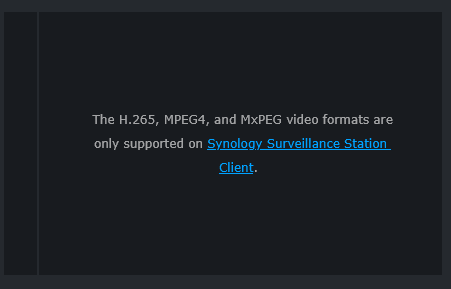
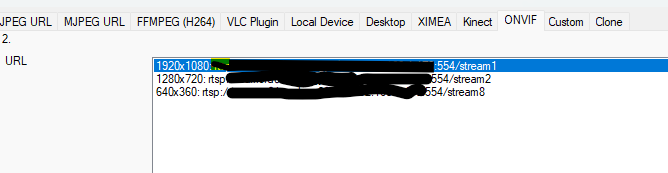
2. Using Ispy and ONVIF I get access to this streams:
- Copy Link
- Report Inappropriate Content
Hi,
I have escalated your case to our tech team, and they will contact you via email to assist you further. Please wait patiently.
Best Regards
- Copy Link
- Report Inappropriate Content

Hey there - same issue when i choose the C560WS 'pack' with synology - it just connects to stream2 / low quality. I can set it up with onvif as an unknown camera, and do see stream1 stream, however, it's still only seeing one stream option, so i'm stuck doing stream1 in live view with takes up a lot of cpu.
- Copy Link
- Report Inappropriate Content
Hi,
If you are in the US, it's recommended to contact the technical support team for assistance with the following information.
1. A brief description of the phenomenon you have experienced.
2. Forum link: https://community.tp-link.com/en/smart-home/forum/topic/853622
3. The camera's MAC address. You can find it in the Tapo app > camera's Device Settings > Device Info page.
Best Regards
- Copy Link
- Report Inappropriate Content
@Solla-topee The issue is normally resolved in the 1.1.8 firmware. At least for me worked.
- Copy Link
- Report Inappropriate Content
Information
Helpful: 0
Views: 565
Replies: 6
Voters 0
No one has voted for it yet.