
Tapo C610 moving to face downward and can’t go upward again
Tapo C610 moving to face downward and can’t go upward again

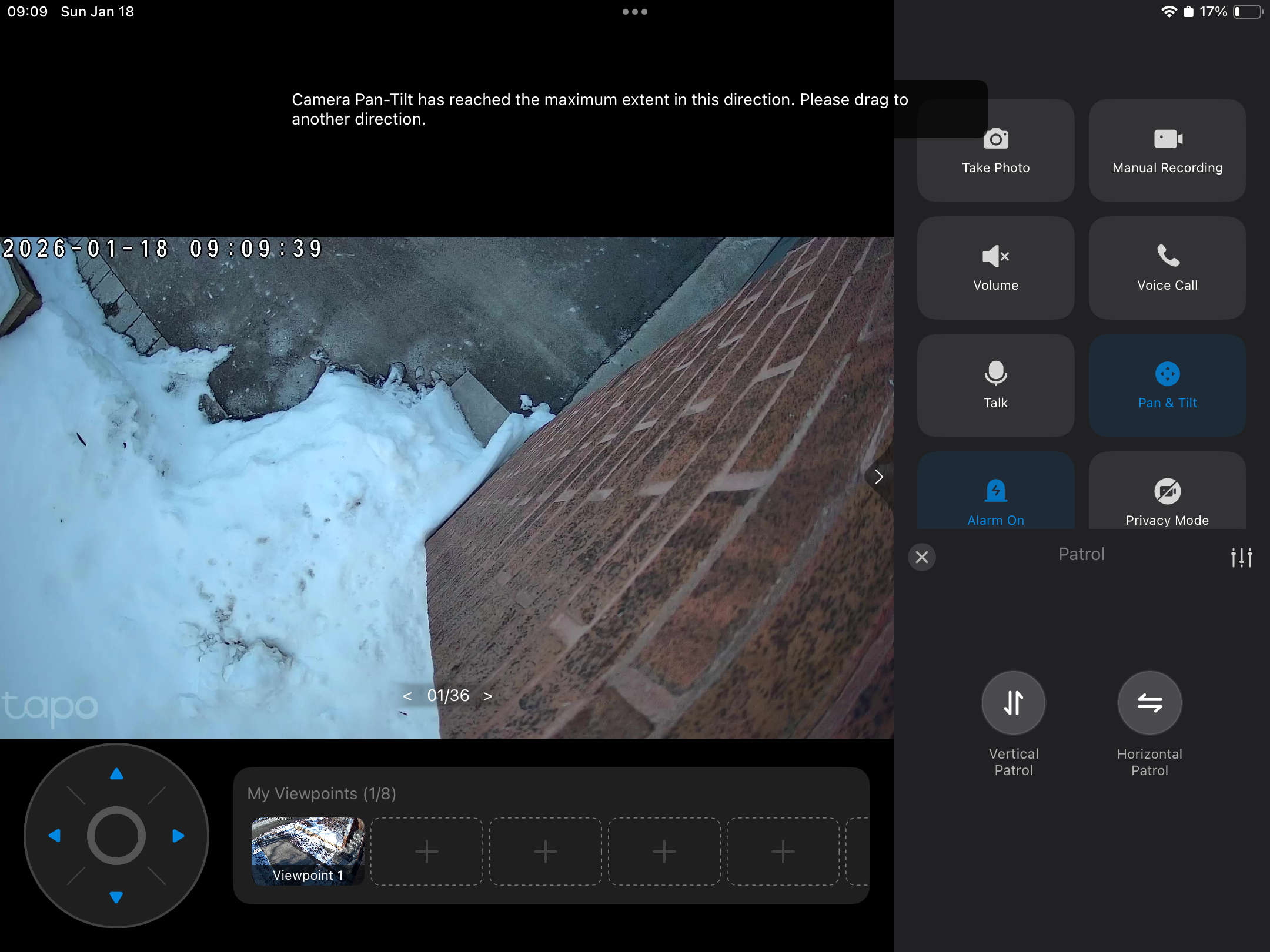 My C610 consistently moves to the downward facing position. When I reboot it shows the correct position and then turns downwards again.
if I use the tilt it will not go up more that 10 degrees then says it's at maximum.
I will again try a factory reset. But this cannot be normal. Wifi is good. Doorbell and wired 530 are also good.
help before returning please
- Copy Link
- Subscribe
- Bookmark
- Report Inappropriate Content


Hi,
Please provide the following information for further analysis.
1. Does the camera move downwards after each tracking, or does it move downwards even without pan/tilt operation?
2. When did you purchase the camera? When did the reported phenomenon start?
3. Please go to the Tapo app > Me > About page to check its version.
4. On the camera's Device Settings > Pan & Tilt page, tap Pan & Tilt Correction. Can the camera return to the correct position after the correction?
Best Regards
- Copy Link
- Report Inappropriate Content
Hi,
Please provide the following information for further analysis.
1. Does the camera move downwards after each tracking, or does it move downwards even without pan/tilt operation?
2. When did you purchase the camera? When did the reported phenomenon start?
3. Please go to the Tapo app > Me > About page to check its version.
4. On the camera's Device Settings > Pan & Tilt page, tap Pan & Tilt Correction. Can the camera return to the correct position after the correction?
Best Regards
- Copy Link
- Report Inappropriate Content
The downward is sporadic. Not always. But when it happens it stays
Camera purchased 29th December 2025. First happened after 3 days. Then happening after about 5 days each time
Version 1.0
Not with correction. Patrol is the nearest to get it back. Usually needs a reset on the camera as well.
Regards Ian
- Copy Link
- Report Inappropriate Content

I am having exactly the same issue. When I reset it works perfectly, but after a while reverts to facing down and I have very limited cob
- Copy Link
- Report Inappropriate Content
@Ian-S
Hi,
I would like to know what actions on the camera cause its lens to tilt downwards over time. For example, after tracking an event, does the camera return to a position lower than its original position? Or, does clicking on preset viewpoints in the live view > pan & tilt page cause the camera lens to tilt downwards each time? Or does the camera lens tilt downwards even when nothing is being done?
V1.0 likely refers to the camera's hardware version, not the app version. You can go to the Tapo app > Me > About page to check its version.
If you have a video showing the reported phenomenon, please send it to us. You can upload the video to your cloud server (such as Google Drive), generate a download link, and send it to me (@Solla-topee) via a private message.
Best Regards
- Copy Link
- Report Inappropriate Content
Hi,
Is your camera's model number Tapo C610? If so, please also provide the information in this post.
Please note that factory resetting the camera is different from rebooting it. You mentioned that resetting the camera will make it work for a while. Do you mean factory resetting the camera and then reconfiguring it, or rebooting it in the Tapo app or by unplugging the power source and replugging?
Best Regards
- Copy Link
- Report Inappropriate Content
- Copy Link
- Report Inappropriate Content
- Copy Link
- Report Inappropriate Content
Hi,
How often does the viewpoint offset phenomenon occur, such as once a day, once a week, etc.? Could you please confirm if any actions were taken on the camera that might have caused its lens to tilt downwards over time?
How do you resume the camera's position? By factory resetting it and reconfiguring it, or rebooting it?
Please refer to the following instructions to collect the camera log for further analysis. Then, reply to us once you have collected the logs.
How to get the log of Tapo Camera
Best Regards
- Copy Link
- Report Inappropriate Content
app version 3.16.161
i can't find any reasoning why this happens.
i will try sharing the video from Tapo care.
regards Ian
- Copy Link
- Report Inappropriate Content
Hi,
I have escalated your case to our tech team, and they will contact you via email to assist you further. You can send the video showing the reported phenomenon to our tech team.
Best Regards
- Copy Link
- Report Inappropriate Content
Information
Helpful: 0
Views: 842
Replies: 14
Voters 0
No one has voted for it yet.