
Tapo C610 moving to face downward and can’t go upward again
Tapo C610 moving to face downward and can’t go upward again

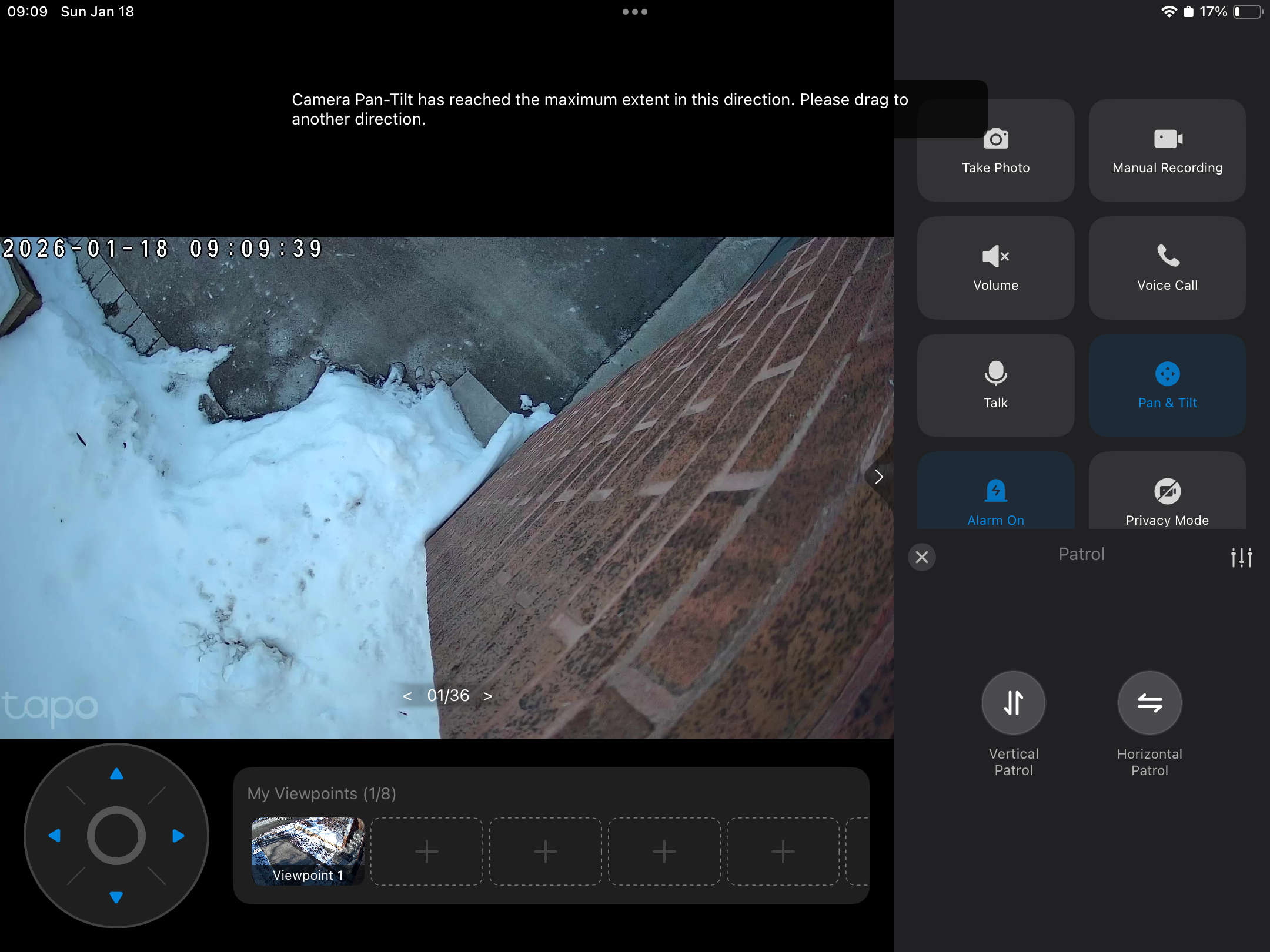 My C610 consistently moves to the downward facing position. When I reboot it shows the correct position and then turns downwards again.
if I use the tilt it will not go up more that 10 degrees then says it's at maximum.
I will again try a factory reset. But this cannot be normal. Wifi is good. Doorbell and wired 530 are also good.
help before returning please
- Copy Link
- Subscribe
- Bookmark
- Report Inappropriate Content

@Ian-S I am having exactly the same problem - did you resolve?
- Copy Link
- Report Inappropriate Content


- Copy Link
- Report Inappropriate Content
@Bigtbw I got a replacement, then they sent out a software update. Same thing happened a couple of times. Then I was asked to insert a SD card. Problem hasn't happened since.
I have noticed it's slow to identify movement though.
I don't think the first unit was faulty to be honest.
- Copy Link
- Report Inappropriate Content
- Copy Link
- Report Inappropriate Content

I’m having the exact same issue. While I haven't tracked the frequency yet, I can add that when the camera 'goes haywire' like this, the Pan & Tilt arrows become completely unresponsive. Interestingly, enabling Privacy Mode and then immediately disabling it fixes the problem (at least until the next time it happens). I’ve also noticed that if left alone, the camera eventually resets itself and returns to its correct position without any manual intervention, though I'm not sure exactly how long that takes.
Please update this post if and when the root cause is identified and a firmware update is released!
- Copy Link
- Report Inappropriate Content
@ErBimbo I've had a couple of similar issues but definitely a lot fewer. I've now just got used to rebooting when I see it.
so maybe a firmware will do it for you.
- Copy Link
- Report Inappropriate Content

Hello,
Please refer to the guidance in this article, especially the three simple troubleshooting steps listed: What to do if the Tapo Pan/Tilt camera can't return to its original position properly after tracking
1. Ensure the screws are tight in the camera SD card slot and the rubber seal is seated.
2. On the Tapo App > Camera's Device Settings > Reboot Camera page, enable the Auto Reboot feature and check if it improves the situation.
3. Go to Camera Device Settings > Pan & Tilt, and tap “Pan & Tilt Correction” to recalibrate the camera.
If the issue persists, we recommend contacting support team for further assistance and follow‑up.
Best Regards,
- Copy Link
- Report Inappropriate Content
Hi Hilbert,
Thanks for pointing me toward that troubleshooting thread! I’ll give those steps a shot asap, though I have to admit that seeing five pages of replies saying they didn't work doesn't give me much hope...
I'll report back once I've tried it.
- Copy Link
- Report Inappropriate Content
Thanks Ian!
For me, it actually resets on its own without a reboot, but the issue is the 'blind spot' it creates in the meantime. If an event happens while the camera is acting up, it misses it entirely, which pretty much defeats the point of having it!
- Copy Link
- Report Inappropriate Content
Information
Helpful: 0
Views: 1035
Replies: 19
Voters 0
No one has voted for it yet.