
Virtual walls and no go zones

All of my virtual walls and no go zones are extremely hard to edit as in charge or delete and also keep changing place depending on the device I am trying to use the app on. Further more the vacuum is ignoring them and going past them
- Copy Link
- Subscribe
- Bookmark
- Report Inappropriate Content


I’m guessing you might be referring to the map appearing too small, so it is difficult to place or move virtual walls to the correct position, is that what you mean? Actually, the map can be zoomed in by pinching and dragging with two fingers. If this is the case, try zooming in on the map before adding virtual walls or no-go zones.
Regarding your feedback about the robot vacuum crossing no-go zones or virtual walls, there might be some misunderstanding based on the images you provided. The cleaning coverage shown in the cleaning report is generated by the app based on the cleaning path, and there may be discrepancies compared to the actual area cleaned. If you zoom in or out on the map, you’ll notice that the size of this cleaned area may change. We recommend observing the robot’s actual cleaning behavior to confirm whether it truly passes through virtual walls or restricted zones.
- Copy Link
- Report Inappropriate Content
Kaiman1821 wrote
All of my virtual walls and no go zones are extremely hard to edit as in charge or delete and also keep changing place depending on the device I am trying to use the app on. Further more the vacuum is ignoring them and going past them
Could you give me an example of what makes it difficult to edit?
Also, are you saying that if you try editing the map on a different phone, the created virtual walls and no-go zones appear shifted? Are you the only one using these devices? Please also check if it’s possible that different people might have made changes without informing each other.
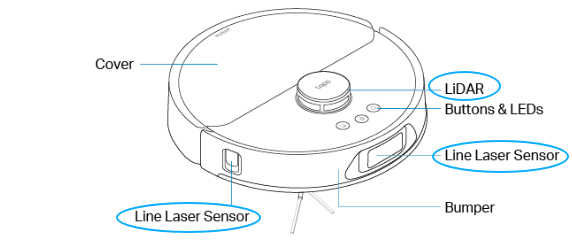
To ensure proper navigation, please clean your robot vacuum’s sensors, remove any protective film that may still be on them, and ensure the LIDAR is unobstructed.
- Copy Link
- Report Inappropriate Content
@Wayne-TP when editing the ends of the virtual wall are difficult to move and the cross doesn't work so even to delete an existing on is difficult... I am the only one that uses the account and have the app on my tablet for when I and at home an access it from there... As you can see from the attached image the hoover has gone over the virtual wall so I have had to set the line to far over to one side so it actually misses the cable on the floor (like an offset) 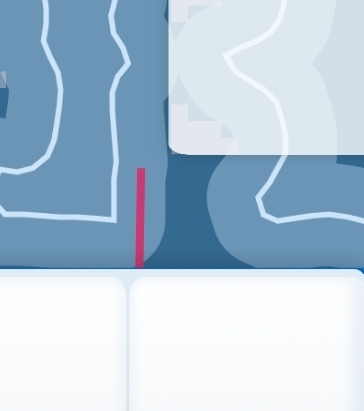
- Copy Link
- Report Inappropriate Content
I’m guessing you might be referring to the map appearing too small, so it is difficult to place or move virtual walls to the correct position, is that what you mean? Actually, the map can be zoomed in by pinching and dragging with two fingers. If this is the case, try zooming in on the map before adding virtual walls or no-go zones.
Regarding your feedback about the robot vacuum crossing no-go zones or virtual walls, there might be some misunderstanding based on the images you provided. The cleaning coverage shown in the cleaning report is generated by the app based on the cleaning path, and there may be discrepancies compared to the actual area cleaned. If you zoom in or out on the map, you’ll notice that the size of this cleaned area may change. We recommend observing the robot’s actual cleaning behavior to confirm whether it truly passes through virtual walls or restricted zones.
- Copy Link
- Report Inappropriate Content
Information
Helpful: 0
Views: 335
Replies: 3
Voters 0
No one has voted for it yet.