
Local Smart Actions with S112 or S11E with H500

Hello,
I am interested on Tapo devices like S112 or S110E.
I have seen that they are not compatible devices with Tapo H500. Why? Any reason? Will they be supported in the future?
Because i am testing with S112, and i can control locally from my Tapo App their two reles, but i can't generate local smart rules with them. Why can i control them from my Tapo App locally in my LAN? But on the contrary, why can't H500 do the same if they are reachable in the same LAN? Which are the reasons that prevent local smart actions with them on the H500?
In the same way, why other Matter devices, if they are also directly reachable from the same LAN, are not managed locally?
Are all Matter devices dependant on the other manufacturers clouds?
Do i have any advantage if i integrate S112 and S110E as Matter devices on the H500? Will they be managed locally? Or as the other Matter devices will they depend on TP-Link Cloud?
Disadvantages? Maybe energy monitor is not available, right?
Thanks for your support.
- Copy Link
- Subscribe
- Bookmark
- Report Inappropriate Content


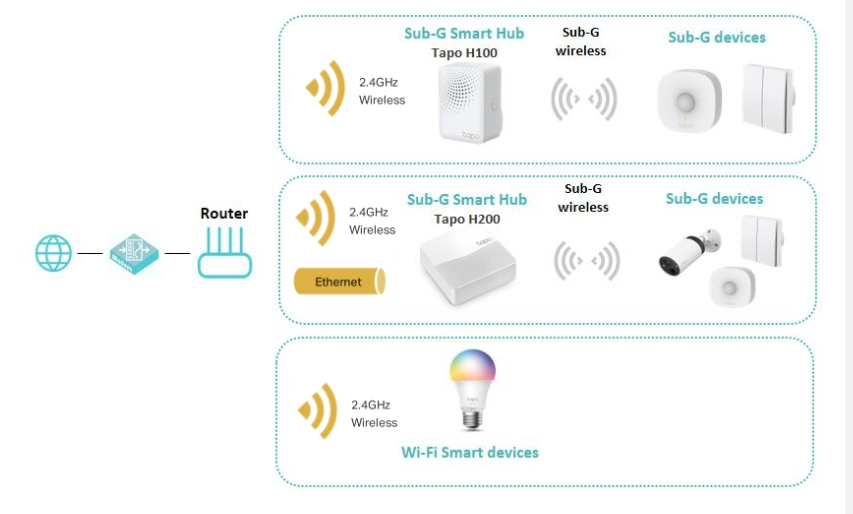
The Tapo S112 and S110E use a different wireless frequency (2.4GHz Wi‑Fi or Bluetooth) than the Tapo H500, which operates on a Sub‑GHz frequency. Because of this difference, they cannot connect directly to the H500 as a network source—which may be why you consider them “incompatible.” The diagram below may help you better understand their relationships.
However, Tapo smart devices can still work together without being directly linked as network sources. If your devices are on the same router network, you can set up automation rules to enable interaction between them. How to create Smart Action (Automation or Shortcut) on Tapo app
Tapo S112 or S110E can be managed locally through the Tapo app. If you want to control them through automation, they should be connected to the internet first, as they do not support Local Smart Action. What is Local Smart Action? We do not have information regarding future product update plans -- in your case, when or whether Tapo S112 and S110E will support Tapo Local Smart. To stay up to date, we recommend following our official website or monitoring new firmware releases for the latest updates.
If you wish to implement local automation control via Matter, you may consult the customer support of the relevant Matter platform.
- Copy Link
- Report Inappropriate Content
The Tapo S112 and S110E use a different wireless frequency (2.4GHz Wi‑Fi or Bluetooth) than the Tapo H500, which operates on a Sub‑GHz frequency. Because of this difference, they cannot connect directly to the H500 as a network source—which may be why you consider them “incompatible.” The diagram below may help you better understand their relationships.
However, Tapo smart devices can still work together without being directly linked as network sources. If your devices are on the same router network, you can set up automation rules to enable interaction between them. How to create Smart Action (Automation or Shortcut) on Tapo app
Tapo S112 or S110E can be managed locally through the Tapo app. If you want to control them through automation, they should be connected to the internet first, as they do not support Local Smart Action. What is Local Smart Action? We do not have information regarding future product update plans -- in your case, when or whether Tapo S112 and S110E will support Tapo Local Smart. To stay up to date, we recommend following our official website or monitoring new firmware releases for the latest updates.
If you wish to implement local automation control via Matter, you may consult the customer support of the relevant Matter platform.
- Copy Link
- Report Inappropriate Content
Hello, If i understand well to you, H500 is compatible with Sub-GHz to manage the other type of devices, but not with the most common 2.4GHz Wi-fi. Is that why when ethernet is not available, and i disable 5GHz for integrating new devices, H500 is blinking on green indicating problems? what problems? Is it disconnected from the router? Is it only supporting as backhaul 5GHz?
But right now, i am checking Specs on TP-link: https://www.tp-link.com/es/home-networking/smart-hub/tapo-h500/#specifications
| Red |
|
|---|---|
| Frecuencia | 2.4 GHz + 5 GHz Wi-Fi / Ethernet + Sub-1GHz 863.35MHz, 864.35MHz, 868.35MHz (Para EU/UK) |
So it should be perfectly compatible with 2.4GHz, and if it isn't, it is a big bug, and one big error because Tapo has so many 2.4GHz devices, interesting devices that should be able to communicate with H500 without problems for those interesting Local Smart Actions.
Once that it must be compatible with 2.4GHz, i would not understand that only this wifi should be used as backhaul to the router, and not for connecting with same band devices.
Because another problem that i am finding, it's that H500 seems to be only Matter over wifi (not over Thread or with no interoperation with other Hubs Matter over Thread to add more devices). And if its Matter over wifi is being limited with the 2.4GHz, very wrong situation as Matter Hub.
And for example, i am testing another manufacturer Hub, i have integrated S110E as Matter, and i am able to establish local smart actions with it. At the first, as easy as it should be with H500.
So my conclusion is H500 should solve its problems and limitations with 2.4GHz asap.
Thanks.
- Copy Link
- Report Inappropriate Content
The 2.4GHz is reserved for the WiFi cameras, enabling the video storage and WiFi backup features.
We don't have information about product's future plans. But you're recommended to raise a separate thread for such product suggestions. Our product team will review the feature requests regularly, hot topics with detailed background information (e.g., use scenarios, reasons why you want or don't want a particular feature, etc) will be prioritized for evaluation. Tapo - Feature Requests
- Copy Link
- Report Inappropriate Content

Hi,
I have a button S200B integrated on H500 that controls, via automations, multiple S112 and cameras not directly connected to H500. But only Single Tap (turn on S112 double switch function) appears as Local, while Double Tap (privacy camera control) and rotation (blind control via S112) seems not.
Considering the question by Jabato, and that I am new to Tapo ecosystem, is there any drawback in this integration? Would the system stop working if internet goes down (while the router still operating the WiFi that links all devices)?
- Copy Link
- Report Inappropriate Content
Hello @Wayne-TP
Yes, i am testing my first video device, and i have activated WiFi backup. I can see it sometimes connected to my wifi, and oftenly to one own H500 wifi. So is H500 2.4GHz only limited to provide this extra wifi backup?
Is it not possible to use 2,4GHz like 5GHz as backhaul?
I can not have video devices at all, but many compatible with 2,4GHz wifi. Is in this case H500 completely useless because it can not use 2,4GHz for those other connectivities?
I don't really know if it is a feature request, or really a big limitation or bug.
A part from that connectivity problem, we will have to see later the local smart actions. Something really desirable to implement in certain uses cases like i commented.
Anyway i will check your link for Feature Requests.
Thanks.
- Copy Link
- Report Inappropriate Content
Jabato wrote
Hello @Wayne-TP
Yes, i am testing my first video device, and i have activated WiFi backup. I can see it sometimes connected to my wifi, and oftenly to one own H500 wifi. So is H500 2.4GHz only limited to provide this extra wifi backup?
Is it not possible to use 2,4GHz like 5GHz as backhaul?
I can not have video devices at all, but many compatible with 2,4GHz wifi. Is in this case H500 completely useless because it can not use 2,4GHz for those other connectivities?
I don't really know if it is a feature request, or really a big limitation or bug.
A part from that connectivity problem, we will have to see later the local smart actions. Something really desirable to implement in certain uses cases like i commented.
Anyway i will check your link for Feature Requests.
Thanks.
As the feature name suggests, the H500 provides Wi‑Fi backup for cameras, allowing them to automatically switch to the hub when the router signal is weak, ensuring a stable connection. This switch is automatic and does not support manual selection. The Tapo hub does not offer direct connections for Wi‑Fi devices, whether 2.4 GHz or 5 GHz. Currently, it only serves as a direct network source for Tapo Sub‑GHz devices.
- Copy Link
- Report Inappropriate Content
DJAP wrote
Hi,
I have a button S200B integrated on H500 that controls, via automations, multiple S112 and cameras not directly connected to H500. But only Single Tap (turn on S112 double switch function) appears as Local, while Double Tap (privacy camera control) and rotation (blind control via S112) seems not.
Considering the question by Jabato, and that I am new to Tapo ecosystem, is there any drawback in this integration? Would the system stop working if internet goes down (while the router still operating the WiFi that links all devices)?
Thank you for sharing the information! It’s possible that the S112 is in the process of being adapted for local smart feature, which certainly sounds like good news, though I don’t have any confirmed details at the moment. If you’d like to learn more, I’d recommend reaching out directly to the support team.
If and when the feature is officially released, I’ll be sure to share the update with the community!
By the way, cameras are not a supported device type in Local Smart, so it’s normal if an automation that involves controlling a camera cannot be created as a local rule. What is Local Smart Action?
- Copy Link
- Report Inappropriate Content
Information
Helpful: 0
Views: 1394
Replies: 7
Voters 0
No one has voted for it yet.