
RV50 PRO OMNI cannot connect to tapo apps

It cannot connect to tapo apps like all other cameras. Cannot find this tapo device or something. The iphone connected via bluetooth. So frustrated.
- Copy Link
- Subscribe
- Bookmark
- Report Inappropriate Content

@Jarud we have exactly the same problem. The new RV50 pro Omni is not connecting to the Applike other Tapo devices , I can see it listed in the Bluetooth devices on the phone but the app will never find it. Frustrating! Has anyone solved this? I have tried on 2 devices and both the same
- Copy Link
- Report Inappropriate Content

@Rod7374 Hi there! Did you manage to work out a solution? We purchased one today and it is doing the exact same thing.
- Copy Link
- Report Inappropriate Content

@alyssiaj we had the same problem. We had to use an old Samsung phone as none of our Apple devices would connect via Bluetooth. Once we connected via Bluetooth it connected to the WiFi and appeared in the Tapo app.
- Copy Link
- Report Inappropriate Content
@alyssiaj no we still have not been able to connect it. Logged a job with their support as we tried with 2 x iPhones and an Android tablet and all 3 failed to find it. I could see it listed in the Bluetooth devices but the app never works! Hope they can fix this fast
- Copy Link
- Report Inappropriate Content
@King_Bob_II I tried an Android tablet and it failed but it was a new model device
- Copy Link
- Report Inappropriate Content


@Jarud @Rod7374 @Alyssia @King_Bob_II
Hello everyone, please try to restart your robot vacuum in the following way, then reconfigure the device, see if that helps.
1. Open the cover on top of the robot vacuum, then press the System Shutdown Button to power off the device
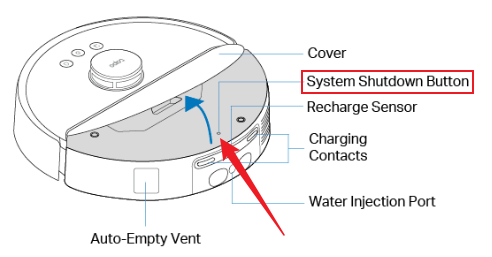
2. Press the Power button for 3 seconds to turn on the robot vacuum.
Once the robot vacuum has been set up successfully, How to Update Tapo and Kasa Device Firmware via the Tapo App
- Copy Link
- Report Inappropriate Content
@Wayne-TP I have tried this and it still did the same thing, is still not detecting the vacuum
- Copy Link
- Report Inappropriate Content
- Copy Link
- Report Inappropriate Content
@Jarud this method did not work for me, still fails to connect
- Copy Link
- Report Inappropriate Content
Information
Helpful: 0
Views: 295
Replies: 9
Voters 0
No one has voted for it yet.