
AI filter draining battery

 Hey,
Hey,
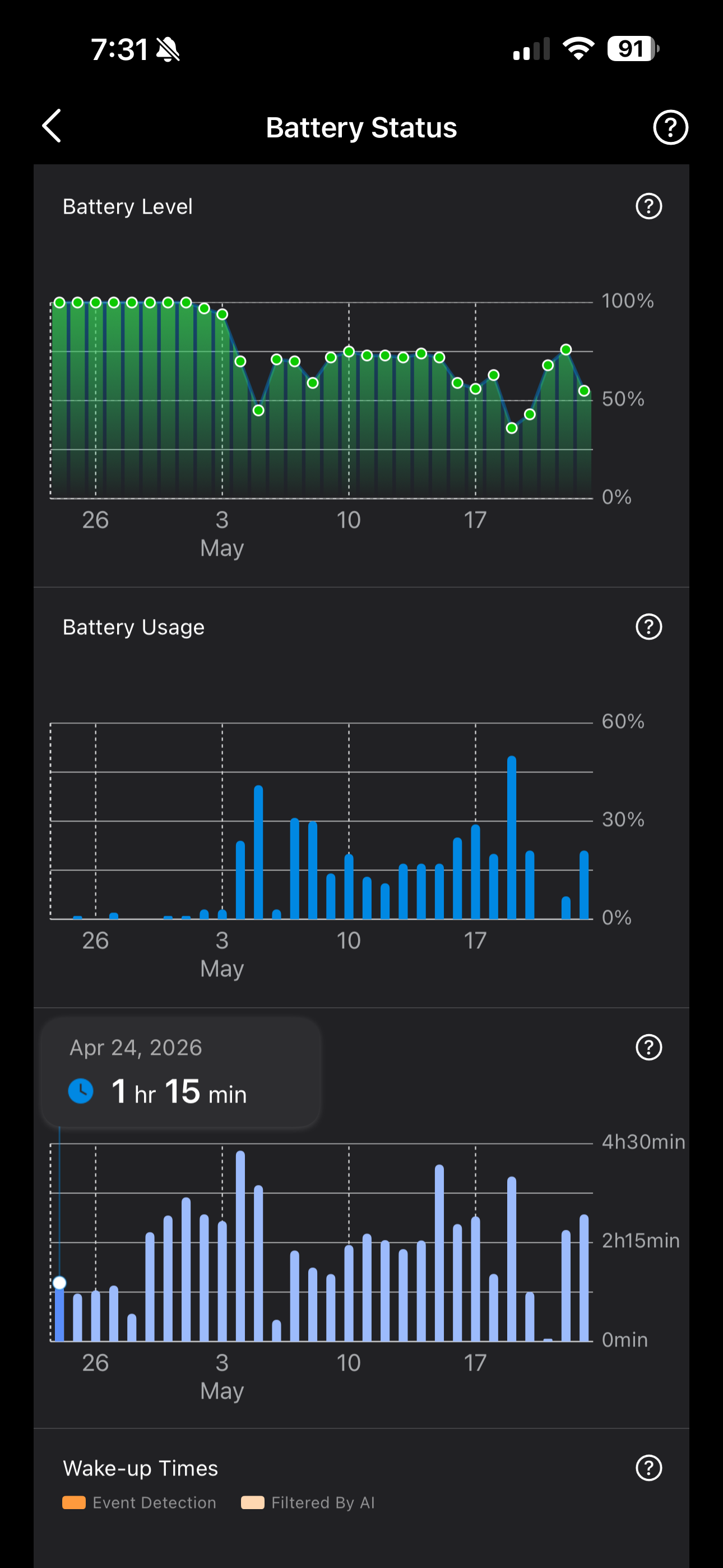
I feel like since having the hub added (H500) my front camera struggles to hold charge and AI detection is unreal.
Camera is c460 - as you can see filtered by AI is very high, how can I reduce this as I think it's killing my battery so fast...
- Copy Link
- Subscribe
- Bookmark
- Report Inappropriate Content

MatthewOs wrote
Hello,
We understand your concern about the frequent “AI Filtered” events potentially affecting battery performance, and we’re happy to provide some clarification on this matter.
The high number of “AI Filtered” events you’re seeing is primarily caused by frequent activations of the camera’s PIR (Passive Infrared) sensor. It’s important to note that the PIR sensor operates independently of your AI detection settings. Even if you have all event recording or notifications turned off, the PIR sensor will still wake up the camera when significant heat changes in the environment are detected (such as swaying branches, passing vehicles, shifting sunlight, airflow from vents, etc.). If the algorithm determines the motion is not a person, vehicle, or pet, it will be logged as an “AI Filtered” event. Each wake-up cycle itself consumes battery power.
Therefore, the issue likely relates to your camera’s surroundings. Common sources of PIR false triggers include: busy roads, trees or bushes moving in the wind, direct or reflected sunlight, and airflow from ventilation openings. We recommend adjusting the camera’s position or angle to avoid such dynamic heat sources, which can significantly reduce unnecessary activations and help improve battery life.
For more detailed guidance on angle adjustment, you can refer to the following FAQ article:How to extend the battery life of Tapo Camera/Doorbell
Best Regards,
- Copy Link
- Report Inappropriate Content
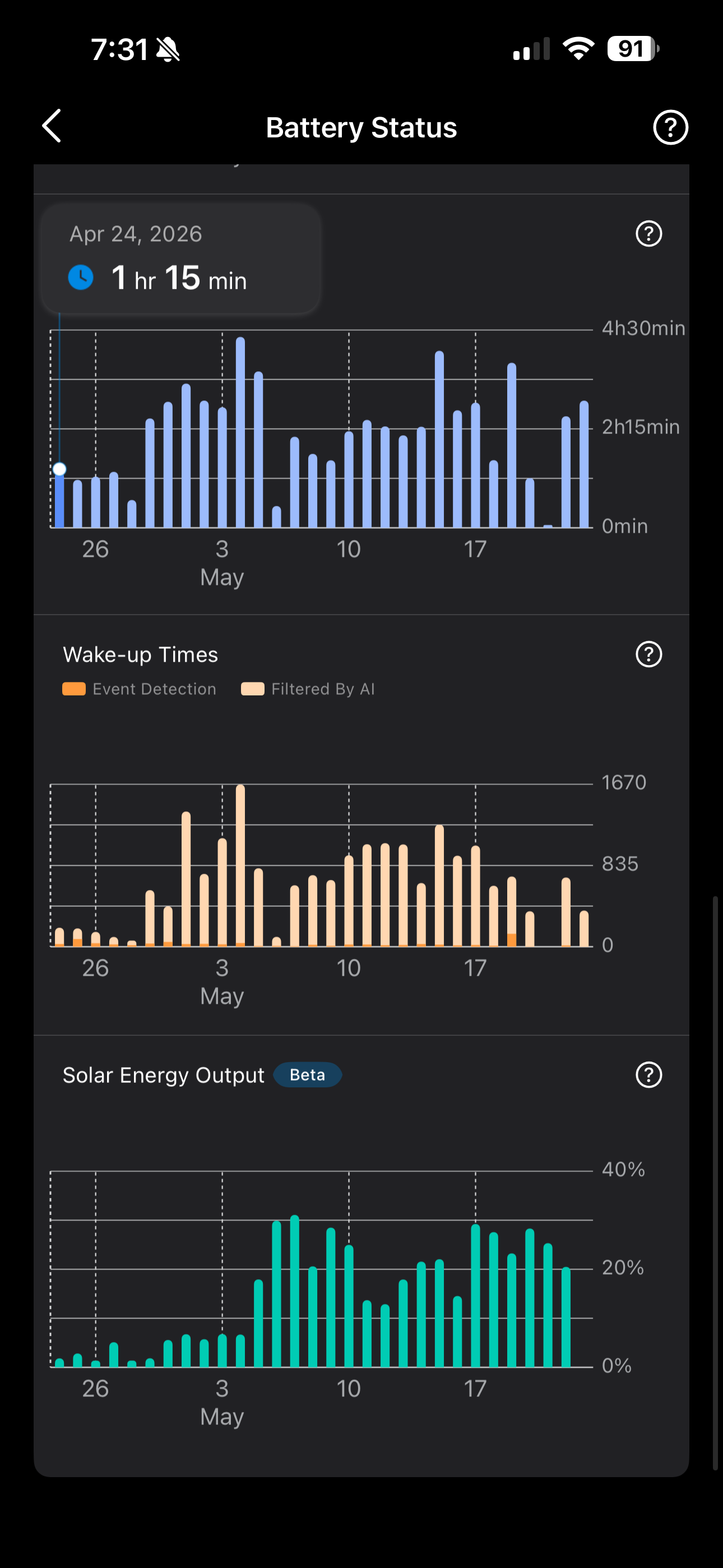 This is the other image. I can't add it to my other post.
- Copy Link
- Report Inappropriate Content
Hello,
Welcome to TP-Link community.
Events judged as invalid are filtered out by AI to avoid unnecessary recordings and alerts, the camera still performs the detection process before the AI makes its decision. This detection activity consumes energy, which can increase overall battery usage. If you notice a large number of “Filtered By AI” events, it is recommended to follow the following suggestion to adjust the installation position or use a wedge to change the viewing angle: How to extend the battery life of Tapo Camera/Doorbell
A common reason for excessive filtered events is that the camera lens faces areas with frequent dynamic changes, such as vegetation that moves easily in the wind or busy streets with constant activity.
If the problem persists, contact our customer service team and provide the results of the above troubleshooting steps.
Best Regards,
- Copy Link
- Report Inappropriate Content
- Copy Link
- Report Inappropriate Content
MatthewOs wrote
Hello,
We understand your concern about the frequent “AI Filtered” events potentially affecting battery performance, and we’re happy to provide some clarification on this matter.
The high number of “AI Filtered” events you’re seeing is primarily caused by frequent activations of the camera’s PIR (Passive Infrared) sensor. It’s important to note that the PIR sensor operates independently of your AI detection settings. Even if you have all event recording or notifications turned off, the PIR sensor will still wake up the camera when significant heat changes in the environment are detected (such as swaying branches, passing vehicles, shifting sunlight, airflow from vents, etc.). If the algorithm determines the motion is not a person, vehicle, or pet, it will be logged as an “AI Filtered” event. Each wake-up cycle itself consumes battery power.
Therefore, the issue likely relates to your camera’s surroundings. Common sources of PIR false triggers include: busy roads, trees or bushes moving in the wind, direct or reflected sunlight, and airflow from ventilation openings. We recommend adjusting the camera’s position or angle to avoid such dynamic heat sources, which can significantly reduce unnecessary activations and help improve battery life.
For more detailed guidance on angle adjustment, you can refer to the following FAQ article:How to extend the battery life of Tapo Camera/Doorbell
Best Regards,
- Copy Link
- Report Inappropriate Content
Information
Helpful: 0
Views: 140
Replies: 4
Voters 0
No one has voted for it yet.