
Solution What to Do If My Tapo Doorbell/Camera’s Detection Fails to Activate Alexa Routines (Workaround)


This Article Applies To
All Tapo Smart Cameras and Video Doorbells are compatible with Alexa.
Phenomenon Description
When an Amazon Alexa Routine is configured to be triggered by a “Person Detection” event from a Tapo camera, the Routine may fail to execute.
Specifically, you may see:
-
The Tapo camera functions as expected: The Tapo camera correctly detects a person, and the event is recorded and viewable in the Tapo app
-
However, the corresponding Alexa Routine—set up to perform actions such as turning on smart lights or making announcements—does not activate.
After investigating, we’ve found that this issue is caused by an anomaly on Alexa’s end related to the functionality design, which is preventing the automation from triggering properly.
The Alexa team has provided the following workaround to help with the behavior until they are able to optimize the integration in a future update:
Workaround
Please follow these steps to enable the setting in your Alexa app:
1. Open the Alexa app and navigate to Devices and select your Tapo Camera.
2. Tap on the Settings icon (gear icon, top right).
3. Scroll down to the Camera Events section and ensure both Person Detection Announcements and Package Detection Announcements are toggled ON (toggle should appear blue)
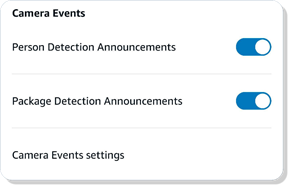
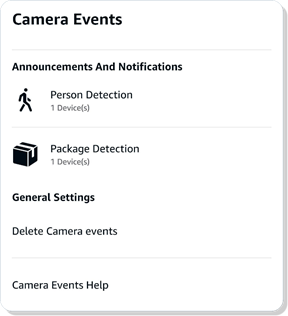
4. Tap on Camera Events settings to access further configuration.
5. In the Camera Events Settings page, under Announcements and Notifications, tap on Person Detection.
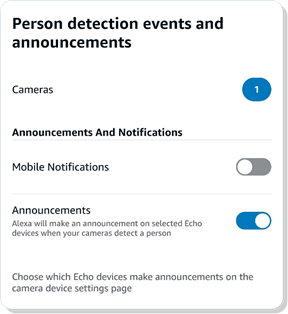
6. Tap on Cameras to enter the "Choose person detection cameras" page, then please ensure your Tapo camera has a blue checkmark next to it.

7. Tap Save at the bottom of the screen.
Official Solution Roadmap
The Tapo teams have been proactively communicating with the Alexa team regarding this behavior. The Alexa team has acknowledged that the current triggering logic is part of their platform’s existing design framework and has indicated plans to optimize the integration mechanism in a future service update to enhance the overall user experience.
For now, we recommend that users follow the temporary configuration steps outlined in the Workaround section to receive voice announcements. We also suggest keeping an eye on Amazon’s official channels for updates regarding Alexa platform improvements.