
"Check for Updates" in router GUI doesn't appear to be working

This thread has been locked for further replies. You can start a new thread to share your ideas or ask questions.

"Check for Updates" in router GUI doesn't appear to be working

This thread has been locked for further replies. You can start a new thread to share your ideas or ask questions.

"Check for Updates" in router GUI doesn't appear to be working
2025-09-03 02:29:33 - last edited 2025-09-03 14:24:32
Model: Archer BE550  
Hardware Version: V1
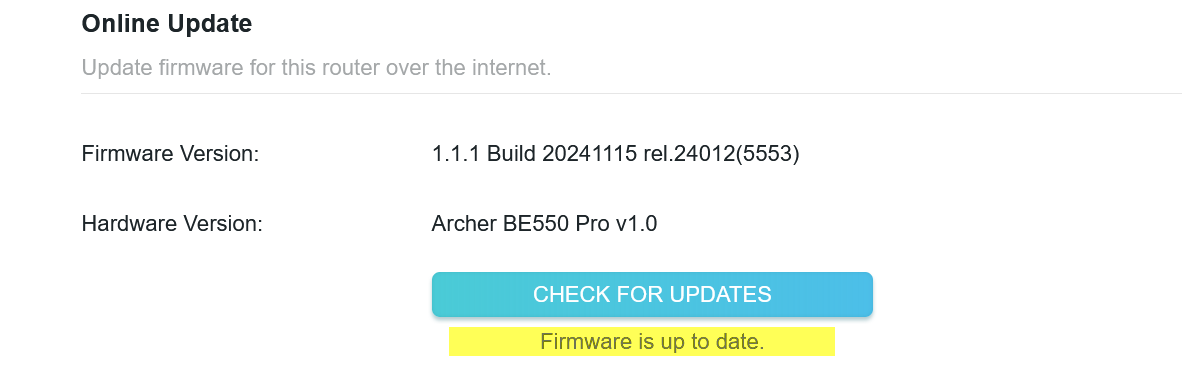
Firmware Version: 1.1.1 Build 20241115 rel.24012(5553)

I'm logged into the router and under System>Firmware when I click the "Check for Updates" button it shows Firmware is up to date even though it looks

like i'm using firmware dated 20241115.  Surely there must be a newer version by now.  I'm not having any issues but the firmware seems pretty old.
 

6e6106e6425143b8ae6bcf94aeac949f


I looked on the web site for firmware downloads but am really confused which one I need and installing the wrong firmware would probably brick the router

which is something I do not want to do.


Thanks in advance

Bob Gregory

0
0
#1
5 Reply
Re:"Check for Updates" in router GUI doesn't appear to be working
2025-09-03 16:30:38 - last edited 2025-09-03 16:37:44

  @ragkag Looking at the support page for your router it seems you have the latest one.  Make sure you use the links for BE550 PRO, not the plain BE550.


Download for Archer BE550 Pro | TP-Link

2
2
#2
Re:"Check for Updates" in router GUI doesn't appear to be working
2025-09-03 16:43:36

  @DVair Thank you.

0
0
#3
Re:"Check for Updates" in router GUI doesn't appear to be working
2025-09-04 10:49:22 - last edited 2025-09-04 10:50:31

Hello @ragkag ,

Welcome to our community.


As DVair mentioned, 1.1.1 Build 20241115 rel.24012 is the latest version. 


Currently we have not received any notification about firmware updates. The way we do firmware is that we only release a new version when there is a bug/flaw/vulnerability to patch or a new feature to add.


Do you have any questions about the usage of the router?

Welcome to Community! Get the latest posts: △New Firmware for Archer GE550/GE650 V1 Introduces AI-QoS, EasyMesh IoT Expansion, and More! △New Firmware Releases for Archer BE805 V1/BE450 V1 to Support VPN Merge, New ECO Mode, and More! More posts, please see: △ Get the Ongoing Pre-release Firmware for Wi-Fi Routers Here— Subscribe for Updates! Urgent problems with your Wi-Fi Router, Range Extender, or DSL Modem? Please reach out via private Messages or @Joesph-TP in your new thread directly. Click Or ☆Recommended Solution if the post/answer helps.
0
0
#4
Re:"Check for Updates" in router GUI doesn't appear to be working
2025-09-04 10:56:18

  @Joseph-TP Not at this time.  This is a new router for me and it's been working just fine.  Just thought the firmware was prettry old.

Thank you

1
1
#5
Re:"Check for Updates" in router GUI doesn't appear to be working
2025-09-05 08:01:20

Hi @ragkag ,

Thanks for getting back to me.

In reality, newer firmware and more features don't necessarily improve device performance.
If your device is stable, you can continue to use it. Of course, you can keep the Auto Update button enabled to monitor for future firmware updates.

Welcome to Community! Get the latest posts: △New Firmware for Archer GE550/GE650 V1 Introduces AI-QoS, EasyMesh IoT Expansion, and More! △New Firmware Releases for Archer BE805 V1/BE450 V1 to Support VPN Merge, New ECO Mode, and More! More posts, please see: △ Get the Ongoing Pre-release Firmware for Wi-Fi Routers Here— Subscribe for Updates! Urgent problems with your Wi-Fi Router, Range Extender, or DSL Modem? Please reach out via private Messages or @Joesph-TP in your new thread directly. Click Or ☆Recommended Solution if the post/answer helps.
0
0
#6
