
tp-link BE5000 Guest network

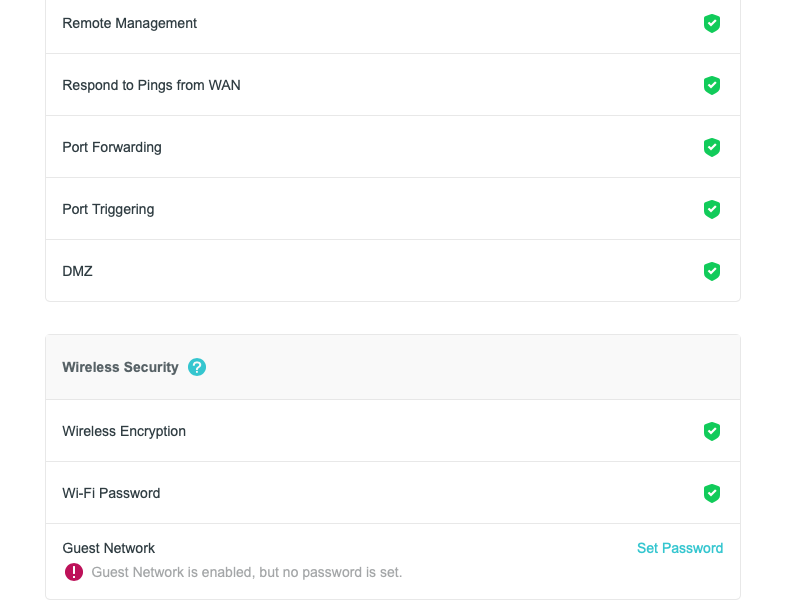
I set up a guest network and entered a password. However, when I do a HomeShield > Network Check, I get the following message: Guest Network is enabled, but no password is set.
I double-checked and my password is set, so why am I still getting this message?
- Copy Link
- Subscribe
- Bookmark
- Report Inappropriate Content


Hello @OldInternetGuy ,
Welcome to our community.
Here are some key points and suggestions:
1. Double-check the guest network settings: Make sure the password is set and saved correctly in the router's management interface or Tether App.
2. Firmware update: Ensure your router's firmware is up to date, as outdated firmware can sometimes cause display or detection issues.
3. Restart your router: After making changes, restart your router to apply the new settings.
4. App/Software update: Make sure you are using the latest version of the Tether App and HomeShield.
Please take a screenshot with the error message and send it here.
- Copy Link
- Report Inappropriate Content
Joseph-TP wrote
Hello @OldInternetGuy ,
Welcome to our community.
Here are some key points and suggestions:
1. Double-check the guest network settings: Make sure the password is set and saved correctly in the router's management interface or Tether App.
2. Firmware update: Ensure your router's firmware is up to date, as outdated firmware can sometimes cause display or detection issues.
3. Restart your router: After making changes, restart your router to apply the new settings.
4. App/Software update: Make sure you are using the latest version of the Tether App and HomeShield.
Please take a screenshot with the error message and send it here.
Thank you for the suggestions. I checked all the settings and updated my Tether app. Then I rebooted the router. This problem only appears when I run a security check while logged in to my router through Safari on my Mac Mini. I have pasted the screenshot below.
Note that this message does not happen when I run a security check through the Tether app. It says everything is perfect. The message in the screenshot is definitely wrong, since I know the password is set and saved. Any other suggestions?
- Copy Link
- Report Inappropriate Content
Hello @OldInternetGuy ,
Thanks for getting back to me.
Have you compared with a different browser? It appears to be due to compatibility or configuration conflicts when using Safari to access the router's management interface, rather than network settings.
Please try the following steps:
1. Completely clear your Safari cache.
2. Check for browser extensions or security software that might be interfering;
3. Ensure there are no other guest networks interfering with the test.
- Copy Link
- Report Inappropriate Content
@Joseph-TP Tried your suggestions with the same result. I used both the Safari and Chrome browser. Both showed the incorrect error when running HomeShield. I definitely have a password set for my guest network.
The Tether app shows no such error, so it is a bug in the web UI. I believe the Help desk has escalated the issue to the engineering team. Hopefully they can fix the bug.
- Copy Link
- Report Inappropriate Content
@OldInternetGuy Just to let you know, I got an email from the Help desk which stated that they will be putting out new firmware addressing the guest network issue with tp-link BE 5000 router.
- Copy Link
- Report Inappropriate Content
Hello @OldInternetGuy ,
Thanks for your update.
If you get any solution, you are welcome to share here.
OldInternetGuy wrote
@OldInternetGuy Just to let you know, I got an email from the Help desk which stated that they will be putting out new firmware addressing the guest network issue with tp-link BE 5000 router.
- Copy Link
- Report Inappropriate Content
Information
Helpful: 0
Views: 693
Replies: 6
Voters 0
No one has voted for it yet.