
How do I add a static route on a Deco W3600 network? (Option missing in app and web UI is useless)

I’m trying to add a static route to my Deco network but I can’t find the option anywhere. My setup is two Deco W3600 units. I checked both the Deco mobile app and the web management page, and neither seems to have any option for static routing.
Am I missing where this setting is located, or is static routing simply not supported on the W3600/Deco platform? If it is supported, could someone point me to the exact steps or menu path to configure it? If it’s not supported, is there any workaround (bridge mode, advanced settings, etc.) that would allow static routes?
Any help would be appreciated—I’ve been digging through the app and web UI and can’t find anything related to routing tables or static routes.
- Copy Link
- Subscribe
- Bookmark
- Report Inappropriate Content

Thanks for reaching out! I understand you're looking for the static routing feature on your Deco W3600 units but can't locate it in either the mobile app or the web interface.
Based on our documentation, static routing is available on Deco systems. Here's where you should find it:
To Set Up Static Routing on Deco:
1. Open the Deco app and make sure you're connected to your Deco network
2. Go to MORE > Advanced > Static Routing
3. Input the required information: Destination, Subnet Mask, Gateway, and Interface (WAN or LAN)
4. Save your settings
Important Note: Creating static routes is usually not necessary for a home network because routes are automatically generated and managed by Deco. Static routing is typically only needed in relatively complex network setups where you need to access certain IP destinations.
If you're following these exact steps and still cannot see the "Static Routing" option under MORE > Advanced, this could indicate that:
• Your Deco W3600 may be running in Access Point mode (static routing is only available in Router mode)
• The firmware version may need updating
• This specific model may have limitations regarding this feature
I'd recommend checking your operation mode first (Router vs Access Point) in the Deco app under MORE > Advanced > Operation Mode. If you're in Router mode and still don't see the option, please let us know
- Copy Link
- Report Inappropriate Content
Thank you for the quick response. I also found those instructions but they didn't help (that happens a lot with this router, so I may be searching wrong). Unfortunately, " Static Routing " does not appear in my app. There is a search for feature option but that also doesn't find any Static Routing. I am using the TP-Link Deco app from Google Play. Below is a screen shot of all the options in MORE > Advanced .
Any help is greatly appreciated.
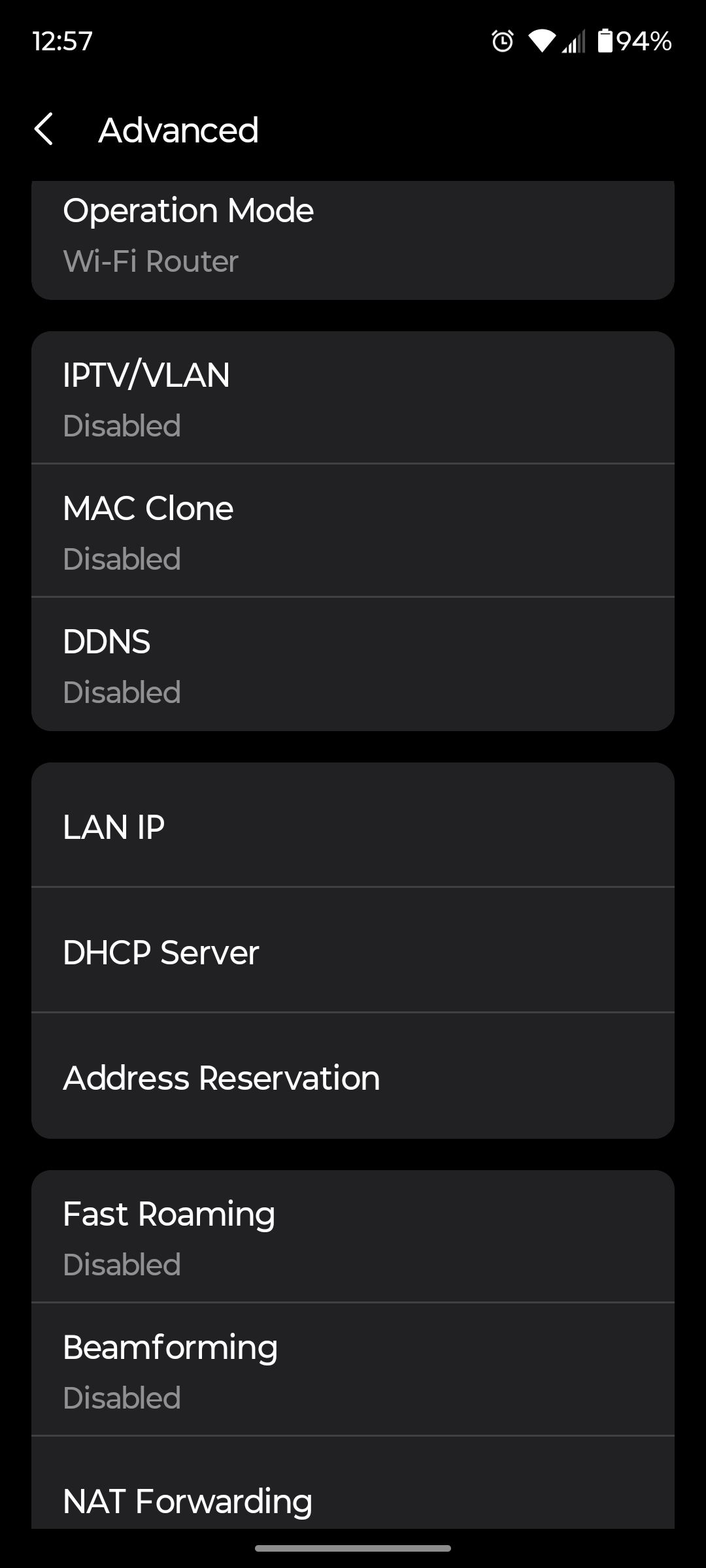
- Copy Link
- Report Inappropriate Content


Hi, thank you very much for the feedback.
Deco W3600_V1.2_1.6.1 Build 20250910 Rel. 43292 and Deco W3600_V1.0_1.6.1 Build 20250831 Rel. 77853 don't support Static Route.
Best regards.
- Copy Link
- Report Inappropriate Content
@David-TP Ah, thank you internet friend. It is an aging system and I am considering an upgrade anyway.
Is there a place that I could have found this information for myself?
- Copy Link
- Report Inappropriate Content
Hi, usually it is suggested to check the release notes for the specific model:
https://www.tp-link.com/us/support/download/deco-w3600/v1.26/#Firmware
Or you can also check the "Applied model" here:
https://www.tp-link.com/en/support/faq/3993/
Best regards.
- Copy Link
- Report Inappropriate Content
Information
Helpful: 0
Views: 576
Replies: 5
Voters 0
No one has voted for it yet.