
printing delay

nerw user: intalled XE75 (3 units).. Dell PC, xfinity sevice and modem, Setyup went smooth, BUT
HP printer set up with static IP.
Pronblem: any print (word, excel. Edge, test page has at least a 20 second delay before print begins, (was instantly on old system (netgear Orbi)
no obvious solution on intyrernet.althjoigh many many search rresults
Any here know of this and have a solution??
- Copy Link
- Subscribe
- Bookmark
- Report Inappropriate Content

This printing delay issue can be related to network communication settings between your printer and the Deco network. Please try the following troubleshooting steps:
1. Verify IP address configuration:
• Ensure that both your Dell PC and HP printer are getting IP addresses within the same subnet (the Deco's LAN IP range). You can check this by verifying both devices have IP addresses in the same range (e.g., both should be 192.168.68.x).
• Reference: https://www.tp-link.com/support/faq/838/
2. Check network settings:
• Verify that both your PC and printer are connected to the Deco's main Wi-Fi network (not the guest network)
• Ensure that "Device Isolation" is disabled in your Deco app settings
3. Windows Network Profile (if applicable):
• If you're using Windows, make sure your network profile is set to "Private" rather than "Public". A Public profile can cause delays in local network communication.
• You can refer to this FAQ to change your network profile: https://www.tp-link.com/support/faq/3072/
4. Test direct connection:
• Try connecting your Dell PC directly to the main Deco unit via Ethernet cable and test printing to see if the delay persists
5. Printer firewall settings:
• Confirm that the firewall settings on your printer allow proper communication from the local network
- Copy Link
- Report Inappropriate Content
thanks for the reply and suggestions
1. both pc and hp are on 192.168.68.x ( I recabled today to get to a single subnet!
2. pc is connected to Main deco (with ethernet to cable modem) and ethernet to switch which has ethernet to PC and rest of my ethnet network
3 both ethernet and wifi are Private
43. dell is connected to Main
have tried static and dhcp ip assignment - same delay
have tried guest network with only 2.4 per google AI suggestion. could not ,make it print at all
May be myu perception, but it just seems to tke a long time (short opf 20 secs) to 'find printer" as IO think I see a screen flicker just before it starts to print.
This is a wide spread issue as google returns many hits when searching for 20 second printing delay.
history with pc and same hp printer with ORBI mesh work flawlessl;y for 5+ years (till thee Orbi failed - printing started almost immediately witth static IP as HP seemed to loose printers that were hooked up with dhcp - static was my fix for several years
- Copy Link
- Report Inappropriate Content
- Copy Link
- Report Inappropriate Content

Hi, thank you very much for the feedback.
Is the HP printer also connected to the network switch via an Ethernet cable? Or via WiFi(2.4GHz of the Main WiFi Network)to the main Deco?
Will you have similar printing delay issues on other devices, apart from the Dell PC?
By the way, would there be many 2.4GHz devices, such as smart home devices connected to the Mesh network?
I don't have any other suggestions, and if you can consistently reproduce this issue on the Dell PC, it is recommended to send an email to the forumsupport.usa@tp-link.com
with the following information:
Subject: [Forum Escalation][ID 861312] printing delay on Deco XE75
Thread URL: https://community.tp-link.com/us/home/forum/topic/861312
Model&Version: Deco XE75_1.3.1
Some screenshots of the Network maps and Mesh Backhaul types on the Deco App, such as:
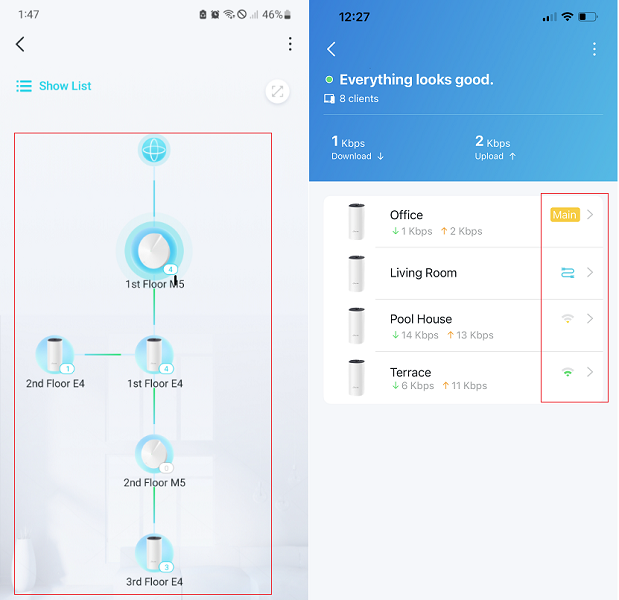
Once sent, a ticket will be created in our support system, and a member of the team will follow up to gather more information or troubleshoot the cause.
Thanks a lot.
Best regards.
- Copy Link
- Report Inappropriate Content
Information
Helpful: 1
Views: 294
Replies: 4
Voters 1
