
Bug/Feature Request

Subject: Bug/Feature Request: Deco App prompts to "Add Device" for MAC addresses already on the Block List
Deco Model: BE63
App Version: iOS (Latest)
Issue Description:
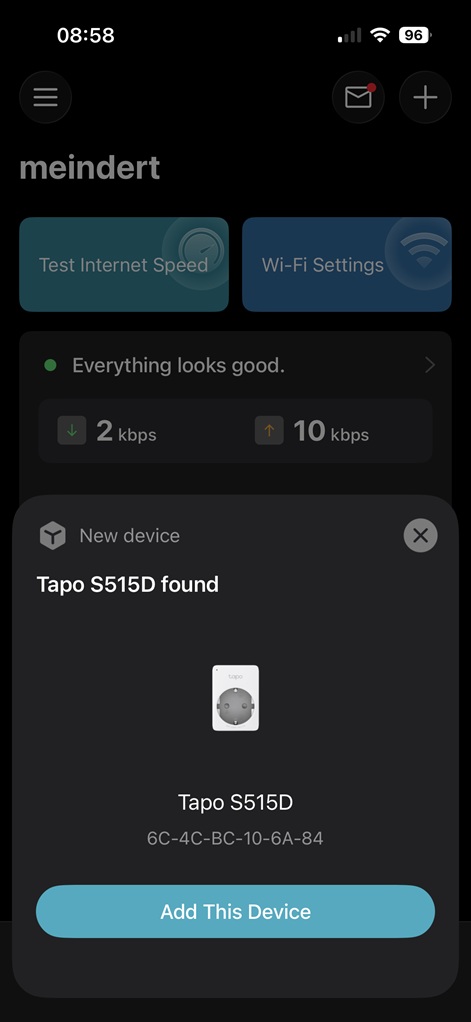
Every time I open the Deco app on my iPhone, I receive a pop-up notification detecting a nearby neighbor's Tapo device (Tapo S515D) asking me to "add this device."
To stop this, I manually identified the device's MAC address and added it to the Deco Router's Block List / Blacklist. However, the Deco iOS app completely ignores this block list and continues to broadcast the "Add Device" pop-up on every single launch.
Why this needs to be fixed:
The app's discovery wizard should cross-reference nearby setup beacons against the router's active Block List. If a MAC address has been explicitly banned by the network administrator, the app should automatically suppress any pairing prompts or setup wizards for that specific hardware ID. Forcing users to completely disable iOS Bluetooth or Local Network permissions just to stop a neighbor's device from spamming the UI is poor software logic.
Requested Fix:
Please update the Deco app firmware/software to ignore and suppress "Add Device" prompts for any MAC addresses currently residing on the network's Block List.
- Copy Link
- Subscribe
- Bookmark
- Report Inappropriate Content

- Copy Link
- Report Inappropriate Content


Hi,
Regarding the reported phenomenon, please provide the following information for further analysis.
1. What's the MAC address of the Tapo S515D shown on the label stuck on the smart switch? Is it the one you added to the Deco's block list? If not, please also send us the MAC address you added to the Deco's block list. (Please send me (@Solla-topee) the MAC address via a private message.)
2. Please describe your network diagram. If the Tapo S515D is not connected to the Deco's Wi-Fi, which Wi-Fi does it connect to? Does your Deco work in AP mode?
3. Please send us a screenshot of the "Add Device" prompt.
Best Regards
- Copy Link
- Report Inappropriate Content
Thank you for your response. Below are the answers to your questions:
1. The MAC address of the Tapo S515D device is 6C-4C-BC-10-6A-84 (see image #1 below). This is the MAC address that I have added to the Deco's block list.
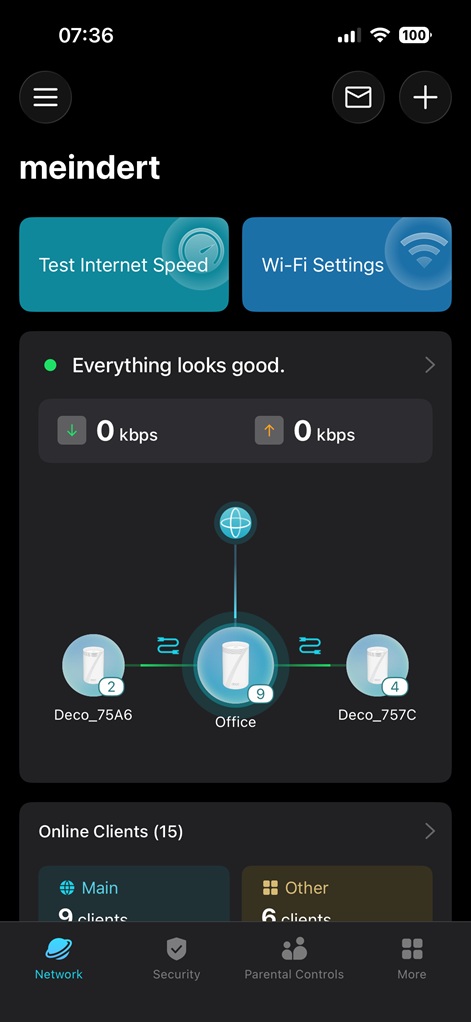
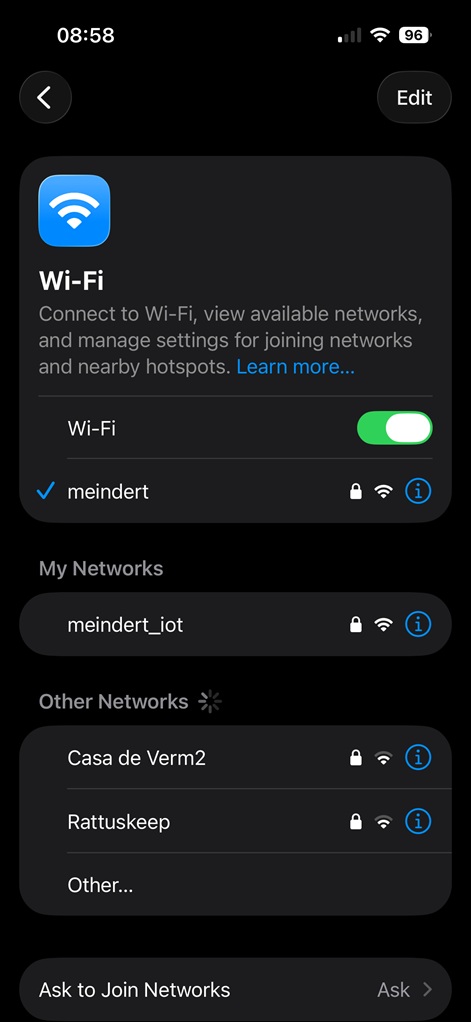
2. I have the Deco BE63. These are 3 Deco devices setup in a mesh configuration, one main router with two access points. They are connected as shown in the image #2 below. I do not own a Tapo S515D device, so I assume it belongs to one of my neighbors. The Deco is setup using two Wi-Fi networks: SSID "meindert" and SSID "meindert_iot" (see image #3 below). I have no information about which one of these two networks the Tapo device is trying to connect to.
3. See image #1 below.
- Copy Link
- Report Inappropriate Content
Hi,
On the Deco app > Network tab > Client List or Smart Devices page, please check if the Tapo S515D is shown.
Please change the passwords of your Deco Wi-Fi networks and check if the "Add This Device" prompt appears.
Best Regards
- Copy Link
- Report Inappropriate Content
- Copy Link
- Report Inappropriate Content
Hi,
Thank you very much for your detailed information. Typically, the Deco Block List can only identify and block a device when that device attempts to connect to the Deco network. Based on the behavior you described, it appears that Deco is detecting the Tapo device through another discovery protocol rather than through a network connection. As a result, adding the Tapo device's MAC address to the Block List would not prevent it from being detected.
Could you please check whether the "Add This Device" prompt in the Deco app no longer appears after Bluetooth is turned off on your phone?
Best Regards
- Copy Link
- Report Inappropriate Content
- Copy Link
- Report Inappropriate Content
Hi,
I confirmed that when the Tapo S515D is powered on but not yet configured, it broadcasts a default SSID; once the Deco detects the relevant parameters, an "Add the Device" prompt appears in the Deco app to facilitate setup and management.
Since the Tapo S515D is not connected to the Deco's Wi-Fi, adding its MAC address to the Deco's Block List does not prevent the "Add the Device" prompt from appearing. However, I fully understand your use case and the feature request; I will document your request to add the Tapo device's MAC address to a list to suppress the "Add the Device" prompt and forward it to the relevant team for evaluation.
Best Regards
- Copy Link
- Report Inappropriate Content
Information
Helpful: 0
Views: 565
Replies: 8
Voters 0
No one has voted for it yet.