
Solution Connecting to OpenVPN Server on Archer AX55 may Impact Web UI Login Attempts


Hey TP-Link Community,
Recently, we received reports from some users that after upgrading the firmware on their Archer AX55, they are unable to reliably access the web management interface with OpenVPN Server enabled. Typically, users encounter an “operation failed” error message, despite the router being accessible via the Tether app.
Affected Model(s)
Archer AX55_V1_1.4.1
sperla first provided relevant details in this thread.
Available Solution:
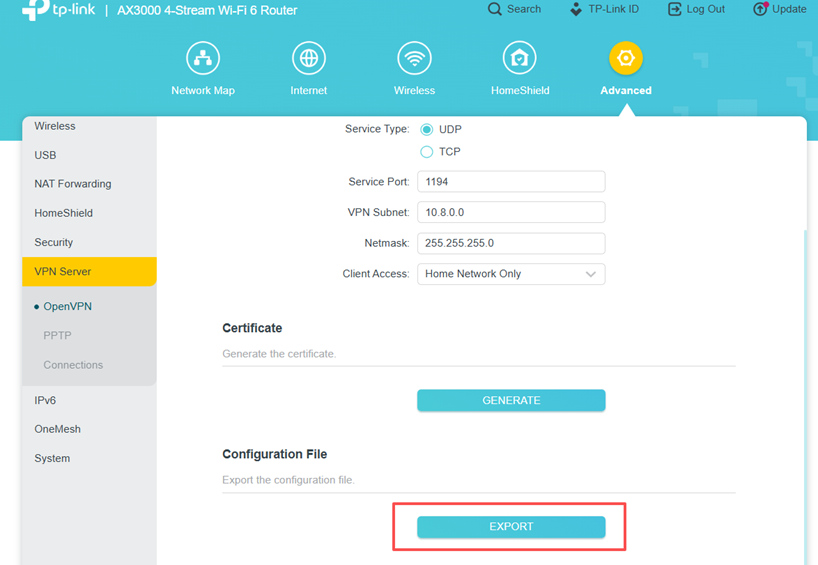
Our Teams have identified the root cause of this phenomenon. After testing, a temporary solution was found—Please export a new OpenVPN server configuration file and distribute this new file to clients again.
To do this, please enter your router's Web UI, then go to VPN Server > OpenVPN, and click EXPORT:
Additional Information
As always, we value your feedback. If you happen to encounter any concerns during or after attempting these troubleshooting steps, please feel free to comment below with the following information. Your input helps us continue to improve and provide the best possible products and support.
- Provide a detailed network layout, including how the devices are connected, especially if there are EasyMesh satellite devices.
- Include a detailed description of the issue and as much information as possible regarding the specific conditions that seem to trigger the behavior.
Thank you for your continued support and for being part of our community.