
C660 Field of view

C660 Field of view

C660 Field of view
C660 Field of view
2025-12-09 02:06:50
Model: Tapo C660 KIT  
Hardware Version:
Firmware Version:

14028309351c4e88a27224a5ec064148I just sent this note to support t.. I am a long time VueZone, Arlo and Nest user and based on the excellent Deco mesh i thought I would flip over to TP-Link aka Tapo ..


I bought 2 of the C660 to get going and have 2 more coming and 2 4k mags.. however, I am really struggling with these cameras and I think its a design thing not a user thing ...


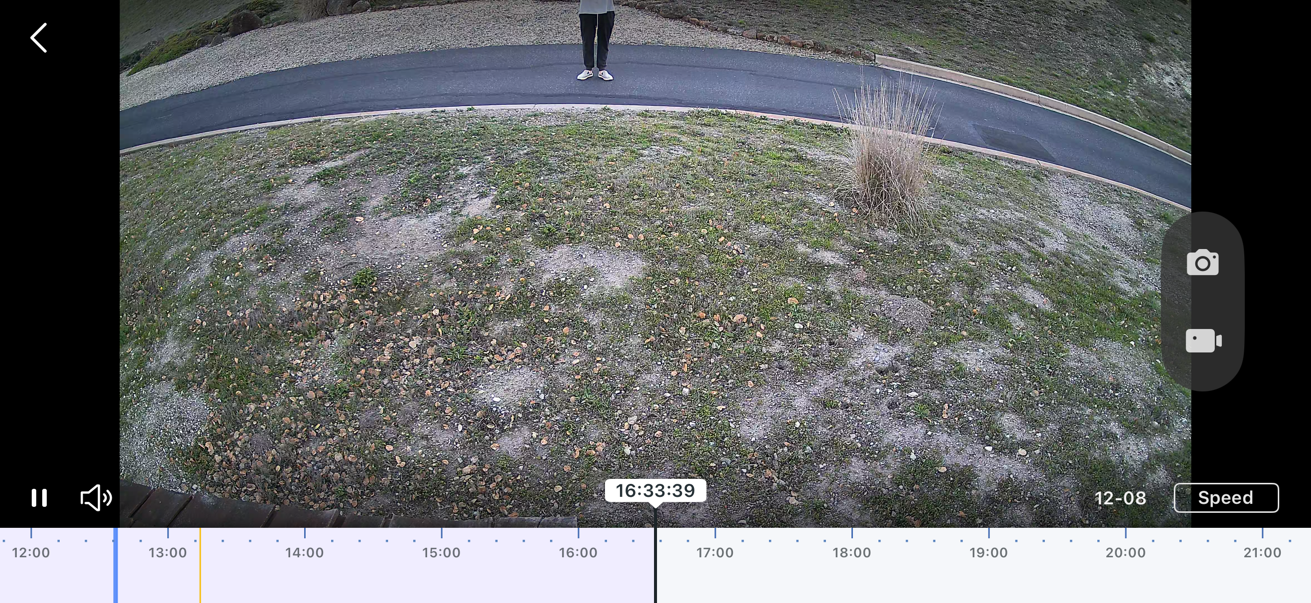
The issue I am having is the Pan and Tilt cameras default with quite a tilt down as a start position and the field of view isn't wide, as such even with me installing one 8.5ft off the ground and another over 12+feet and the field of view is cut off and inadequate rendering them not viable for me … I only show half a person or half a car or they don't trigger fast enough as my drive is elevated coming into the property  .. e.g I cannot zoom out far enough and the camera is tilted too far down to be of any use..


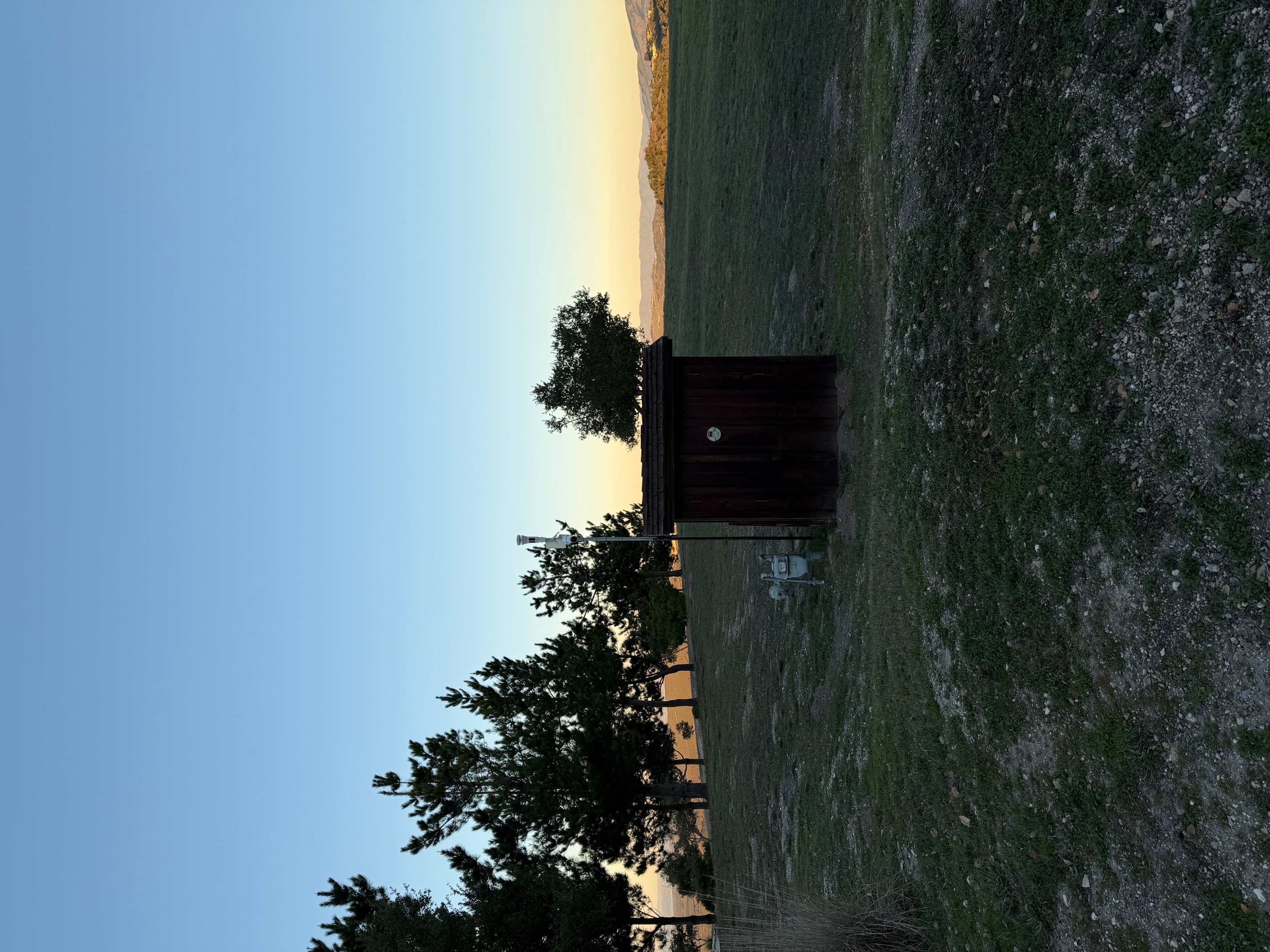
The lens is not pinched in and wont tilt up anymore than in the images attached (for examples)


You can see where the camera is positioned and you can see me photographing it as a still from the video which should show you the problem… You would think this is a perfect application for a pan n tilt yet your optics render it useless (unless I am missing something) 


I really need some help  before I throw the towel in and go back to using Arlos 


Thank you 
  0      
  0      
#1
Options
7 Reply
Re:C660 Field of view
2025-12-09 02:07:43
  0  
  0  
#2
Options
Re:C660 Field of view
2025-12-09 21:32:41

  @-Guy-C-  for anyone interest I solved thsi problem myself ...


1.. Removed the camera from my app

2.. Factory rest 

3.. Re added the camera

4.. Calibrated

5.. Manually pushed the camera in a tthe top briging the image level


that combination seems to have solved my issue... I can now see more than 1/2 a person and 12 a car.. happy days...


  3  
  3  
#3
Options
Re:C660 Field of view
2026-01-22 18:22:34

  @-Guy-C- I've had this problem periodically like every other day also. I find that just rebooting the camera solves the issue (at least for me it does).

  0  
  0  
#4
Options
Re:C660 Field of view
2026-01-23 06:30:42

  @Mmeehan2025  @-Guy-C- 

Hi,
Usually, if the camera lens is not covering the area you want to monitor, you can adjust the camera's lens position using the Pan & Tilt feature on the Tapo app > camera's live view page. You may also adjust your camera's position and installation height to better cover the desired area.


If the camera lens tilts downward over time and the Tapo app prompts that it has reached the limit position even though it has not when tilting the camera up, you can refer to the following instructions for further assistance.
What to do if the Tapo Pan/Tilt camera can't return to its original position properly after tracking
 

Best Regards

  0  
  0  
#5
Options
Re:C660 Field of view
a week ago

  @-Guy-C- Same deal here. The combination of image sensor and lens gives a narrow field of view. 
Likewise for anyone following the thread, It is better to place the camera from the side of the area you intend to protect. I put my C660 PTZ at the crest of my garage and cannot cover the width of my driveway. 
Forunately I have a Palm tree across from my driveway that I can see the entire Field of View. 
-By the way Guy, besides Reset, how do you calibrate the camera, I have one that loses its position.  

  0  
  0  
#6
Options
Re:C660 Field of view
a week ago

  @Johnny_Bravo Sadly I have 2 660's that lose their postion all the time... one seems to get stuck almost backwards and the other wipes out the preset and locks where it was last triggering from ... I just hit recalibration and expect Tapo will wake up and fix with a firmware update as its annoying but not a showstopper.. wierd thing is I have 2 others that dont have the issue and they are all on teh same firmware ... most odd... 

  0  
  0  
#7
Options
Re:C660 Field of view
a week ago

  @Johnny_Bravo @-Guy-C- 

Hi,
Typically, in the Tapo app > camera's Device Settings > Pan & Tilt page, you can tap Pan & Tilt Correction to calibrate the camera.


If the Tapo C660 loses its position after tracking or rotates, you may refer to this thread to email our technical support for further assistance.

Best Regards

  0  
  0  
#8
Options


