removing faceplate from D225 on the wall

removing faceplate from D225 on the wall

removing faceplate from D225 on the wall
2 weeks ago
Model: Tapo D225  
Hardware Version: V7
Firmware Version: 1.20

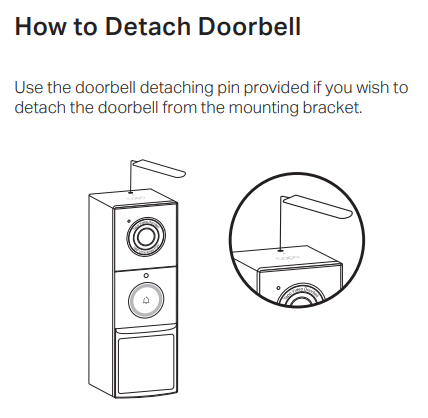
How can I take the video camera off easily?  I put a flat screw drive head between the plate and the camera and saw space but it did not come off.


I have it on my back door with no wires so I will need to recharge it I hope once a year.  The top screw is not tight so I want to tighten it up.  Also I have a 256gb MicroSD card in it and I could not figure out how to delete records with the app, so if I find a deal, I would put in a 512gb card.


I wanted to put it in the front but disabling my house internal chimes is not good.  I will keep my Ring door bell in the front.


Any insights would be great.  I not want to put alot of pressure on it or break the faceplate.  I had to get new screws at ACE for installation into morter and was worth buying them.


Thanks in adance and be safe,

PurpleB

 

  0      
  0      
#1
Options
1 Reply
Re:removing faceplate from D225 on the wall
2 weeks ago

  @PurpleB 

Hi,
1. If you want to detach the D225 from the mounting bracket, the following picture in the D225's QIG may help.

e50c913ded72417ca2655ba1bbb856f8


2. The Tapo cameras do not support the feature to delete video recordings stored on the SD card. However, on the camera's Device Settings > Storage & Recording > Local Storage page, you can tap Format microSD Card to format the inserted SD card and remove all saved video recordings.


3. If you want to change the SD card in the camera, it's recommended to refer to the instructions below to select a compatible SD card.
What type of microSD card does Tapo/Kasa Camera support?

Best Regards

  0  
  0  
#2
Options