
Lose connection

I have X55 and BE25 working together. Recently. The X55's lose connection from the base (BE25) and I can't reconnect them without removing them and reinstalling them! What's my problem here?
- Copy Link
- Subscribe
- Bookmark
- Report Inappropriate Content

Can you please provide the hardware version of each deco. It can be found on the bottom of eah deco unit and the firmware of each unit thanks.
- Copy Link
- Report Inappropriate Content
Model: X55
Connected to: Living Room (5 GHZ|2.4 GHZ/6 GHZ)
Firmware Version
1.8.0 Build 25102213 Rel. 43970
MAC
1C-61-B4-A9-72-FC
IP
192.168.71.246
Model: X55
Connected to: Living Room (2.4 GHZ/5 GHz)
Firmware Version
1.8.0 Build 25102213 Rel. 43970
MAC
1C-61-B4-А9-72-F8
IP
192.168.71.248
Default SSID
Deco_72F8
Model: X55
Connected to: Living Room (5 GHZ|2.4 GHZ/6 GHZ)
Firmware Version
1.8.0 Build 25102213 Rel. 43970
MAC
1C-61-B4-A9-72-F0
IP
192.168.71.247
Lose connection every day and sometimes twice a day have to push reset button to get them working again.
I have 6 total, 3 are X55 and 3 are BE25. The main Deco is BE25! I've had this setup over a year now and haven't had this problem until now.
- Copy Link
- Report Inappropriate Content


Hi, I saw a similar post here:
https://community.tp-link.com/en/home/forum/topic/858878
Could you please send an email to forumsupport.usa@tp-link.com with the following details:
(Please add forum ID#858882 in the subject and update here with the support ticket ID after submitting the feedback.)
- Would the satellite Deco X55 turn flashing red when it lost connection to the BE25?
- some screenshots of the network maps and Mesh Backhaul types on the Deco App, such as:
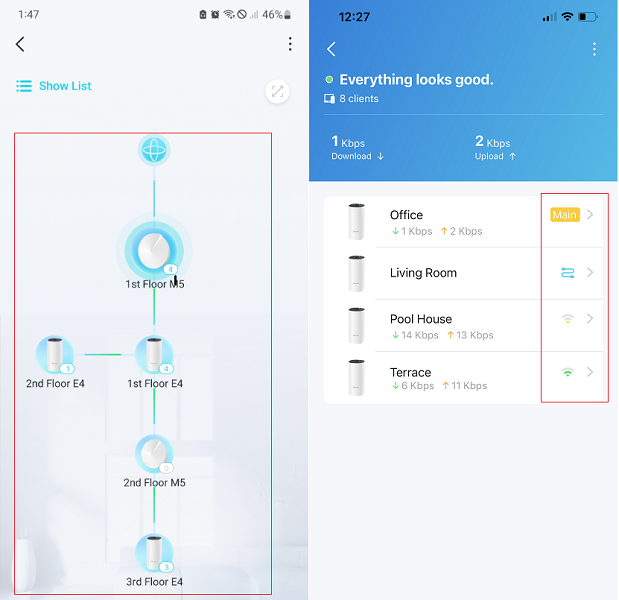
Thank you very much for your cooperation and support.
Best regards.
- Copy Link
- Report Inappropriate Content
Information
Helpful: 1
Views: 430
Replies: 3
Voters 1