
Official Release Deco M9 Plus_1.8.1 with Wi-Fi Access Control and ECO Mode Ready for Test


This Article applies to
Deco M9 Plus_V2.0/V2.2_1.6.4
Firmware Modifications and Bug Fixes
- Added Static Routing.
- Added Firmware Auto Update.
- Added Wi-Fi Access Control feature to support block list and allow list.
- Added Matter protocol.
- Add ECO Mode
- Supported KLAP protocol for adding new Kasa/Tapo models under Smart Home.
- Fixed the bug of certain programs and services not being loaded properly after turning on the QoS.
- Improved system stability.
Firmware Download Link
| Deco M9 Plus_V2.0/V2.2 | 1.8.1_Build 20250219_Official | Newly updated to 1.10.0 Platform |
Update Advice:
- How to update the firmware via web UI.
- Firmware recovery is needed if users want to revert to the official 1.6.4: How to Downgrade Deco
- Copy Link
- Subscribe
- Bookmark
- Report Inappropriate Content

@David-TP I could be wrong but my understanding is that QoS packets are used to monitor and manage network traffic and so the Deco app is probably using them to generate its maps and manage the devices. Plus I note that a QoS fix was the only change in the latest firmware update.
The wifi continues to work well by the way, the app continues to report that the network is not functioning (apparently incorrectly).
- Copy Link
- Report Inappropriate Content
Hi, thanks for your time and patience.
The good news is that the engineer can reproduce the "Connection Preference" issue in the lab. But I haven't received any workarounds/solutions yet.
@GoldPunchTR , I'm afraid there hasn't been any updated news about Deco M9 Plus_V1. You can subscribe to this post:
Deco Recap- Check What's Currently Going on With Deco
I'll update it here with the latest firmware release news about the Deco firmware upgrade.
Thank you very much.
Best regards.
- Copy Link
- Report Inappropriate Content
Hi, thanks for the update.
I don't have any other suggestions now and will wait for the further replies from the engineer to the APP log.
By the way, why do you think it might be a "QoS bug"? Maybe I missed something important, and I can't figure out how they might be related.
Thank you very much.
Best regards.
- Copy Link
- Report Inappropriate Content

- Copy Link
- Report Inappropriate Content
@David-TP Hi,
The powerline models are AV600.
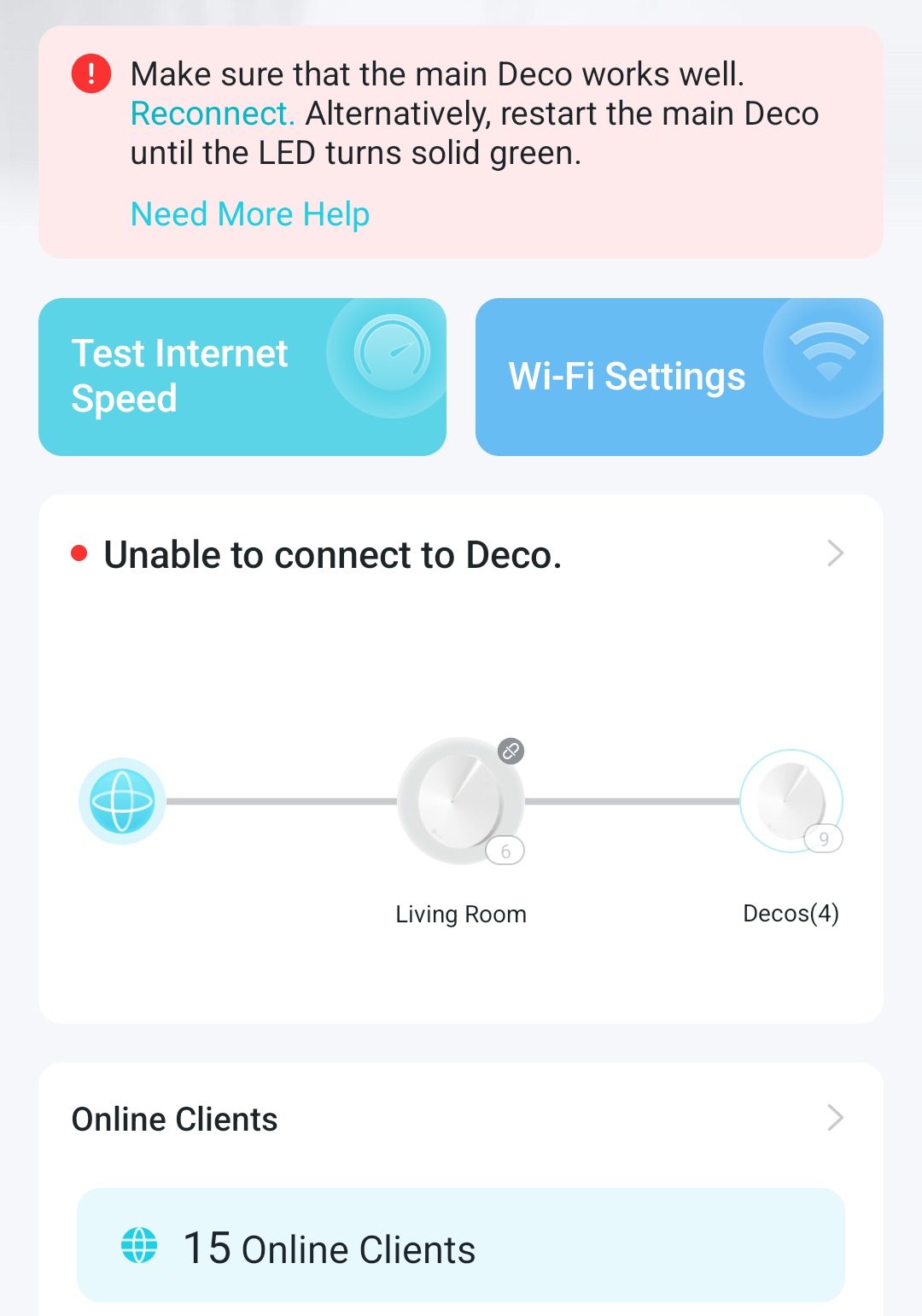
The app is inconsistent. Sometimes it reports everything is fine but within a few seconds it then says the main deco isn't working. Sometimes it reports some of the satellites as not working, but I can click and see connected clients. I emphasise that the wifi appears to be working perfectly now from a user's POV.
I think it is probably a problem with the Decos reporting to the App correctly, which may be a QoS bug.
- Copy Link
- Report Inappropriate Content

@David-TP It doesn't matter to where the the other satellites are connected to or not. All my M9 are connected to my main M9 via Ethernet, also all of my m5s are connect through Ethernet except one. my X50-outdoor will never connect to the preferred M9, the closest. All many others here are experiencing. It's just your R&D whom cannot reproduce. It's a pity.
- Copy Link
- Report Inappropriate Content
Hi, thank you very much for the update.
the main Deco M9 Plus must be connected via an Ethernet cable, so the Deco APP usually doesn't display its Mesh Backhaul type.
I noticed you mentioned that:
(The two Ethernets are different powerline networks with TP-Link adapters)
Do you mean the "Ethernet connections" of satellites 3 and 4 are established with powerline adapters? If yes, can I have the model number of the powerline adapters?
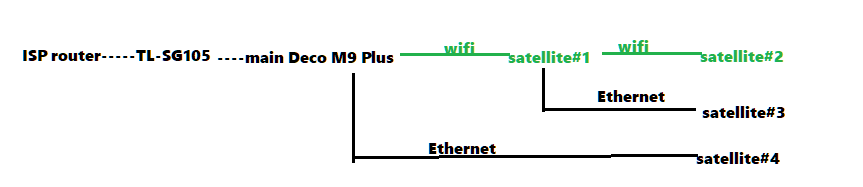
Will you consistently run into the following issues:
- Satellite # 3 showed "WiFi Backhaul" on the Deco APP
- Satellite #2 reported "Offline"
- Deco APP reported "Can't connect to Deco"
Wait for your reply.
Best regards.
- Copy Link
- Report Inappropriate Content
@nickname125 i have reset the "satellite 2" deco and it still cannot be added to the network. Either in it's original position or next to the main Deco. The setup process seems to work, it says it has been added successfully, but it continues to show as offline in the app. Connecting it via ethernet seems to allow it to show as connected in the app but then Satellites 1 and 3 are shown as disconnected... however the wifi does appear to be working. Perhaps it is an app problem.
- Copy Link
- Report Inappropriate Content
The network map is:
ISP Router -- switch/hub -- main deco
\ <wireless> -- satellite 1 -- <wireless> -- satellite 2
\ --<ethernet>-- satellite 3
\ <ethernet> -- satellite 4
Satellite 2 will not reconnect. The Main deco doesn't have an ethernet symbol in the list but satellite 4 is connected so I guess it is working. Satellite 3 should be ethernet but is currently connected by wireless with a very weak signal (i would actually prefer this configuration but the signal is weak and not stable enough).
The switch/hub is a tplink SG105. I have swapped it for another unbranded chinese one and it seems to behave the same.
(The two ethernets are different powerline networks with tp-link adapters)
I will submit the log now.
Update: while the wifi seems to be working ok (minus the deco that won't connect) the Android App always has the error "Can't connect to Deco" when it starts up, except I can click on each Deco and see its details and what devices are connected.
- Copy Link
- Report Inappropriate Content
Thank you very much for the feedback.
Please also refer to this link to help me submit the Deco APP log:
By the way, would there be any network switch used for Ethernet Backhaul among 5*Deco M9 Plus units? (If yes, can I have the model number of the switch?)
Can I have the current network map, such as:
main ISP router---main Deco M9---switch--satellite#1------<wireless>-----satellite#4
\---satellite#2------<wireless>-----satellite#5
\---satellite#3
Wait for your reply.
Best regards.
- Copy Link
- Report Inappropriate Content
Information
Helpful: 2
Views: 6831
Replies: 37
Voters 0
No one has voted for it yet.