
Official Release Deco M9 Plus_1.8.1 with Wi-Fi Access Control and ECO Mode Ready for Test


This Article applies to
Deco M9 Plus_V2.0/V2.2_1.6.4
Firmware Modifications and Bug Fixes
- Added Static Routing.
- Added Firmware Auto Update.
- Added Wi-Fi Access Control feature to support block list and allow list.
- Added Matter protocol.
- Add ECO Mode
- Supported KLAP protocol for adding new Kasa/Tapo models under Smart Home.
- Fixed the bug of certain programs and services not being loaded properly after turning on the QoS.
- Improved system stability.
Firmware Download Link
| Deco M9 Plus_V2.0/V2.2 | 1.8.1_Build 20250219_Official | Newly updated to 1.10.0 Platform |
Update Advice:
- How to update the firmware via web UI.
- Firmware recovery is needed if users want to revert to the official 1.6.4: How to Downgrade Deco
- Copy Link
- Subscribe
- Bookmark
- Report Inappropriate Content

Hello, I installed rel 56714 this morning and had big problems bringing the network back up. Ethernet backhaul appears to be disabled by default and some of the more remote decos will not reconnect to the mesh whatever I do. Fast Roaming is also disabled and can't be enabled.
I have 5 M9s in access point mode with a combination of mesh connection and ethernet backhaul. Usually firmware upgrades are problem free but this one was not.
On the main deco some combination of rebooting and switching the ethernet port eventually got it to recognise the backhaul but on another nothing will make it work. On yet another (without ethernet) it will not connect to the mesh even right next to another deco. I will perform a hardware reset on it shortly.
- Copy Link
- Report Inappropriate Content
Hi, welcome to the community.
As only Samsung TV had the reported issue, I don't think it was due to the firmware of Deco.
And I saw there was similar feedback mentioned in r/Youtube as well:
https://www.reddit.com/r/youtubetv/comments/xdof6z/constantly_getting_black_screen_issue_on_samsung/
Have you tested connecting the TV to the mobile hotspot to see whether the issue continues?
Wait for your reply.
Best regards.
- Copy Link
- Report Inappropriate Content
Thank you for the feedback.
I hope you can submit a Deco APP feedback, then ask for assistance from the senior engineers:
Best regards.
- Copy Link
- Report Inappropriate Content

@David-TP It's concerning that TP-Link engineers can't reproduce the issues, especially since multiple users with similar setups are experiencing them. It makes one wonder if they have access to the necessary hardware for proper testing.
- Copy Link
- Report Inappropriate Content

after this update i cannot run youtube on my Samsung NEO Qled 2024. prior it was no issue.
also i have no QOS activated, which was a bug that should be addressed in this update.
i tried:
rebooting tv
rebooting Deco
this dit not change a thing. when running youtube on the samsung tv, the screen just turns black.
i can run youtube on my ps5/iphone/ipad without any issue.
please resolve this bug.
i run three deco M9plus V2 with firmware 1.8.1
- Copy Link
- Report Inappropriate Content

I'm also experiencing an issue where my Deco units are completely ignoring the connection preferences set in the app since updating to firmware version 1.8.1.
I have three Deco M9 Plus V2's running in Access Point mode. Two of them are connected via Ethernet to the main router. However, the third unit is not connecting to the preferred connection I set, it always connects to whichever Deco is designated as the "Main" deco, regardless of my settings.
I've tested this by placing the third Deco right next to the preferred unit, but it still insists on connecting to the "Main" Deco located on the opposite side of the house, resulting in a red signal. Even when I set the connection preference to "Auto," it continues to connect to the distant "Main" unit instead of the Deco it is sitting right next to.
When I downgraded to firmware version 1.6.4, the connection preferences work correctly again without any issues.
- Copy Link
- Report Inappropriate Content
@neston10 Hi, thanks for the feedback.
After reviewing the previous feedback record, the latest update from the engineer was that they were unable to reproduce this issue and asked for extra cooperation from the users.
I wonder whether you'd like to update to 1.8.1 again and cooperate with our engineers for further analysis.
If you're interested, you can refer to this link to help me submit the Deco APP: How to submit Deco APP log
Thank you very much.
Wait for your reply.
Best regards.
- Copy Link
- Report Inappropriate Content

Similar issue for me.
4 m5s and 2m9plus (v2)
I used the 2 m9plus to bridge between two building.
The m5s were connected to the m9s via ethernet.
All worked fine.
Upgraded the m9plus to 1.8.1 this week.
The m9s would not connect to each other.
Tried to move the m5s around and they do not connect to the m9s.
Did a firmware reload back to the last version 1.6.x and they work like before.
Clients would connect to the m9s but they would not mesh to themselves or to the m5s.
The m5s mesh to other m5s fine sill.
Definitely a bad release.
I have turned off auto upgrade.
- Copy Link
- Report Inappropriate Content
Hi, Thanks for the feedback.
Do you also have Deco M9 Plus+Deco X50-outdoor?
Could you please refer to this link to help me submit the Deco APP log:How to submit Deco APP log
And please also add the following screenshots of the Deco network map:
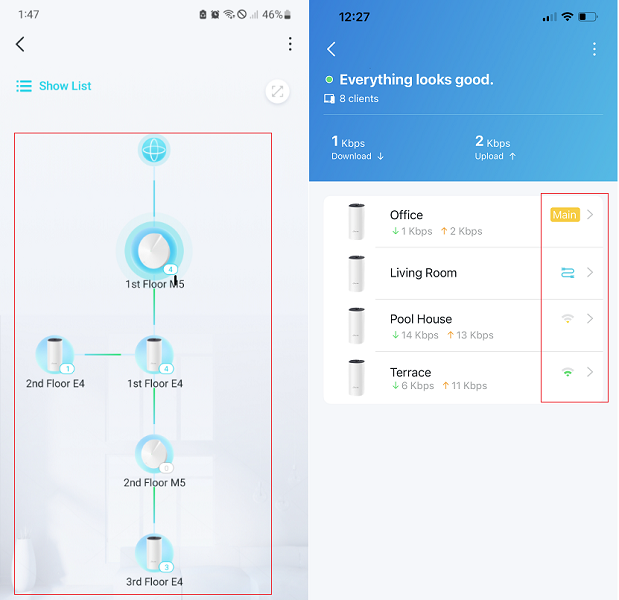
Wait for your reply.
Best regards.
- Copy Link
- Report Inappropriate Content

@David-TP
Hi have the same issue since the update.. i cant connect to prefferd device
i have fysically set them next to each other on the second floor and still it refuses to connect. only to my main unit on the ground floor with weak signal
- Copy Link
- Report Inappropriate Content
Information
Helpful: 2
Views: 6830
Replies: 37
Voters 0
No one has voted for it yet.