
Official Release Deco M9 Plus_1.8.1 with Wi-Fi Access Control and ECO Mode Ready for Test


This Article applies to
Deco M9 Plus_V2.0/V2.2_1.6.4
Firmware Modifications and Bug Fixes
- Added Static Routing.
- Added Firmware Auto Update.
- Added Wi-Fi Access Control feature to support block list and allow list.
- Added Matter protocol.
- Add ECO Mode
- Supported KLAP protocol for adding new Kasa/Tapo models under Smart Home.
- Fixed the bug of certain programs and services not being loaded properly after turning on the QoS.
- Improved system stability.
Firmware Download Link
| Deco M9 Plus_V2.0/V2.2 | 1.8.1_Build 20250219_Official | Newly updated to 1.10.0 Platform |
Update Advice:
- How to update the firmware via web UI.
- Firmware recovery is needed if users want to revert to the official 1.6.4: How to Downgrade Deco
- Copy Link
- Subscribe
- Bookmark
- Report Inappropriate Content
Thanks a lot for the pictures.
I'd like to follow up on your case via email and ask the senior engineer for further assistance.
Please check whether you have received my email.
Best regards.
- Copy Link
- Report Inappropriate Content

@David-TP I have verified that if I add another M5 AP, set the X50-Outdoor to force connect to the new M5, it does do that. Setting it to connect to the M9 with best signal, it does not.
- Copy Link
- Report Inappropriate Content
@David-TP Hello please see the provided screenshots.
"Arrie out" is x50-outdoor which is "connection preference" to "Kontoris" a m9 running 1.8.1. It always connect to AP "pit from hell", an m5 running 1.7.8.
Even if i restart all the invovled APs (like restart "Arrie out" and wait for connect, it always connects to "pit from hell", before 1.8.1 of the 3 m9s it always connected to "Kontoris" as the software tells it to.

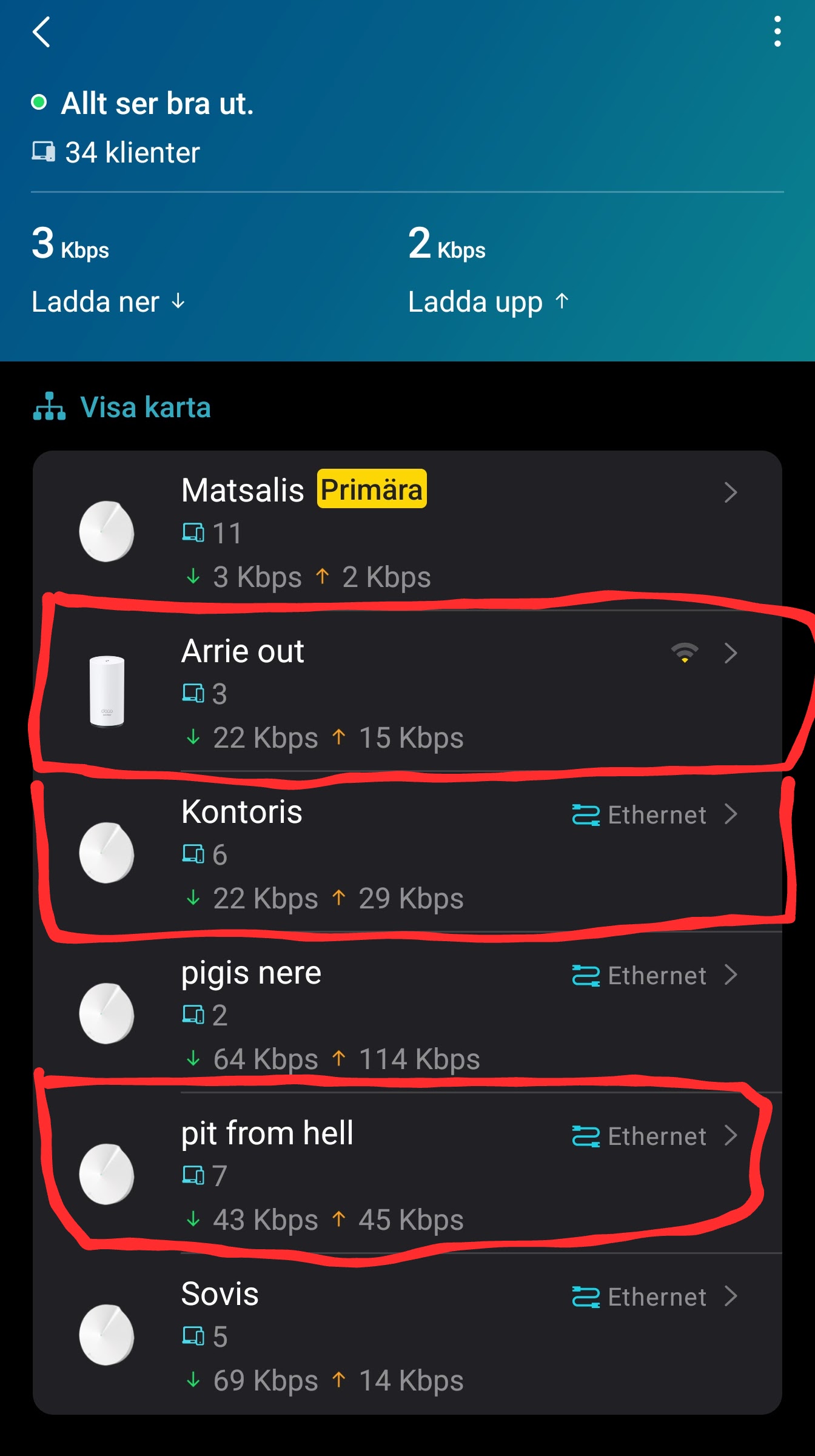


- Copy Link
- Report Inappropriate Content
Hi, thank you very much for the feedback.
Can I have some screenshots of the current network topology, such as:

Do you mean if the "Connection Preference" of the satellite Deco X50-outdoor is set to one of the M9 plus, it can't connect to this M9 plus?
-Would it completely disconnect from the Mesh network and turn flashing red, or will it automatically pick up another satellite Deco?
-Can you consistently reproduce this issue?
Wait for your reply.
Best regards.
- Copy Link
- Report Inappropriate Content
@David-TP Upgraded m9 plus (v2) to 1.8.1 and now my X50-Outdoor does not connect to the AP set "connection preference", if that AP is a m9 plus.
- Copy Link
- Report Inappropriate Content
Hi, thanks for your time and patience.
I'm afraid the 1.8.1 version for Deco M9 Plus_V1 hasn't been available yet.
I'll update this post later if there is any further progress.
Best regards.
- Copy Link
- Report Inappropriate Content

Thank you @David-TP for this early access. I have 3 Deco M9 Plus, 2 V2.0 and 1 V1.0 (being the main deco of the 3 M9 Plus + 5 M5 home network). The three Deco M9 Plus are working under 1.6.4 (1.6.4 Build 20240719 Rel. 40539 for 1.0 and 1.6.4 Build 20240718 Rel. 76925 for 2.0).
Would it be possible if you provide this pre release firmware 1.8.1 for M9 Plus 1.0 too so I can upgrade the three units and test ?
- Copy Link
- Report Inappropriate Content
Information
Helpful: 2
Views: 6829
Replies: 37
Voters 0
No one has voted for it yet.