
Early Access Introducing AI QoS: Elevate Your Gaming Experience on the Archer GE800 Gaming Router!
 This thread has been locked for further replies. You can start a new thread to share your ideas or ask questions.

Update on Jan 16th, 2026:
The official version of Archer GE800 V1, 1.3.2 Build 20250929, has been released publicly. Users can check for updates via the router's web interface or through the Tether App to install the latest version manually.
If you cannot find the latest version, please download the firmware from the official website and upgrade it manually:
Archer GE800_V1_1.3.2 Build 20250929
We will manually lock this post to better focus on discussions regarding the new firmware. We also encourage all users to upgrade to the latest firmware for testing and to provide feedback.
--------------------------------------------------------------------------------
Hello Everyone,
We are excited to announce a pre-release firmware update introducing AI QoS (Quality of Service) for the Archer GE800 V1 before its official release. This allows our users to enjoy the ultimate gaming experience in advance.
AI QoS is designed to revolutionize your online gaming experience. Leveraging artificial intelligence, our new feature set transforms how your router manages bandwidth, ensuring seamless performance for all your applications. Here are the key features that make AI QoS a game-changer.
One-Click Acceleration
Say goodbye to complicated setups! With just a single click, you can enjoy lightning-fast performance without the hassle of complex configurations. Get ready to dive into your favorite games instantly.
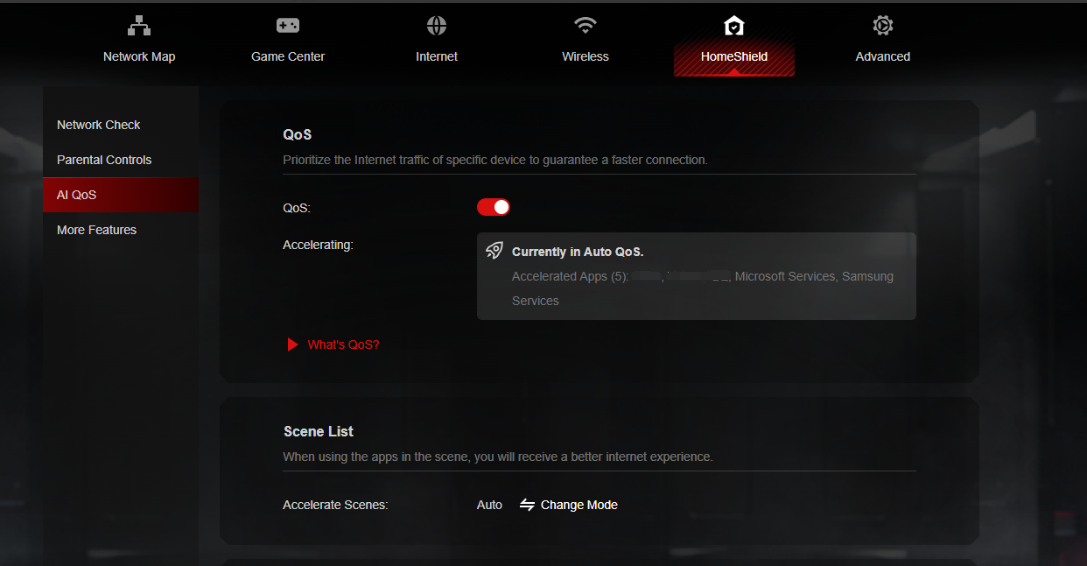
Dynamic Bandwidth Detection
Our advanced technology allows you to instantly assess your available bandwidth. By continuously monitoring network conditions, AI QoS helps prevent congestion, ensuring that your gaming and streaming sessions remain smooth and uninterrupted.
Enhanced QoS Optimization
Experience significantly reduced gaming latency, even in congested network scenarios. AI QoS intelligently optimizes your connection, minimizing lag and providing a competitive edge when it matters most.
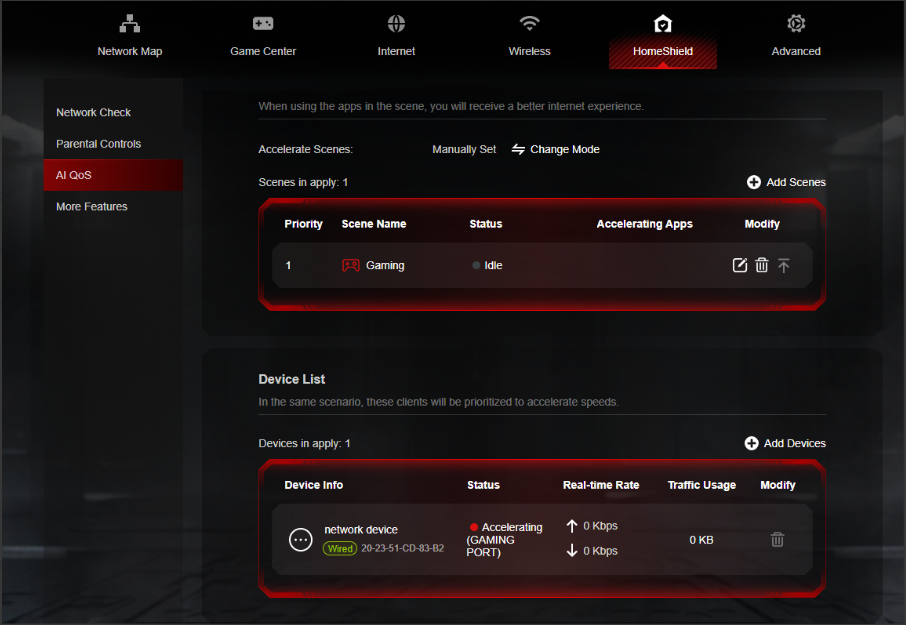
Intelligent Traffic Prioritization
Every application deserves the best performance. With AI QoS, traffic is prioritized intelligently, guaranteeing that all your applications run optimally. Whether you're gaming, streaming, or video conferencing, you can be confident that your experience will be top-notch.
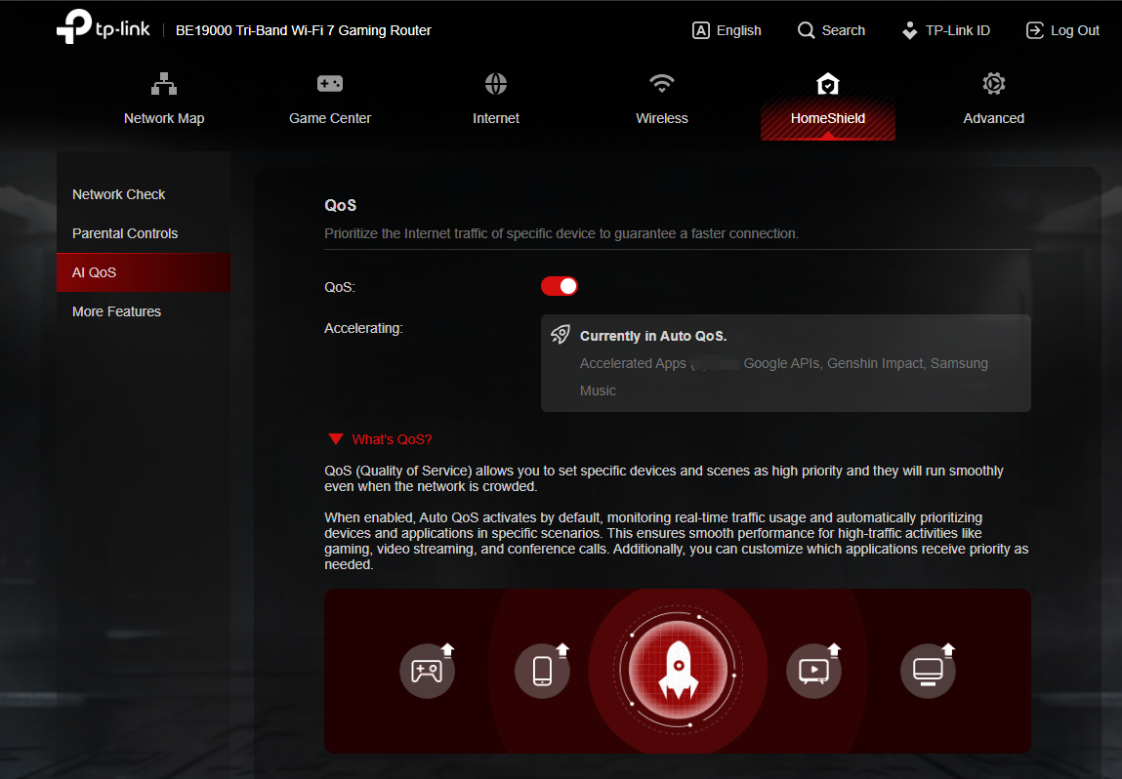
More New Features and Modifications:
This pre-release firmware includes all the new features and modifications mentioned in previous posts below:
Pre-release Firmware for Archer GE800/GE550/GE650v1 Supports EasyMesh in AP Mode, DoH&DoT, ECO Mode
Bug Fixes:
Fixed the issue where enabling Bandwidth Control for the Guest Network will take effect for all networks.
Firmware Download:
Before the Upgrade
(1) Please be sure you have read the Beta Test Agreement before upgrading the pre-release firmware!
(2) For the sake of insurance, it's always recommended to save a copy of the router's Backup Config file before upgrading or downgrading.
(3) This pre-release firmware for Archer GE800 V1 can be applied to all versions (EU/US/AU/CA/etc).
(4) You may follow the guide to upgrade the firmware of your router. How to Upgrade the Firmware on the TP-Link Wi-Fi Routers.
(5) The screenshots in this article are taken from the web GUI of Archer GE800 V1 for reference only.
(6) This version of software can be degraded to the previous official version.
Direct Firmware Download Link
| Archer GE800_V1 | Archer GE800(EU)_V1_1.3.2 Build 20251013 (Updated Pre-release firmware) |
Additional Information
As always, we value your feedback. If somehow you encounter an issue during or after the router firmware upgrade, please comment below with the following info. Your input helps us continue to improve and provide the best products and support.
- Provide a detailed network layout, including how the devices are connected, especially if there are EasyMesh satellite devices.
- Detailed issue description, and provide more information on the specific conditions that seem to trigger the problem.
Thank you for your continued support and for being part of our community.
Update Log
Oct 13th, 2025:
Updated to provide a new pre-release firmware based on the latest 1.3.1 official version.
Jul 4th, 2025:
Updated to provide a new pre-release firmware based on the latest 1.2.1 official version.
Jun 13th, 2025:
Release of the article.
Related Articles
Pre-release Firmware for Archer GE800/GE550/GE650v1 Supports EasyMesh in AP Mode, DoH&DoT, ECO Mode
- Copy Link
- Subscribe
- Bookmark
- Report Inappropriate Content

@Vendex ...but wouldn't a pause create latency spikes?
- Copy Link
- Report Inappropriate Content
@Jaybonaut that’s a common misconception! While the word 'pause' sounds like it would cause a spike, these pauses happen at the microsecond level-far too fast for a human or even a game engine to perceive as a lag spike.
The real latency spikes occur when flow control is off. Without it, if a buffer overflows, the packets are simply dropped. Your system then has to detect the missing data and request a retransmission (TCP retransmission), which takes significantly more time than a tiny flow control pause.
Think of flow control like a smart traffic light that keeps cars moving steadily, whereas turning it off is like having no lights at all-eventually, a crash occurs, and everything stops until the mess is cleared. For gaming on a router like the GE800, a steady flow is always better than 'fast but broken' data delivery :)
- Copy Link
- Report Inappropriate Content

This isn't entirely accurate for gaming. Things like competitive games prioritize latency 100% (this is why they operate on UDP). The game cannot pause processing and will not request or wait for your retries. In applications where milliseconds matter, packet loss is preferable to latency. They are constantly trasmitting small packets to update game state (~60 pps) and the timeliness of their arrival is much more critical for the whole thing to work than whether or not a couple of them are missing. Flow control is for data integrity, not minimizing latency. Queued packets are generally the cause of "rubber banding" in online games.
- Copy Link
- Report Inappropriate Content
@jfunk exactly, for dedicated competitive scenarios, avoiding queued packets is key to preventing rubber banding. However, instead of relying on a binary setting like flow control to manage this, that's where the AI QoS on the GE800 really shines.
While flow control handles the physical link stability, AI qos identifies game packets and ensures they jump to the front of the line without being delayed by other heavy traffic. This effectively solves the latency issue you mentioned without risking the packet loss that can occur when buffers are simply left to overflow. Ultimately, if you're running a clean network solely for gaming, turning off flow control might give you that raw edge, but for most living room scenarios, the AI-driven optimization is a much more surgical way to keep latency at absolute zero
- Copy Link
- Report Inappropriate Content
...so, Flow Control on or off then? Conflicting replies. ...also, what about at the NIC settings? (not just the router flow control?)
- Copy Link
- Report Inappropriate Content
Vendex and jfunk provided very theoretical and detailed explanations and debates for Flow Control feature on the router. To be honest, both of them are extremely professional, even surpassing my own understanding of Flow Control.
To conclude, it's recommended to keep Flow Control enabled on the GE800 to ensure optimal traffic management for connected devices.
However, if you experience a specific issue with gaming or the network, I'm happy to escalate your case to our support engineers for further investigation to determine whether it's caused by the Flow Control setting.
- Copy Link
- Report Inappropriate Content
Pro-gamer wrote
Hi Kevin, I have a problem, the MTU must support 1500 for PPPEO. I only use 1492 and that causes internet speed problems. Waiting for TP-Link: The GE800 is a high-end gaming router. You can submit a request to TP-Link Support for a firmware update that supports "Baby Jumbo Frames" (RFC 4638) for KPN/PPPoE.That's confirmation: the firmware of the TP-Link Archer GE800 does not currently support RFC 4638. Without this support, the router cannot send the necessary 1508 bytes (1500 data + 8 PPPoE overhead) over the WAN port, so you are stuck with 1492.
With a 4Gbps connection this is a major problem for two reasons:
Packet fragmentation: Because almost all servers on the Internet send 1500 bytes, your router has to "shop" every incoming packet into smaller pieces. This eats up the processor capacity.
CPU Bottleneck: As mentioned earlier, TP-Link handles PPPoE on a single processor core. Due to the extra fragmentation, that core reaches its limit much faster, so your speed is probably stuck somewhere between 1.5 and 2.2 Gbps.
I saw you opened another thread to submit this request earlier here.
I'm not seeing other home routers support "Baby Jumbo Frames" (RFC 4638) and allow for configuring the MTU larger than 1500. Do you know any brand or model that supports it already? Kindly share more details with me, and it will be more convincing when we submit feature requests to the development team.
BTW, I also wonder whether the speed problems are caused by the MTU settings on the GE800? How did you determine that? I remember that you can achieve 3 Gbps when your GE800 is running the official 1.2.1 firmware. How about now? With the latest Archer GE800(EU)_V1_1.3.2 Build 20250929 official version, what is the speed you can get?
- Copy Link
- Report Inappropriate Content

@Kevin_Z Actually, it would be necessary to fix the firmware in this regard...
- Copy Link
- Report Inappropriate Content

I get a wireless speed test around 3500 mps firmware is 1.3.2 my provider is pppeo and on mtu I can only use 1492 MTU or lower on 1500 MTU yesterday I had a connection problem PS5 online game I immediately checked my connection and speedtt says 2200 mps I researched on google and it says because your router does not give 1500 mtu but 1492 that is the reason why the connection is heppering
KPN Box 14 (Arcadyan):
Brand: Arcadyan
Model: ERV67AX348B
Wi-Fi: Wi-Fi 6 (802.11ax)
Speed: Suitable for 4 Gbit/s
Functionality: Supports mesh networks with suitable KPN equipment. their own modem can operate at 1500 mtu if next firmware update comes for "Baby Jumbo Frames" (RFC 4638) then all connection problems would be solved for pppeo mtu 1500. Too bad I use provider PPPEO if it uses DHCP (Dynamic IP) then the router would automatically switch 1500 mtu
- Copy Link
- Report Inappropriate Content
@Kevin_Z pfSense / OPNsense: DIY firewalls with suitable NICs (e.g. Intel igb driver) support this functionality.
OpenWrt: Suitable for various hardware, provided the PPPoE connection and underlying switch hardware (802.1Q) can handle this.
Ubiquiti EdgeRouter/UniFi: Select models support an MTU of 1508 on the WAN port via configuration to achieve 1500 over PPPoE.
TP-Link: TP-Link community requests suggest newer models are updated for RFC 4638.
Important notes:
The Internet Service Provider (ISP) must also support this.
It is a commonly used solution for fiber optic (such as KPN networks) and VDSL connections with
PPPoE.
as you can see tp-link is working to support this but I'm afraid. not for ge800 if we do get it that would be nice
- Copy Link
- Report Inappropriate Content
Information
Helpful: 7
Views: 95715
Replies: 521
Voters 7





