
Early Access Introducing AI QoS: Elevate Your Gaming Experience on the Archer GE800 Gaming Router!


Update on Jan 16th, 2026:
The official version of Archer GE800 V1, 1.3.2 Build 20250929, has been released publicly. Users can check for updates via the router's web interface or through the Tether App to install the latest version manually.
If you cannot find the latest version, please download the firmware from the official website and upgrade it manually:
Archer GE800_V1_1.3.2 Build 20250929
We will manually lock this post to better focus on discussions regarding the new firmware. We also encourage all users to upgrade to the latest firmware for testing and to provide feedback.
--------------------------------------------------------------------------------
Hello Everyone,
We are excited to announce a pre-release firmware update introducing AI QoS (Quality of Service) for the Archer GE800 V1 before its official release. This allows our users to enjoy the ultimate gaming experience in advance.
AI QoS is designed to revolutionize your online gaming experience. Leveraging artificial intelligence, our new feature set transforms how your router manages bandwidth, ensuring seamless performance for all your applications. Here are the key features that make AI QoS a game-changer.
One-Click Acceleration
Say goodbye to complicated setups! With just a single click, you can enjoy lightning-fast performance without the hassle of complex configurations. Get ready to dive into your favorite games instantly.
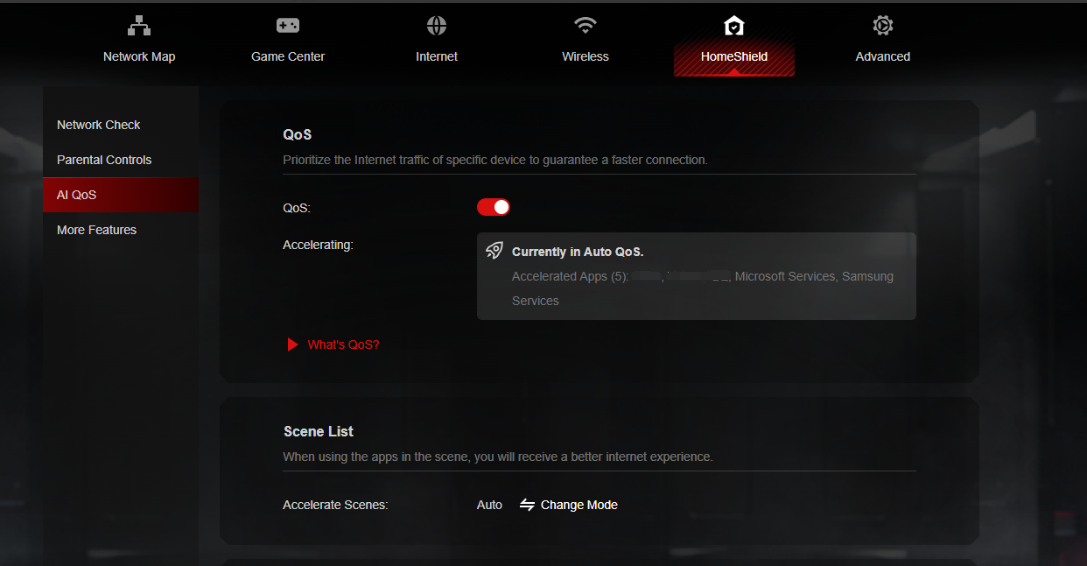
Dynamic Bandwidth Detection
Our advanced technology allows you to instantly assess your available bandwidth. By continuously monitoring network conditions, AI QoS helps prevent congestion, ensuring that your gaming and streaming sessions remain smooth and uninterrupted.
Enhanced QoS Optimization
Experience significantly reduced gaming latency, even in congested network scenarios. AI QoS intelligently optimizes your connection, minimizing lag and providing a competitive edge when it matters most.
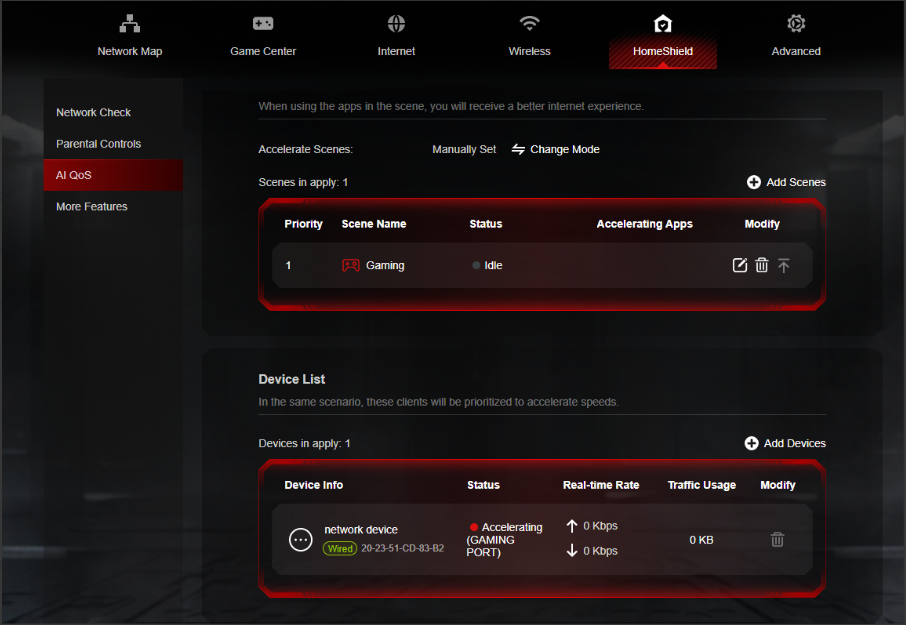
Intelligent Traffic Prioritization
Every application deserves the best performance. With AI QoS, traffic is prioritized intelligently, guaranteeing that all your applications run optimally. Whether you're gaming, streaming, or video conferencing, you can be confident that your experience will be top-notch.
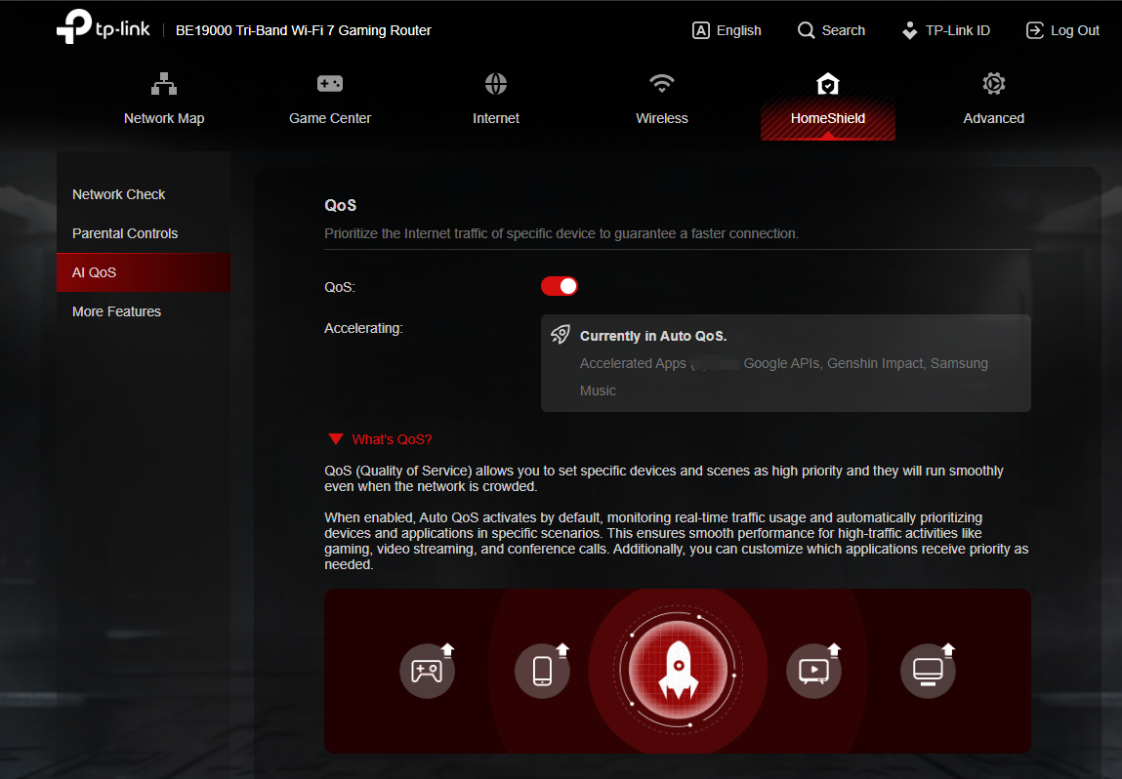
More New Features and Modifications:
This pre-release firmware includes all the new features and modifications mentioned in previous posts below:
Pre-release Firmware for Archer GE800/GE550/GE650v1 Supports EasyMesh in AP Mode, DoH&DoT, ECO Mode
Bug Fixes:
Fixed the issue where enabling Bandwidth Control for the Guest Network will take effect for all networks.
Firmware Download:
Before the Upgrade
(1) Please be sure you have read the Beta Test Agreement before upgrading the pre-release firmware!
(2) For the sake of insurance, it's always recommended to save a copy of the router's Backup Config file before upgrading or downgrading.
(3) This pre-release firmware for Archer GE800 V1 can be applied to all versions (EU/US/AU/CA/etc).
(4) You may follow the guide to upgrade the firmware of your router. How to Upgrade the Firmware on the TP-Link Wi-Fi Routers.
(5) The screenshots in this article are taken from the web GUI of Archer GE800 V1 for reference only.
(6) This version of software can be degraded to the previous official version.
Direct Firmware Download Link
| Archer GE800_V1 | Archer GE800(EU)_V1_1.3.2 Build 20251013 (Updated Pre-release firmware) |
Additional Information
As always, we value your feedback. If somehow you encounter an issue during or after the router firmware upgrade, please comment below with the following info. Your input helps us continue to improve and provide the best products and support.
- Provide a detailed network layout, including how the devices are connected, especially if there are EasyMesh satellite devices.
- Detailed issue description, and provide more information on the specific conditions that seem to trigger the problem.
Thank you for your continued support and for being part of our community.
Update Log
Oct 13th, 2025:
Updated to provide a new pre-release firmware based on the latest 1.3.1 official version.
Jul 4th, 2025:
Updated to provide a new pre-release firmware based on the latest 1.2.1 official version.
Jun 13th, 2025:
Release of the article.
Related Articles
Pre-release Firmware for Archer GE800/GE550/GE650v1 Supports EasyMesh in AP Mode, DoH&DoT, ECO Mode
- Copy Link
- Subscribe
- Bookmark
- Report Inappropriate Content

@Kevin_z also i am using AI QoS at the moment without having any type of profiles. I have it only ON because somehow it is better than using the suggested profiles.
- Copy Link
- Report Inappropriate Content
Thank you very much for your thorough testing results.
I'm a little bit confused about how you tested gaming latency and jitter when there is no WAN/Internet connection. If you're playing offline games on the game console, I assume there is no interaction between the GE800 and the console. You can simply disconnect the console's LAN or Wi-Fi to play the games. How does the GE800 affect the gaming then?
If I didn't understand your testing scenario, please correct me.
- Copy Link
- Report Inappropriate Content
Hi @Kevin_Z ,
Thank you for your reply I appreciate it.
I am doing other test using the gaming port and upnp and basically the gaming port bufferbloat like 2 - 6 ms on the upload. The download site is fine 0+ latency. I have been testing it with AI QoS but without profiles and it has been working better than having profiles.
To go about the test of console. Basically what i did i played offline without any connectivity to the router, thus with the physical cable out. Than i just placed the cable in the gaming port and my game just changed completely, thus slowed down and did not play well. At this moment my console was not connected to the internet, only physically connected. Meaning, physically connected but i switched off the console connection to the router. Things were the same. What i did to know that the router was the issue, at this time, disconnect again physically and play offline again. Everything played good and smooth. Again when connecting it did the same.
I went to do a lot of ping testing to the gateway while playing now with the console connected to the router, receiving IP etc. But still not connected to the ISP modem (internet). I noticed a lot of jitter when i press some buttons on my console, i noticed sometimes my ping would spike when testing through my pc.
Basically how it affected the game was: it was not smooth, so when i press a button it felt like bufferbloating or sluggish, slow, and felt like stuck in mud. So that was basically how the game felt when it was connected.
Now i am using AI QOS without profile, upnp, gaming port and it felt better. Most of the time the sluggish feeling etc. the tp link page and all my other devices were feeling slow etc.
The tp link is now more responsive because i switched off in Accessability > Hide animation. This was for me a work around waiting till you guys have this router become the best.
Now my network feels more responsive and also gaming. But i switched off a lot of stuff, like I told in the previously. Which i think that gaming router should already come optimize for gaming (plug and play).
I hope my explanation help you guys for the next firmware release.
If you need me to explain anything else please let me know.
- Copy Link
- Report Inappropriate Content
@Zeryoung thanks for sharing your testing process.
I think your results are interesting but I also believe the way the test was done can’t really represent how the router behaves in real use.
When the GE800 has no internet connection it keeps trying to establish a link and that affects its internal behaviour
so testing console performance or latency while the router is in this state will not show normal conditions.
Any router will act differently when it is searching for an uplink or trying to authenticate with the modem.
In my case I only see the jitter when I test over Wi Fi with normal internet connectivity,
when I play or use the network in real situations the behaviour is different,
so for reliable results I think the router should be tested with a proper WAN connection and the devices working as they usually do.
Your observations may still help but I would focus more on tests done while the router is fully online,
otherwise the measurements can look worse than they are because the system is not in a stable state.
I hope this helps clarify why the offline testing might give misleading latency behaviour
- Copy Link
- Report Inappropriate Content
- Copy Link
- Report Inappropriate Content
@Kevin_Z Any news on a new firmware? Version 1.3.2 caused unstable Wi-Fi, so I downgraded to 1.3.1.
- Copy Link
- Report Inappropriate Content

I have noticed my router got a lot more stable on the wireless side on all freqs after I went from scheduled daily/weekly reboots to monthly ones (I suspect the feature might be broken), I'm running 1.3.2 beta version (not the one from the website) and by far this has been working near perfectly since I bought this device.
I'm still not able to use Tether app at all tho, client list is always empty, also if I log with my TP-Link account within the router page the session will not be saved and page would ask for credentials over and over again.
- Copy Link
- Report Inappropriate Content
I finally received my GL.iNet Flint 3 Wi-Fi 7 router to compare, and with SQM and QoS enabled I’m getting an A+ bufferbloat score something I’ve never achieved before. I can’t get anywhere close to that with the GE800.
I’m also not experiencing ping spikes or unstable packet loss like I do with the GE800 when the Qos is activate. I tested both routers back-to-back to compare, but the GE800 still performs poorly, which is wild.
I’ve tried every available firmware for the GE800, but with no real success.
I honestly don’t understand how a router that costs twice as much performs worse. Clearly the firmware problem is not good enough after more than a year for such expensive device.
- Copy Link
- Report Inappropriate Content
@Bauhaus I get your frustration, but honestly the comparison doesn’t make much sense. The GE800 is in a completely different performance class from the Flint 3, both in hardware and overall capabilities. Saying the Flint performs “better” because of an A+ bufferbloat score with SQM and QoS doesn’t tell the whole story, especially when the load, chipset and processing headroom between the two routers aren’t even close.
I’ve tested the GE800 back-to-back with other Wi-Fi 7 models too, and the issues people report mostly come from firmware maturity, not from the hardware itself. It’s clear the device has the potential, and it’s also clear that TP-Link still needs to refine the firmware, but acting like the GE800 is outright worse than a router with half the specs just isn’t a fair comparison.
If the Flint 3 works better for your specific setup, that’s totally fine, but it doesn’t mean the GE800 is incapable or badly engineered. It just means the firmware still needs work, which everyone here already knows and has been waiting for improvements on
- Copy Link
- Report Inappropriate Content
> Saying the Flint performs “better” because of an A+ bufferbloat score with SQM and QoS doesn’t tell the whole story, especially when the load, chipset and processing headroom between the two routers aren’t even close.
It’s not about bufferbloat at all. If the firmware is bad and performs poorly, it doesn’t matter how much RAM or CPU power the router has everything comes down to how well the device is optimized in real world scenarios. The same applies to games: if a game is poorly optimized, even a good setup won’t help.
In reality, the GE800 performs worse than the Flint 3 (which also has its own issues) in most scenarios. its CPU and RAM are simply better optimized.
At the end of the day, you want a device that works especially at this price. If enabling a gaming feature gives worse results for most people, then clearly something is wrong. I’m sorry, but we clearly don’t share the same definition of a ‘performance class.’ It is just my opinion (nothing against you of course)
OpenWRT is more mature (even with a Qualcomm CPU), even on the new Flint 3. And even my old ROG Rapture GT-AX6000 with Asuswrt-Merlin on a simple 5 GHz band performs better.
The core problem comes down to the firmware, but many issues still remain. AI QoS doesn’t work as intended and actually makes things worse. It has been out for a year and a half already, and the problems are still there.
I bought the router for his gaming capability but it makes things worst firmware after firmware unfortunately. Unfortunately I learned afterward that T-plink have a reputation to provide not good firmware.
I talked to one of the engineer few months back regarding some issues with the GE800. None of issues/requests have been implemented
I am just frustrated 
- Copy Link
- Report Inappropriate Content
Information
Helpful: 7
Views: 85809
Replies: 520
Voters 7





