
Early Access Introducing AI QoS: Elevate Your Gaming Experience on the Archer GE800 Gaming Router!


Update on Jan 16th, 2026:
The official version of Archer GE800 V1, 1.3.2 Build 20250929, has been released publicly. Users can check for updates via the router's web interface or through the Tether App to install the latest version manually.
If you cannot find the latest version, please download the firmware from the official website and upgrade it manually:
Archer GE800_V1_1.3.2 Build 20250929
We will manually lock this post to better focus on discussions regarding the new firmware. We also encourage all users to upgrade to the latest firmware for testing and to provide feedback.
--------------------------------------------------------------------------------
Hello Everyone,
We are excited to announce a pre-release firmware update introducing AI QoS (Quality of Service) for the Archer GE800 V1 before its official release. This allows our users to enjoy the ultimate gaming experience in advance.
AI QoS is designed to revolutionize your online gaming experience. Leveraging artificial intelligence, our new feature set transforms how your router manages bandwidth, ensuring seamless performance for all your applications. Here are the key features that make AI QoS a game-changer.
One-Click Acceleration
Say goodbye to complicated setups! With just a single click, you can enjoy lightning-fast performance without the hassle of complex configurations. Get ready to dive into your favorite games instantly.
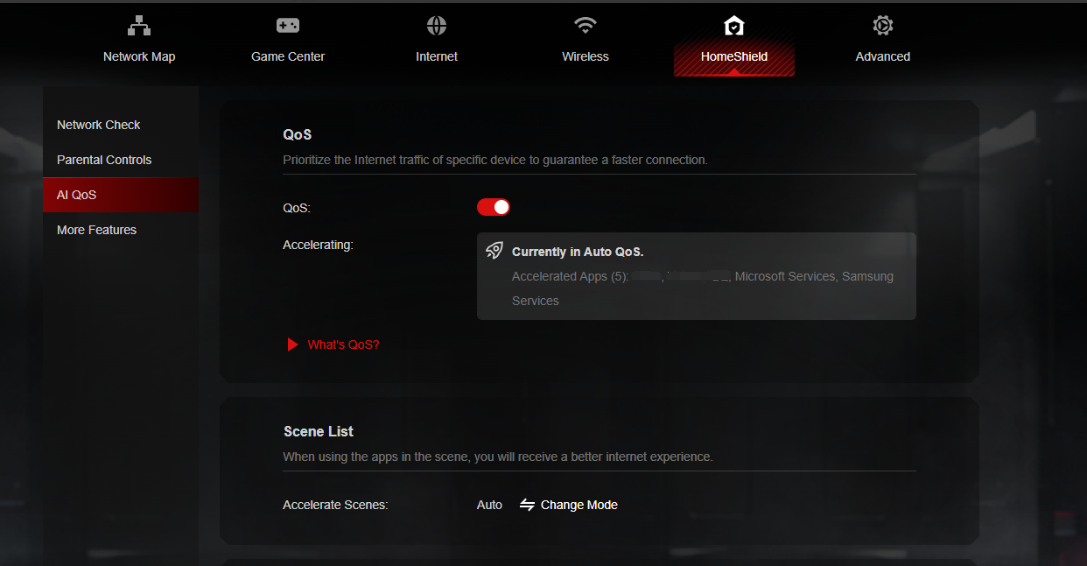
Dynamic Bandwidth Detection
Our advanced technology allows you to instantly assess your available bandwidth. By continuously monitoring network conditions, AI QoS helps prevent congestion, ensuring that your gaming and streaming sessions remain smooth and uninterrupted.
Enhanced QoS Optimization
Experience significantly reduced gaming latency, even in congested network scenarios. AI QoS intelligently optimizes your connection, minimizing lag and providing a competitive edge when it matters most.
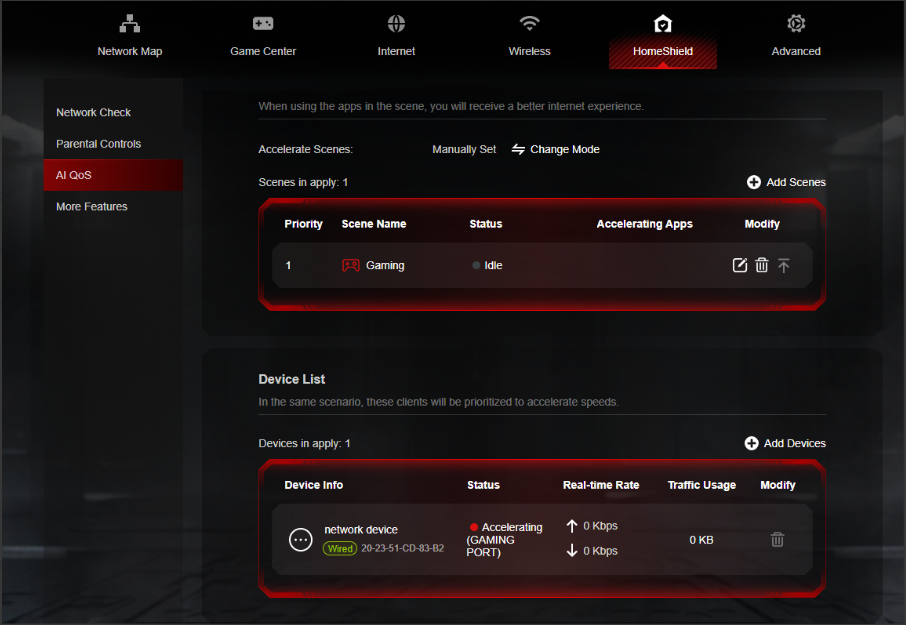
Intelligent Traffic Prioritization
Every application deserves the best performance. With AI QoS, traffic is prioritized intelligently, guaranteeing that all your applications run optimally. Whether you're gaming, streaming, or video conferencing, you can be confident that your experience will be top-notch.
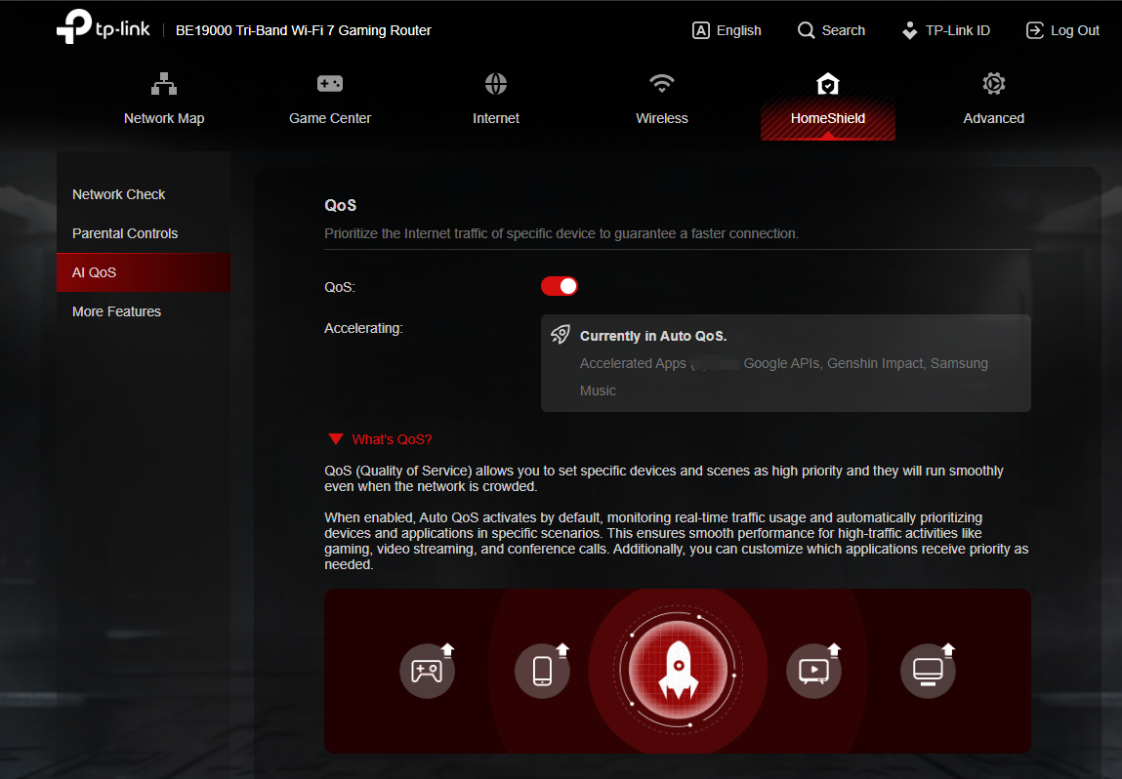
More New Features and Modifications:
This pre-release firmware includes all the new features and modifications mentioned in previous posts below:
Pre-release Firmware for Archer GE800/GE550/GE650v1 Supports EasyMesh in AP Mode, DoH&DoT, ECO Mode
Bug Fixes:
Fixed the issue where enabling Bandwidth Control for the Guest Network will take effect for all networks.
Firmware Download:
Before the Upgrade
(1) Please be sure you have read the Beta Test Agreement before upgrading the pre-release firmware!
(2) For the sake of insurance, it's always recommended to save a copy of the router's Backup Config file before upgrading or downgrading.
(3) This pre-release firmware for Archer GE800 V1 can be applied to all versions (EU/US/AU/CA/etc).
(4) You may follow the guide to upgrade the firmware of your router. How to Upgrade the Firmware on the TP-Link Wi-Fi Routers.
(5) The screenshots in this article are taken from the web GUI of Archer GE800 V1 for reference only.
(6) This version of software can be degraded to the previous official version.
Direct Firmware Download Link
| Archer GE800_V1 | Archer GE800(EU)_V1_1.3.2 Build 20251013 (Updated Pre-release firmware) |
Additional Information
As always, we value your feedback. If somehow you encounter an issue during or after the router firmware upgrade, please comment below with the following info. Your input helps us continue to improve and provide the best products and support.
- Provide a detailed network layout, including how the devices are connected, especially if there are EasyMesh satellite devices.
- Detailed issue description, and provide more information on the specific conditions that seem to trigger the problem.
Thank you for your continued support and for being part of our community.
Update Log
Oct 13th, 2025:
Updated to provide a new pre-release firmware based on the latest 1.3.1 official version.
Jul 4th, 2025:
Updated to provide a new pre-release firmware based on the latest 1.2.1 official version.
Jun 13th, 2025:
Release of the article.
Related Articles
Pre-release Firmware for Archer GE800/GE550/GE650v1 Supports EasyMesh in AP Mode, DoH&DoT, ECO Mode
- Copy Link
- Subscribe
- Bookmark
- Report Inappropriate Content

@Forzic think someone did it but I don't remember who did it here.
- Copy Link
- Report Inappropriate Content

@Pro-gamer Does anyone have a guide or video to follow?
- Copy Link
- Report Inappropriate Content
@Forzic You can read it here, someone had managed to downgrade and here tells you that you have to search for some pages
- Copy Link
- Report Inappropriate Content
Forzic wrote
@Pro-gamer is it possible to downgrade from 1.3.2 to 1.1.6?
You can follow this FAQ (Method 2) to see if you can downgrade to 1.1.6 from the latest 1.3.2 version.
- Copy Link
- Report Inappropriate Content

Hi @Kevin_Z,
I noticed IPv6 does not automatically allow my gaming connections. It feels like it blocks inbound connections for example: I am playing on console and mostly with upnp ports 3659 and 9308 goes open on IPv4, if i do not place a rule for IPv6 the game does not benefit and it does not play well. Gameplay does not feel as smooth. Also, I needed to copy paste the IPv6 of my console given my the dhcp myself to place the rule. The option to choose it through "view connected devices" did not let it show up. Only my certain wifi devices showed up.
Please let the team check if this is normal behaviour because it does not feel right that i need to add rules for my gaming device and also manually enter the ip.
Furthermore I hope in the future to see, nat tracking tables of allowed and blocked ports etcetera, explicitly for the gaming device, because there is not such option to verify if ports are open and to which servers they are connecting and also that allow full-cone NAT or something similar to make NAT Traversal for gaming devices easier and really smooth.
Also hoping to see that QoS (traditional QoS, port based) and/or SQM added + Bufferbloat test through the router itself.
Hopefully the new firmware can show improvement in all the areas already given by the community and more.
- Copy Link
- Report Inappropriate Content
@Kevin_Z instead of global version 1.3.2 you can release new firmware I have been having problems with this bad version for 2 months why are customers not listened to I am not going to write again what my complaints are I write and enough people have submitted enough complaints and errors
- Copy Link
- Report Inappropriate Content
@Pro-gamer I understand the frustration when things don't work as expected, but we should keep in mind that developing a stable firmware takes time. If the process is rushed just to meet a deadline, it often leads to even more bugs and instability.
In my experience with the current version, everything has been running smoothly, which suggests that some issues might be environment-specific and harder to pin down. It is better to wait a bit longer for a high-quality, polished update than to get a quick fix that causes more problems. Patience usually pays off when it comes to long-term reliability
- Copy Link
- Report Inappropriate Content
@Vendex Do you personally believe the things you said? Think about how old the device is. If I were a developer, I wouldn't do this type of work. I would listen to the customers and release updates based on what they expect from me. I am disappointed with every update.
- Copy Link
- Report Inappropriate Content
- Copy Link
- Report Inappropriate Content
Zeryoung wrote
Hi @Kevin_Z,
I noticed IPv6 does not automatically allow my gaming connections. It feels like it blocks inbound connections for example: I am playing on console and mostly with upnp ports 3659 and 9308 goes open on IPv4, if i do not place a rule for IPv6 the game does not benefit and it does not play well. Gameplay does not feel as smooth. Also, I needed to copy paste the IPv6 of my console given my the dhcp myself to place the rule. The option to choose it through "view connected devices" did not let it show up. Only my certain wifi devices showed up.
Please let the team check if this is normal behaviour because it does not feel right that i need to add rules for my gaming device and also manually enter the ip.
Furthermore I hope in the future to see, nat tracking tables of allowed and blocked ports etcetera, explicitly for the gaming device, because there is not such option to verify if ports are open and to which servers they are connecting and also that allow full-cone NAT or something similar to make NAT Traversal for gaming devices easier and really smooth.
Regarding this IPv6 behavior, can you please confirm how you configured the rules? Is it on the GE800's web interface? Can you show me a configuration page for reference?
Zeryoung wrote
Hi @Kevin_Z,
Also hoping to see that QoS (traditional QoS, port based) and/or SQM added + Bufferbloat test through the router itself.
Hopefully the new firmware can show improvement in all the areas already given by the community and more.
Regarding the AI QoS and Bufferbloat concerns, could you please disable AI QoS completely on the GE800 and test whether you also experience Bufferbloat? Is it possible to connect the game console directly to your ISP-provided modem?
- Copy Link
- Report Inappropriate Content
Information
Helpful: 7
Views: 84007
Replies: 520
Voters 7





