
Beta Firmware with Full Band Lock / Aggregation Control for Archer MR600 v5
Beta Firmware with Full Band Lock / Aggregation Control for Archer MR600 v5

I’m using the Archer MR600 v5 (Firmware Version: 1.1.0 0.9.1 v0001.0 Build 240830 Rel.58384n) and I would like to ask if there is a beta firmware version available that allows:
-
Full manual band selection / locking
-
Control over band aggregation behavior (e.g., choosing when and how bands like B1 and B3 aggregate)
-
Preventing the modem from disconnecting or reverting to single band when idle or under low load
I am aware that some older versions (v1/v2) have beta firmware with these features enabled. It would be great to have the same level of control on v5 hardware as well.
This is especially important for rural areas with specific signal conditions, where manual band locking provides much better and more stable performance.
Please let me know if a test firmware is available, or if such functionality is planned.
Thank you in advance.
- Copy Link
- Subscribe
- Bookmark
- Report Inappropriate Content

Hi, welcome to the community. Thank you very much for your time and patience.
-
Full manual band selection / locking
Have you tried to manually search the available LTE bands here:
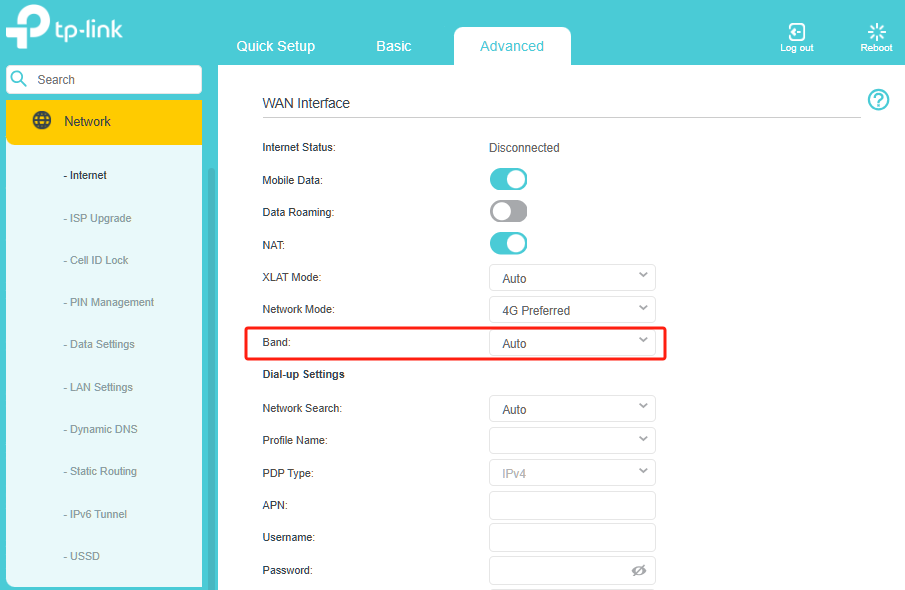
-
Control over band aggregation behavior (e.g., choosing when and how bands like B1 and B3 aggregate)
There hasn't been a beta firmware that allows customizing the Carrier Aggregation bands. It is not only related to the mobile router, but also to the current network bands' capacity of the connected cell(such as whether certain bands are crowded).
Thanks a lot.
Best regards.
- Copy Link
- Report Inappropriate Content
@David-TP Hello there,
Yes, I am using the same router and tried band locking. problem is, 4G+ appears only when downloading huge data or while speed testing.
How can we keep 4G+ permanenetly ON?
- Copy Link
- Report Inappropriate Content
- Copy Link
- Report Inappropriate Content
- Copy Link
- Report Inappropriate Content
Ciao,
this is clear but how we can keep the aggregation permanent?
This is very important for me due to poor signal in my area.
THX
- Copy Link
- Report Inappropriate Content
Hi, welcome to the community.
I'm afraid there hasn't been an option to lock the Carrier Aggregation bands on the Archer mobile router.
The success of certain Carrier Aggregation combinations highly depends on the current mobile signal strength of the SIM ISP. If the signal is noisy, the router will focus all its energy on maintaining just one stable connection rather than trying to juggle several unstable ones.
Thank you very much.
Best regards.
- Copy Link
- Report Inappropriate Content
Hi,

Thanks for your reply. What I'm also noticing is that the router is losing internet connection. The LEDs and signals are 100%, but there's no internet connection. The only solution is to turn it off and on again, and everything works. Any suggestions?
Honestly, when I purchased version 5, I thought I wouldn't have these problems.

When it works, it's quite fast compared to others, but it constantly disconnects.
THX in advance
- Copy Link
- Report Inappropriate Content

SpartaQ wrote
I’m using the Archer MR600 v5 (Firmware Version: 1.1.0 0.9.1 v0001.0 Build 240830 Rel.58384n) and I would like to ask if there is a beta firmware version available that allows:
Full manual band selection / locking
Control over band aggregation behavior (e.g., choosing when and how bands like B1 and B3 aggregate)
Preventing the modem from disconnecting or reverting to single band when idle or under low load
I am aware that some older versions (v1/v2) have beta firmware with these features enabled. It would be great to have the same level of control on v5 hardware as well.
This is especially important for rural areas with specific signal conditions, where manual band locking provides much better and more stable performance.
Please let me know if a test firmware is available, or if such functionality is planned.
Thank you in advance.
I would class the mr600 v5 as don't bother. I bought it used it for one day and went back to my mr600 v1 which I can use with beta/test firmware as follows
Archer_MR600v1_1.1.0_0.9.1_[190412-rel66770]_up_boot_2019-04-12_18.39.25
Archer_MR600v1_1.1.0_0.9.1_[200417-rel75138]_up_boot_2020-04-20_08.44.31 (old but BEST for my purpose)
Archer_MR600v1_1.2.0_0.9.1_[200511-rel44954]_up_boot_2020-05-11_16.11.10 (standard auto, but carrier aggregation is permanent on, Checked with speed test, running on Telstra AU Band 7,3 beautifully and stable. I am around 800meters away from the tower)
Archer_MR600v1_1.2.0_0.9.1_[220818-rel55981]_up_boot_2022-08-18_15.34.47 (don't bother, rudimentary)
I really believe that its a joke that carrier aggregation switches on during a speed test but otherwise its off
- Copy Link
- Report Inappropriate Content
Ciao ,
I know there is a new Firmware release:
| Archer MR600(EU)_V5_1.5.0 Build 251231 |
Download | |
|---|---|---|
| Published Date: 2026-01-23 | ||
Download for Archer MR600 | TP-Link Nordic
www.vigi.com/nordic/support/download/archer-mr600/#Firmware
but I'm not sure if I can use it whre I live.
Maybe these new release can help you.
let me know
- Copy Link
- Report Inappropriate Content
just uploaded the firmware to mr600 v5. Yes, its working as expected, but there is no way back to the previous version. But still no carrier aggregation permanent on= still useless. My Location is Australia
- Copy Link
- Report Inappropriate Content
Information
Helpful: 9
Views: 1891
Replies: 17
Voters 4


