
BE550/9300 High packet-loss on wireless and wired connections.

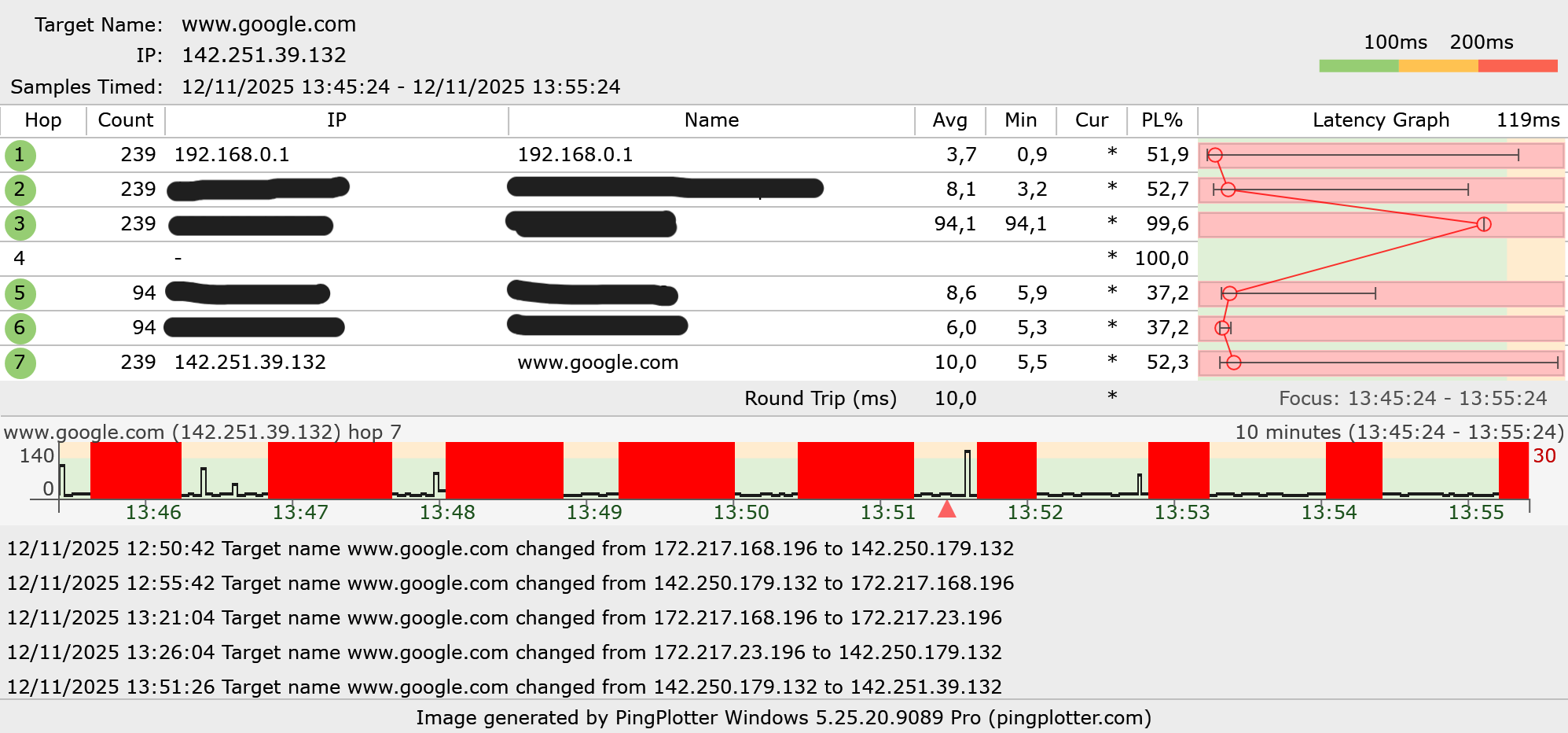
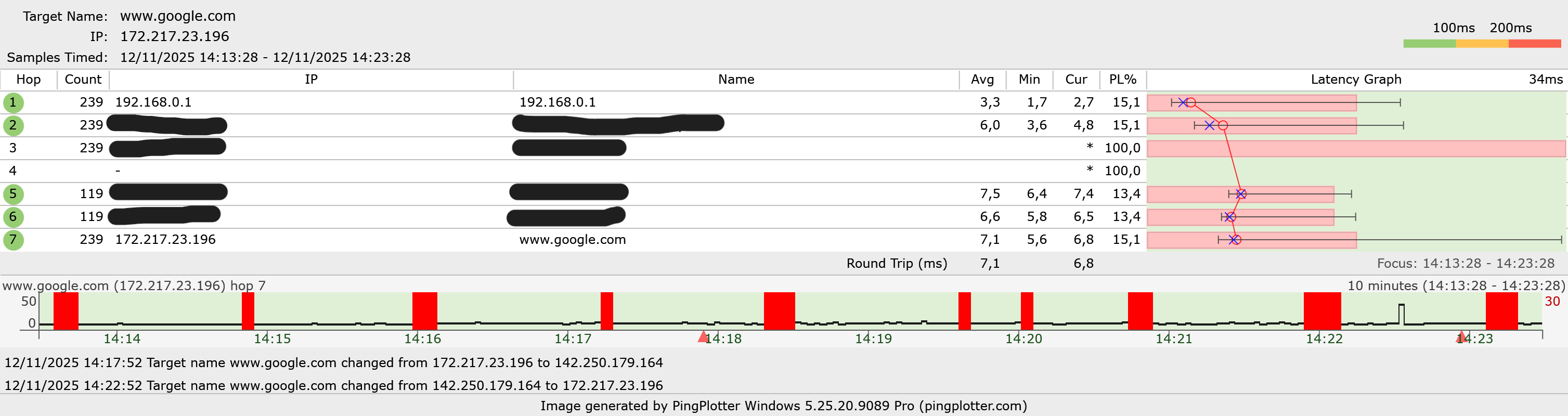
Hi, as the titel says I am experiencing a high amount of packet loss on my internet connection since using the BE9300.
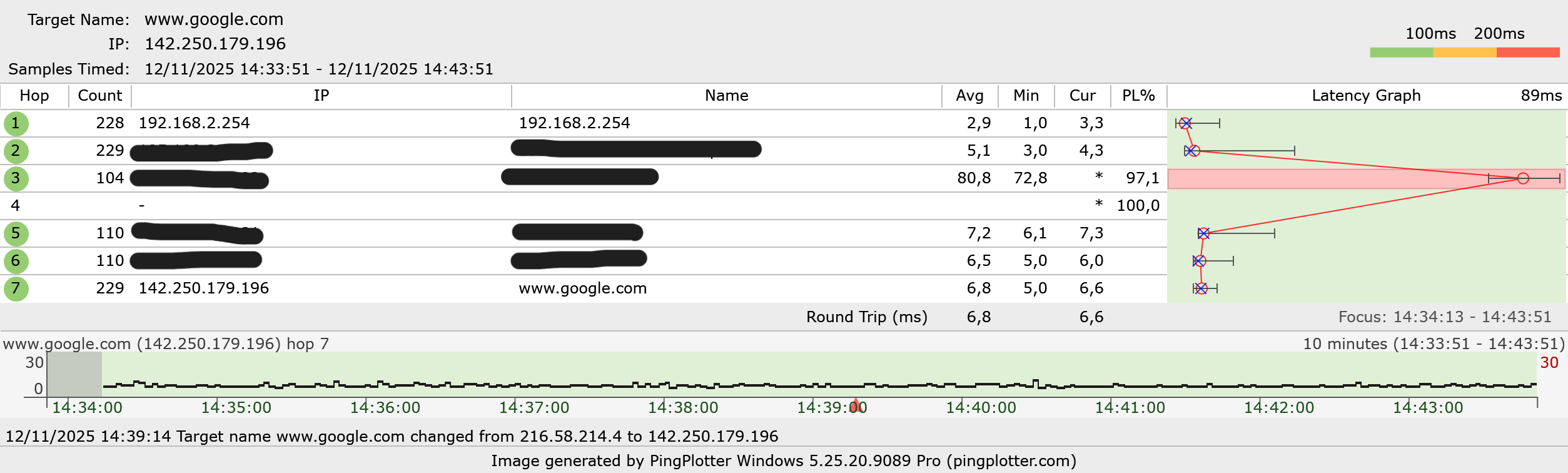
I did not have this issue before when I only used the modem/router provided by my ISP.
Supposed solutions offered on other threads and online have not resolved this issue, i have tried:
- Manually configuring the channel and bandwith for 2.4ghz/5ghz and 6ghz
- Enabling and disabling the MLO network (SSID was the same as the SSID for my 2.4ghz/5ghz and 6ghz SSIDs)
- Trying different SSIDs for 2.4/5 and 6 (MLO disabled), the issue still persisted on all bands
- Changing the DNS to 8.8.8.8 and 1.1.1.1
- Connecting the BE9300 directly to my fiber outlet box and using the ISP modem as bridge in between
- QoS, Guest and IoT networks, IPv6 and EasyMesh are disabled
- Firmware is up to date
- The router is placed in an optimal location, I have also tried using different cables
Is there maybe anything I haven't tried yet? Otherwise I will sadly have to return this product as this is not workable for me.
To double-check I ran a pingplotter to google.com using the BE9300 both wired and wireless, and using my ISP modem connected via ethernet.
BE9300 Wireless Ping
BE9300 Wired Ping
ISP Modem Wired Ping
- Copy Link
- Subscribe
- Bookmark
- Report Inappropriate Content
Hi @Joseph-TP,
Coincidentally after switching back to the BE550 from my ISP modem after testing, I miraculously haven't had any more packetloss issues.
I did change the transmit power of the 2.4ghz/5ghz band to "Middle" instead of "High", but that doesn't explain why my packetloss on my devices connected via ethernet has also disappeared. Maybe it restarting the BE550 for the nth time eventually resolved it.
Here is the information you requested, maybe it will be usefull for a future case:
I first had the following topology, which gave network issues:
fiber optic outlet box — ISP modem(bridge mode) — BE550 — / )))((( client devices
After that i tried it without the ISP modem, which at first gave the same issues, until switching the BE550 out for the ISP Modem and back for testing:
fiber optic outlet box — BE550 — / )))((( client devices
Both configurations were tried with different cables/wall-outlets, multiple power-cycles of all devices and multiple factory resets of the BE550, I even tried an other modem from my ISP (same model). There is a switch between the fiber optic outlet box/BE550, however I did not change anything with the switch causing my network to have issues or solve the issue.
Because of IPTV restrictions my ISP doesnt allow putting the modem into an official bridge mode, but it does allow the use of third party routers connected to the modem.
In the current topology, I don't think im able to use IPTV, because of the way TP-Link configures IPTV settings. However I only get internet from my ISP, no IPTV, so this is not an issue for me.
My ISP is KPN in the Netherlands, they currently use/sent an "Experia Box V12" as modem.
- Copy Link
- Report Inappropriate Content


Hello @MartijnT ,
Welcome to our community.
Have you tried contacting local support for a faster response?
Who is your ISP? May I know if your network topology diagram is as follows:
fiber optic outlet box — ISP modem(bridge mode) — BE550 )))((( client devices
(Note: — stands for wired connection,)))((( stands for wireless connection )
Ensure that all routing functions (such as DHCP, firewall, UPnP) are completely disabled on the ISP device in bridged mode.
Is there a switch between the router and modem? If so, please try removing it.
In addition, please perform a hard reset on the router and then reconfigure it. For the sake of insurance, it's always recommended to save a copy of the router's Backup Config file before upgrading or downgrading.
- Copy Link
- Report Inappropriate Content
Hi @Joseph-TP,
Coincidentally after switching back to the BE550 from my ISP modem after testing, I miraculously haven't had any more packetloss issues.
I did change the transmit power of the 2.4ghz/5ghz band to "Middle" instead of "High", but that doesn't explain why my packetloss on my devices connected via ethernet has also disappeared. Maybe it restarting the BE550 for the nth time eventually resolved it.
Here is the information you requested, maybe it will be usefull for a future case:
I first had the following topology, which gave network issues:
fiber optic outlet box — ISP modem(bridge mode) — BE550 — / )))((( client devices
After that i tried it without the ISP modem, which at first gave the same issues, until switching the BE550 out for the ISP Modem and back for testing:
fiber optic outlet box — BE550 — / )))((( client devices
Both configurations were tried with different cables/wall-outlets, multiple power-cycles of all devices and multiple factory resets of the BE550, I even tried an other modem from my ISP (same model). There is a switch between the fiber optic outlet box/BE550, however I did not change anything with the switch causing my network to have issues or solve the issue.
Because of IPTV restrictions my ISP doesnt allow putting the modem into an official bridge mode, but it does allow the use of third party routers connected to the modem.
In the current topology, I don't think im able to use IPTV, because of the way TP-Link configures IPTV settings. However I only get internet from my ISP, no IPTV, so this is not an issue for me.
My ISP is KPN in the Netherlands, they currently use/sent an "Experia Box V12" as modem.
- Copy Link
- Report Inappropriate Content
Hello @MartijnT ,
You mentioned that everything returned to normal after modifying the transmit power. I think this is a very important factor.
Of course, please continue to monitor the network's operation, and please don't hesitate to contact us with any updates.
- Copy Link
- Report Inappropriate Content

@MartijnT Im having the same issues in the same kind of setup (bridge mode on ISP device) with BE550 at latest firmware, both wired and wireless connections are suffering. Was there more findings on this issue?
It also started this week for me.
- Copy Link
- Report Inappropriate Content
Hello @SlinkyInvasion ,
Welcome to our community.
Have you tried the troubleshooting steps from MartijnT? That is, changing the transmit power of the 2.4ghz/5ghz band to "Middle" instead of "High".
Please let me know the hardware and firmware versions of your router, as well as the complete network topology.
- Copy Link
- Report Inappropriate Content

Hello @MartijnT @SlinkyInvasion
We are pleased to announce the latest pre-release firmware update for the Archer BE550 V2, delivering significant enhancements to EasyMesh™ capabilities, wireless performance, and network management flexibility. This release introduces comprehensive support for extended guest and IoT networks, MLO backhaul, and a suite of advanced EasyMesh features designed to improve security, stability, and user experience.
We strongly recommend you upgrade to this new firmware version to unlock these powerful capabilities. Your feedback remains invaluable - please share your experience to help us continue refining our products:
Enhanced EasyMesh Support with Extended Guest/IoT/MLO Networking and Advanced Features for BE550 V2
- Copy Link
- Report Inappropriate Content
Information
Helpful: 0
Views: 1261
Replies: 6
Voters 0
No one has voted for it yet.