
Solution Resolving Limited Accessibility to Google Services on Specific ISP Networks (Starlink/Launtel)


This Article Applies to:
Deco BE65/BE63/BE11000(EU/US/AU/CA/UK)_V2.0/2.6
Deco BE25(US/EU)_V1.0/V1.6
Deco BE65 Pro(EU/US/AU/CA)_V1.0/V1.6
Deco BE65(EU/US/AU/CA)_V1.0/V1.6
Phenomenon Description:
Recently, there was some feedback that users are experiencing frequent difficulties connecting to Google services(such as Google Calendar, Gmail, YouTube, etc) while using Deco mesh systems on the following ISP networks: Starlink (Global), ISOMEDIA (US), Fastel (US), and Launtel (AU).
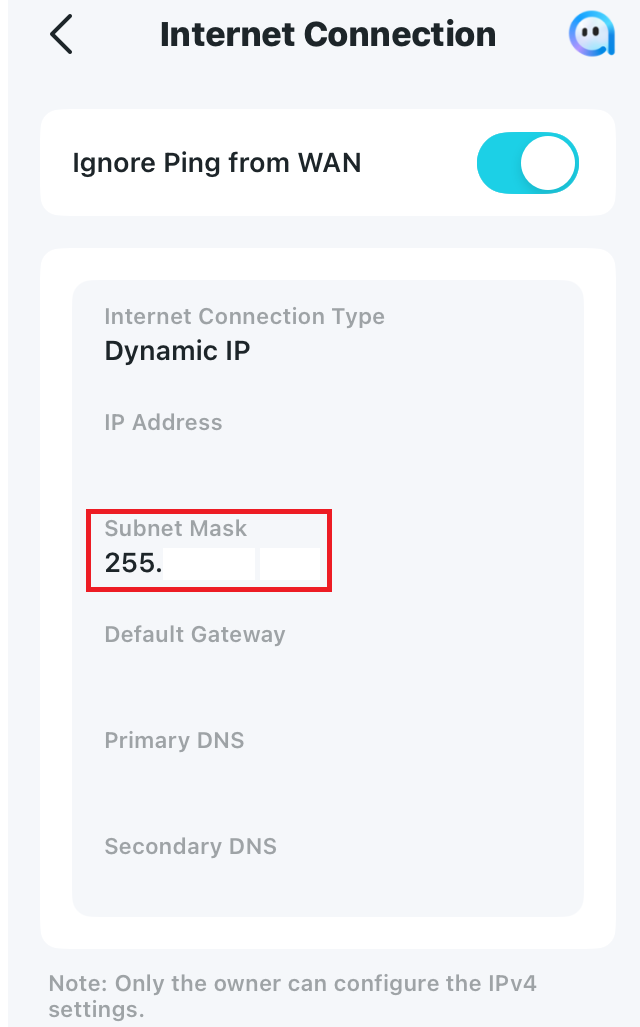
After further troubleshooting, we found that in most cases, the IPV4 WAN subnet mask is often lower than /16, such as 255.192.0.0(/10), 255.0.0.0(/8), or 252.0.0.0(/6), which probably caused the connection issue with Google services.
Available Solutions:
-
Official firmware versions are planned to be released soon to fix this issue.
-
Currently, it is recommended to install the following beta versions as a workaround:
| Deco BE65 Pro_V1.0/1.6 | 1.2.10_build_20251212_Early Access |
| Deco BE65/BE63/BE11000_V2.0/2.6 | 1.2.10_build_20251229_Official |
| Deco BE25_V1.0/V1.6 | 1.1.0_build_20250912_Beta |
| Deco BE65_V1.0/V1.6 | 1.1.1_build_20251209_Beta |
Update Notice:
Please be sure you have read the Beta Test Agreement before upgrading the Pre-release firmware!
How to manually update the firmware via web UI.
-
If you also experienced a similar issue on other Deco models, please comment below with the following details:
- Deco model and current firmware version
- The Internet service provider and IPV4 WAN Subnet mask on the Deco App>More>Internet Connection>IPV4 Subnet Mask
- The web resources that can't be accessed.
- Copy Link
- Subscribe
- Bookmark
- Report Inappropriate Content

I noticed a failure this morning with my network (running this beta firmware on BE63 v2) and the full system seemed to crash and reboot to re-establish connectivity with the xfinity modem. I am not sure what caused the network failure, since the logs are not long enough to show the event. I took a look at the logs and the troubling finding is that the log indicates the router reverted back to the auto-DNS provided by Xfinity, as opposed to my manual cloudflare settings.
It seems there is some critical network failure, and upon reboot the manual dns settings are not appropriately applied.
- Copy Link
- Report Inappropriate Content

@Aeasy I'm also getting random system (individual but random) node crashing. I have a Deco BE65 v2 however. Attempting for a remote sessions with an Engineer is proving to be difficult, I've responded to the Engineer 3 times now and no response.
- Copy Link
- Report Inappropriate Content
@ToneAU have you tried the beta firmware in the first post of this thread? That solved it for me for the most part it seems.
- Copy Link
- Report Inappropriate Content
@Aeasy Yes I sure have, and that has introduced other bugs. Others also have some issues too on the beta firmware, but that's in another thread.I have tried to organise a remote session with a Senior Engineer 3 times now, and no response from the engineer, or TP Link.
- Copy Link
- Report Inappropriate Content

Hi, I’m extremely disappointed with how long this issue has been dragging on.
My TP-Link BE65 router still does not work properly with Google services (Google Search, YouTube, and related apps). This has been an ongoing, well-known problem, and despite the amount of time that’s passed, there is still no firmware update available to fix it.
This is not a minor issue — Google services are essential, and a premium router that cannot reliably access them is simply unacceptable. I’ve confirmed that the problem is isolated to the BE65, as everything works normally when the router is removed from the network.
At this point, I’m frustrated by the lack of a timely solution or clear communication. I’d like to know:
-
When a firmware update will be released to address this issue, and
-
Why this has not already been resolved.
I purchased this router expecting reliable performance, and so far that expectation hasn’t been met.
David-TP wrote
This Article Applies to:
Deco BE65/BE63/BE11000_V2.0/2.6
Deco BE25_V1.0/V1.6Deco BE65 Pro_V1.0/V1.6
Phenomenon Description:
Recently, there was some feedback that users are experiencing frequent difficulties connecting to Google services(such as Google Calendar, Gmail, YouTube, etc) while using Deco mesh systems on the following ISP networks: Starlink (Global), ISOMEDIA (US), Fastel (US), and Launtel (AU).
After further troubleshooting, we found that in most cases, the IPV4 WAN subnet mask is often lower than /16, such as 255.192.0.0(/10), 255.0.0.0(/8), or 252.0.0.0(/6), which probably caused the connection issue with Google services.
Available Solutions:
Official firmware versions are planned to be released soon to fix this issue.
Currently, it is recommended to install the following beta versions as a workaround:
Deco BE65 Pro_V1.0/1.6 1.2.0_build_20251117_Beta Deco BE65/BE63/BE11000_V2.0/2.6 1.2.0_build_20251103_Beta Deco BE25_V1.0/V1.6 1.1.0_build_20250912_Beta Update Notice:
Please be sure you have read the Beta Test Agreement before upgrading the Pre-release firmware!
How to manually update the firmware via web UI.
If you also experienced a similar issue on other Deco models, please comment below with the following details:
- Deco model and current firmware version
- The Internet service provider and IPV4 WAN Subnet mask on the Deco App>More>Internet Connection>IPV4 Subnet Mask
- The web resources that can't be accessed.
- Copy Link
- Report Inappropriate Content

These types of problems with Google services are not specific to this model, these problems have had other devices for years, I can affirm it because I have had these problems since the Deco M4R.
And it carries with other devices, it happened with the deco m9 plus, it also gives me problems with the deco xe75 pro and even so I have had the patience but it is annoying to have these problems.
The problems I have frequently had are on phones, specifically with downloads on Google play and YouTube, the shorts stop and take a long time to load and I have 2 gb of contracted speed. Ah, I must emphasize that I have changed Internet operator to know if it was a problem of the operator but it is not like that, it is the deco.
- Copy Link
- Report Inappropriate Content
Hi, thank you very much for the feedback.
Since you mentioned before(https://community.tp-link.com/en/home/forum/topic/848116?replyId=1634022), the WAN subnet mask of your ISP is Orange Belgium/255.255.255.0, which doesn't fully match the problem description and triggering conditions here. It is highly recommended to reach out to the local technical support for further assistance.
https://www.tp-link.com/en/support/contact-technical-support/#Hotline-Support
Best regards.
- Copy Link
- Report Inappropriate Content
Hi, an official firmware will be released soon to address this issue:
Deco BE65/BE65 Pro_1.2.10 New Firmware with Enhanced Stability & Interference Resistance
Thank you very much.
Best regards.
- Copy Link
- Report Inappropriate Content

Should this firmware work with the BE65 V1 devices (currently on firmware 1.1.1 Build 20250616 Rel. 12316)? I am experiencing the exact same issues as described in the original post, however I've been unable to update the firmware as no matter what I do I receive the following error:
"Upgrade failed. Please select the latest version of firmware to upgrade"
I've tried updating via web UI from my main PC - both connected and disconnected from internet, as well as directly via laptop connected to main unit.
- Copy Link
- Report Inappropriate Content
Hi, thank you very much for your time and patience.
I left a message with a similar beta firmware for Deco BE65_V1. Please help me test whether it helps or not.
Best regards.
- Copy Link
- Report Inappropriate Content
Information
Helpful: 3
Views: 9943
Replies: 38
Voters 1
