D235- Hardwiring: Clarifying Confusing Information

D235- Hardwiring: Clarifying Confusing Information

D235- Hardwiring: Clarifying Confusing Information
3 weeks ago - last edited 2 weeks ago
Model: Tapo D235  
Hardware Version:
Firmware Version:

Hi everyone,


Am finding out how to hardwire D235. Am uncertain which version of D235 but it's this one from Singapore (https://www.tp-link.com/sg/home-networking/smarthome-accessory/tapo-d235/)


Saw various pieces of information which seems to be confusing...


Seek advice on the following please.

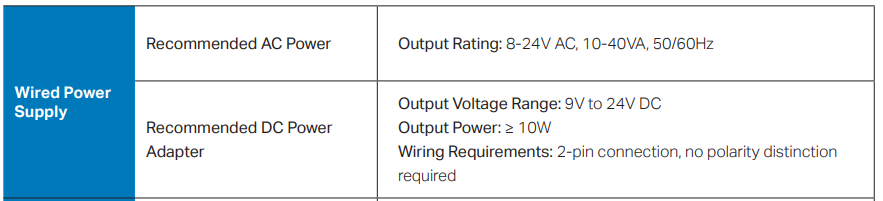
1) To hardwire D235, are we able to directly connect a power adapter or need to go through a transformer?
2) For the version sold in Singapore, does the D235 accept AC, DC power supply or both are acceptable by D235?

3) what's the power required by the D235?

4) Can a hardwired D235 record 24/7 continuously and save to H500?

5) Does H500 need to be connected to the router via Ethernet or wifi?

6) Does D235 connect to H500 direct or go through router?


Saw info here https://community.tp-link.com/en/smart-home/forum/topic/717438?sortDir=ASC&page=2 but the Singapore store page doesn't point to the datasheet. So am confused which info to refer to.


Thanks! Apologies for the many questions!

  0      
  0      
#1
Options
1 Accepted Solution
Re:D235- Hardwiring: Clarifying Confusing Information-Solution
3 weeks ago - last edited 2 weeks ago

  @LearningIoT 


Tapo D235 supports both AC and DC inputs. You can choose the most convenient hardwiring option based on your home’s existing setup.


The Tapo D235 doorbell can save continuous recordings to the H500 hub when hardwired for power and set to Always-On mode. The doorbell connects directly to your router via 2.4GHz Wi-Fi. If both the doorbell and H500 are on the same network, the doorbell will be linked to the hub to enable advanced features like video storage, Wi-Fi backup, and facial recognition.


Frequently asked questions about Tapo D235/D225

Tapo P110M Matter 1.3 Release Energy Monitoring through Matter ▶ Smart HomeBase Tapo H500 - Even More Powerful Smart Hub ▶ First Smart Switch Module! Tapo S112 Smart Switch Module with Roller and Switch Dual ModesTapo Camera Image Style & Image Brightness Try out a different image style for your camera!
Recommended Solution
  0  
  0  
#2
Options
5 Reply
Re:D235- Hardwiring: Clarifying Confusing Information-Solution
3 weeks ago - last edited 2 weeks ago

  @LearningIoT 


Tapo D235 supports both AC and DC inputs. You can choose the most convenient hardwiring option based on your home’s existing setup.


The Tapo D235 doorbell can save continuous recordings to the H500 hub when hardwired for power and set to Always-On mode. The doorbell connects directly to your router via 2.4GHz Wi-Fi. If both the doorbell and H500 are on the same network, the doorbell will be linked to the hub to enable advanced features like video storage, Wi-Fi backup, and facial recognition.


Frequently asked questions about Tapo D235/D225

Tapo P110M Matter 1.3 Release Energy Monitoring through Matter ▶ Smart HomeBase Tapo H500 - Even More Powerful Smart Hub ▶ First Smart Switch Module! Tapo S112 Smart Switch Module with Roller and Switch Dual ModesTapo Camera Image Style & Image Brightness Try out a different image style for your camera!
Recommended Solution
  0  
  0  
#2
Options
Re:D235- Hardwiring: Clarifying Confusing Information
2 weeks ago

  @Wayne-TP thanks for the info. Can D235 connect directly to H500 via H500 wifi?

  0  
  0  
#3
Options
Re:D235- Hardwiring: Clarifying Confusing Information
2 weeks ago

LearningIoT wrote

  @Wayne-TP thanks for the info. Can D235 connect directly to H500 via H500 wifi?

  @LearningIoT 


H500 does not broadcast WiFi, and D235 cannot connect to H500 directly. It needs to be set up first, connecting to the router's 2.4GHz WiFi, then you can configure device settings, such as changing the video storage path.

Tapo P110M Matter 1.3 Release Energy Monitoring through Matter ▶ Smart HomeBase Tapo H500 - Even More Powerful Smart Hub ▶ First Smart Switch Module! Tapo S112 Smart Switch Module with Roller and Switch Dual ModesTapo Camera Image Style & Image Brightness Try out a different image style for your camera!
  0  
  0  
#4
Options
Re:D235- Hardwiring: Clarifying Confusing Information
2 weeks ago

  @Wayne-TP I have tried connecting H500 and D235 via Tapo app. Didn't work. By default, H500 connects to 5GHz only while D235 connects to 2.4Ghz only. The app said that D235 cannot be connected to H500 because it's not on the same network. Would you have solution for this?

Wayne-TP wrote

LearningIoT wrote

  @Wayne-TP thanks for the info. Can D235 connect directly to H500 via H500 wifi?

  @LearningIoT 


H500 does not broadcast WiFi, and D235 cannot connect to H500 directly. It needs to be set up first, connecting to the router's 2.4GHz WiFi, then you can configure device settings, such as changing the video storage path.


  0  
  0  
#5
Options
Re:D235- Hardwiring: Clarifying Confusing Information
2 weeks ago

LearningIoT wrote

  @Wayne-TP I have tried connecting H500 and D235 via Tapo app. Didn't work. By default, H500 connects to 5GHz only while D235 connects to 2.4Ghz only. The app said that D235 cannot be connected to H500 because it's not on the same network. Would you have solution for this?

  @LearningIoT 


Both bands (2.4GHz and 5GHz) from your main network are part of the same network, even if they appear under different SSIDs. In your situation, we recommend checking whether any of your devices are connected to an isolated network, such as a guest WiFi. Alternatively, check if any router settings, such as AP isolation, VLAN configurations, or firewall rules, are applied to these devices, which might prevent them from communicating with others on the same network.


If there are no similar settings, try to restart both the doorbell and the hub, then check it again.

Tapo P110M Matter 1.3 Release Energy Monitoring through Matter ▶ Smart HomeBase Tapo H500 - Even More Powerful Smart Hub ▶ First Smart Switch Module! Tapo S112 Smart Switch Module with Roller and Switch Dual ModesTapo Camera Image Style & Image Brightness Try out a different image style for your camera!
  0  
  0  
#6
Options