
Solution What Can I Do If QoS Enabled Causes BufferBloat and High Latency on My Router After Firmware Update?


This Article Applied to:
Archer BE230_V1/V1.20
Archer BE230_V2
Archer AX55_V1
Archer AX55 Pro _V1
Archer AX72_V1
Archer AX72 Pro_V1
Archer GXE75_V1
Archer AX53_V1
Phenomenon:
Some users have reported performance degradation in their routers after enabling QoS following a firmware update.
Specifically, Bufferbloat test scores for both wireless and wired clients have significantly decreased (e.g., from A/B to F). Serbian_Fantom mentioned this unexpected behavior here.
Additionally, a noticeable increase in upload latency may occur, resulting in higher latency and jitter when the network is under heavy load.
Disabling QoS can resolve the performance degradation described above.
We have identified the cause of these unexpected behaviors. Please take a look at the following feasible solutions.
Available Solutions:
Solution 1:
Our development team has provided the following beta firmware to address this unexpected behavior for the models that have already been reported. Please install the beta firmware for your router if you encounter this anomaly.
| Model | Direct Download Links |
| Archer BE230_V1/V1.20 | Archer BE230_V1/1.20_1.2.1 Build 20250821(Beta Firmware) |
| Archer BE230_V2 | Archer BE230_V2_1.1.3 Build 20260127 (Beta Firmware) |
| Archer AX55_V1 | Archer AX55_V1_1.5.11 Build 20260205(Beta Firmware) |
| Archer AX55 Pro_V1 | Archer AX55 Pro_V1_1.4.3 Build 20251202(Beta Firmware) |
| Archer AX72_V1 | Archer AX72_V1_1.4.1 Build 20250918(Beta Firmware) |
| Archer AX72 Pro_V1 | Archer AX72 Pro_V1_1.4.1 Build 20250918(Beta Firmware) |
| Archer GXE75_V1 | Archer GXE75_V1_1.1.1 Build 20251024(Beta Firmware) |
| Archer AX53_V1 | Archer AX53_V1_1.5.4 Build 20251230(Beta Firmware) |
Note:
- Please be sure you have read the Beta Test Agreement before upgrading the beta firmware!
- For the sake of insurance, it's always recommended to save a copy of the router's Backup Config file before upgrading or downgrading.
- You may follow the guide to upgrade the firmware of your router. How to Upgrade the Firmware on the TP-Link Wi-Fi Routers.
Solution 2:
If you don't want to try the beta firmware, you can temporarily disable the QoS feature.
We welcome you to share your experiences with the beta firmware. If the beta firmware doesn't help, please provide details on your router's current operation and any other relevant information. Like the complete network topology, specific exception details, when the problem started, etc.
What if your router model isn't among those mentioned above, but you've also experienced unexpected bufferbloat and high latency after enabling the QoS feature during firmware updates? Please provide your router model, including firmware and hardware versions, for reference: How to find the hardware and firmware version of my TP-Link device?
Thank you for your feedback and support.
Update Logs:
Jan 29th, added Archer BE230_V2 Beta Firmware
Feb 5th, updated Archer AX55_V1 Beta Firmware
- Copy Link
- Subscribe
- Bookmark
- Report Inappropriate Content
Hello @airtonvfilho ,
Thanks for contacting our community.
As far as I know, the firmware for Archer AX72(US) v1 and Archer AX72(EU) v1 is compatible. For the new firmware, install Archer AX72(EU)_V1_251030.
- Copy Link
- Report Inappropriate Content

@Joseph-TP Hello, I have been testing the Archer AX53_V1_1.5.4 Build 20251230 beta firmware on AX53 V1 (US), and the buffer issue with QoS has been resolved. However, I noticed that now when I limit the download and upload speed to any device via wireless on any frequency or band, latency increases, which does not happen if the device connects without any restrictions. At the moment, I cannot assess whether the same problem occurs with wired devices.
Have a nice day.
- Copy Link
- Report Inappropriate Content
Hello @Jeffsa12 ,
Welcome to our community.
Do you mean that setting limited upload and download speeds for some wireless devices using QoS will increase latency? Could you please provide screenshots comparing latency before and after enabling QoS?
What wireless devices do you have? If possible, please provide screenshots with QoS settings.
- Copy Link
- Report Inappropriate Content
Hello, thank you for responding. To explain in more detail, by default, if there is a speed limit set for a device, it is not possible to enable QoS for it. However, in my case, not enabling QoS for any device increases latency by around 1-2 ms and does not affect latency at any time. Once a bandwidth limit is set, ping latency is affected, especially when performing download tests.
I am attaching two screenshots showing my AX53 router with the latest beta firmware and my PC connected via Wi-Fi 6 on the 5 GHz band. The first image is the result of a speed test with QoS enabled, and the second is with the speed limit set on the router to 10 Mbps. By default, my internet connection is 50 Mbps symmetrical.
https://drive.google.com/file/d/1UWVeIExLzIijfju8dsNDwsuzQfhGIpYX/view?usp=sharing
This effect occurs on any device via wireless or on the guest network as long as a bandwidth limit is set, and although it has been present in previous software versions, it is more noticeable in this latest beta while using the connection. Thank you again for your time.
- Copy Link
- Report Inappropriate Content
Hello@Jeffsa12 ,
Thanks for getting back to me.
Were you testing 2.4GHz or 5GHz? In addition to the main and guest networks, have you tested whether wired clients are also affected?
It's understood that setting QoS to 1/5 of the original internet plan (e.g., 50 Mbps to 10 Mbps) can significantly increase latency, especially in scenarios with high real-time requirements.
If you set it to a different bandwidth level, roughly 85-90% of the internet plan, does latency increase significantly?
- Copy Link
- Report Inappropriate Content

Hello,
I own the BE230 v2 EU, and I'm also experiencing the QoS issue, which is making things worse.
As soon as I activate QoS, at 90-95% of my speed, I experience ping spikes of over 1000ms, QoS is worse than when I disable it.
I would have liked to test the beta version, but I have the EU version. What should I do?
I've tried all the solutions suggested by the community, but nothing has worked.
Thanks you
- Copy Link
- Report Inappropriate Content

@Joseph-TP Hi. I also have QoS issue with Archer BE550 v1.0. 1.2.1 Build 20250813 rel.27119(5553).
Disabled, download ping around 18ms and upload around 10ms.
Enabled, downlaod ping around 35ms and upload around 130ms.
I've tried to set limits to 95%, 90%, 85%, 80% and down to 50%, the ping just get worse when QoS is enabled.
Thanks!
- Copy Link
- Report Inappropriate Content
Hello @Holiday25 ,
If you check for updates on the Firmware Update page, can you get the new firmware 1.2.2?
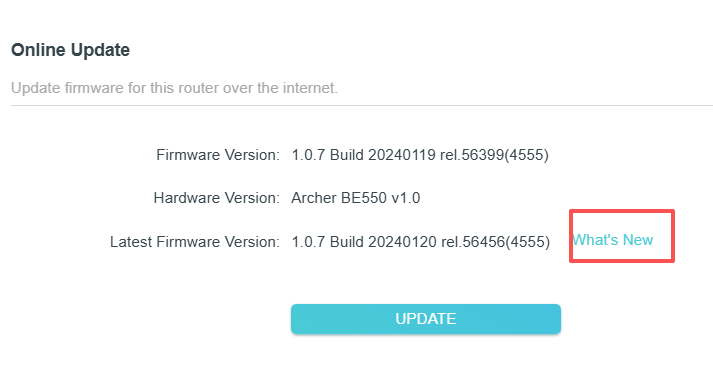
- Copy Link
- Report Inappropriate Content
Hi Joseph. I cheked the updated kon the router, but there is no new firmware. Do can I download the 1.2.2?
Archer BE550 v1.0
Current firmeare: 1.2.1 Build 20250813 rel.27119(5553)
Thank you!
- Copy Link
- Report Inappropriate Content
Hello @Holiday25 ,
Yes, you can install it :https://www.tp-link.com/en/support/download/archer-be550/v1/#Firmware
- Copy Link
- Report Inappropriate Content
Information
Helpful: 1
Views: 9281
Replies: 62
Voters 0
No one has voted for it yet.