
Early Access Enhanced EasyMesh Support with Extended Guest/IoT/MLO Networking and Advanced Features for BE550 V2


We are pleased to announce the latest pre-release firmware update for the Archer BE550 V2, delivering significant enhancements to EasyMesh™ capabilities, wireless performance, and network management flexibility. This release introduces comprehensive support for extended guest and IoT networks, MLO backhaul, and a suite of advanced EasyMesh features designed to improve security, stability, and user experience.
We strongly recommend all Archer BE550 V2 users upgrade to this new firmware version to unlock these powerful capabilities. Your feedback remains invaluable - please share your experience to help us continue refining our products.
Key New Features & Enhancements
1. Enhanced EasyMesh Network Management
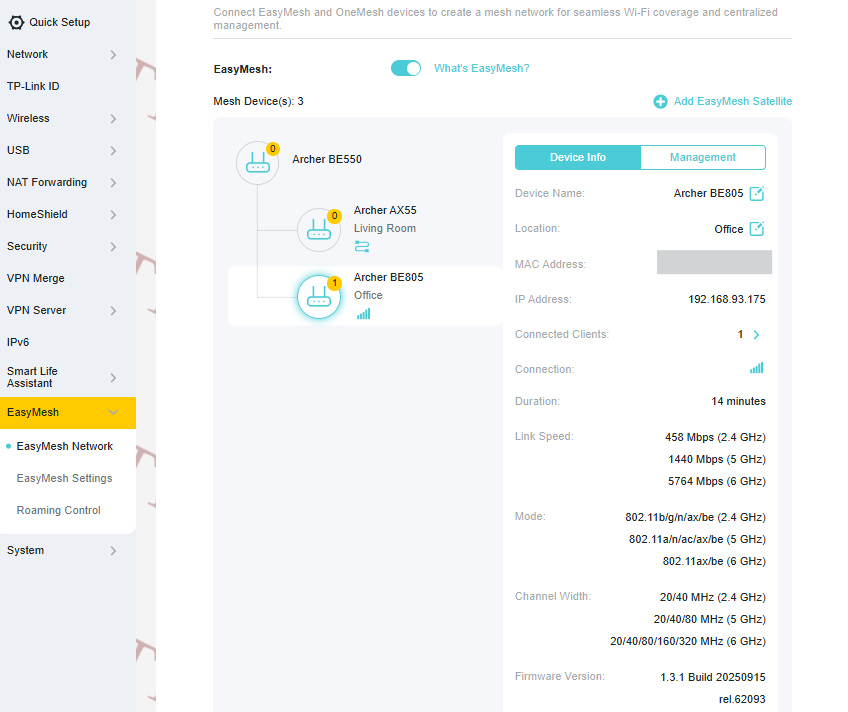
The EasyMesh topology view has been redesigned for improved clarity, offering an intuitive visualization of your mesh network structure. On the Device Info page, you can now view detailed information for each satellite unit, including assigned IP address, number of connected clients, current connection speed.
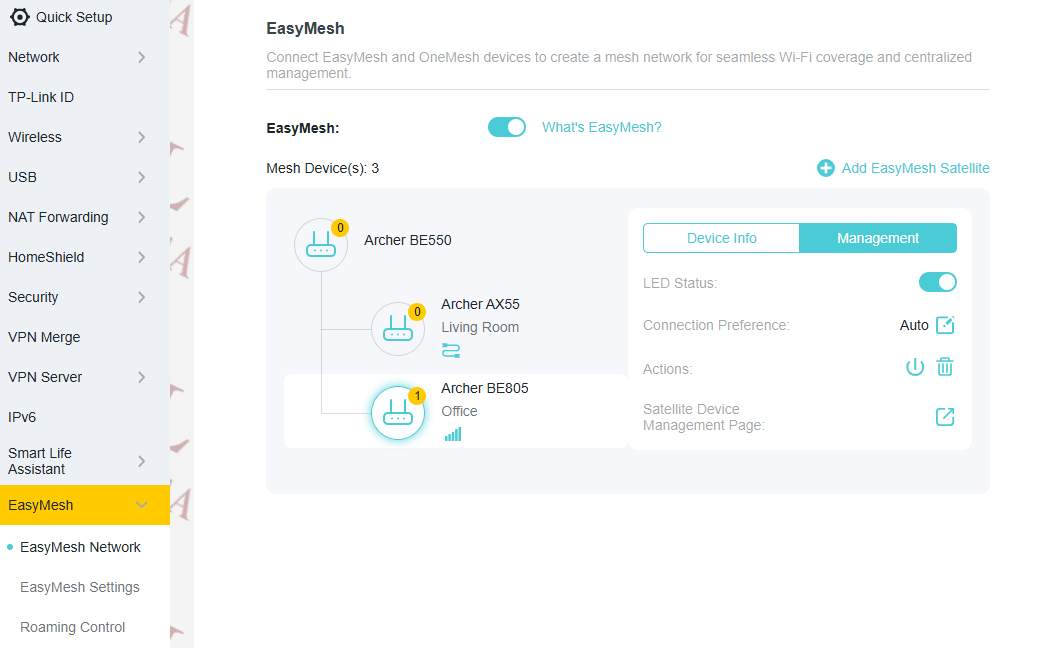
The Management page enables essential administrative actions directly from the main router, such as controlling LED status, rebooting individual satellites, removing devices from the mesh network.
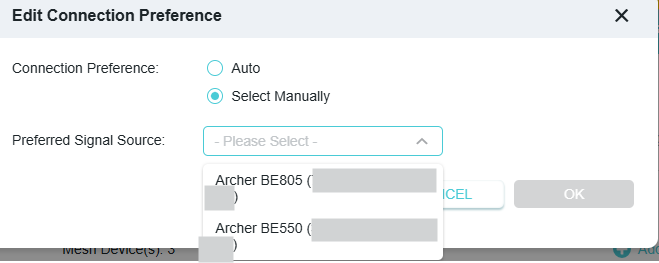
Additionally, a new Connection Preference setting allows you to manually specify which upstream node a satellite should connect to (e.g., directing an AX55 to associate with either the BE550 or BE805).
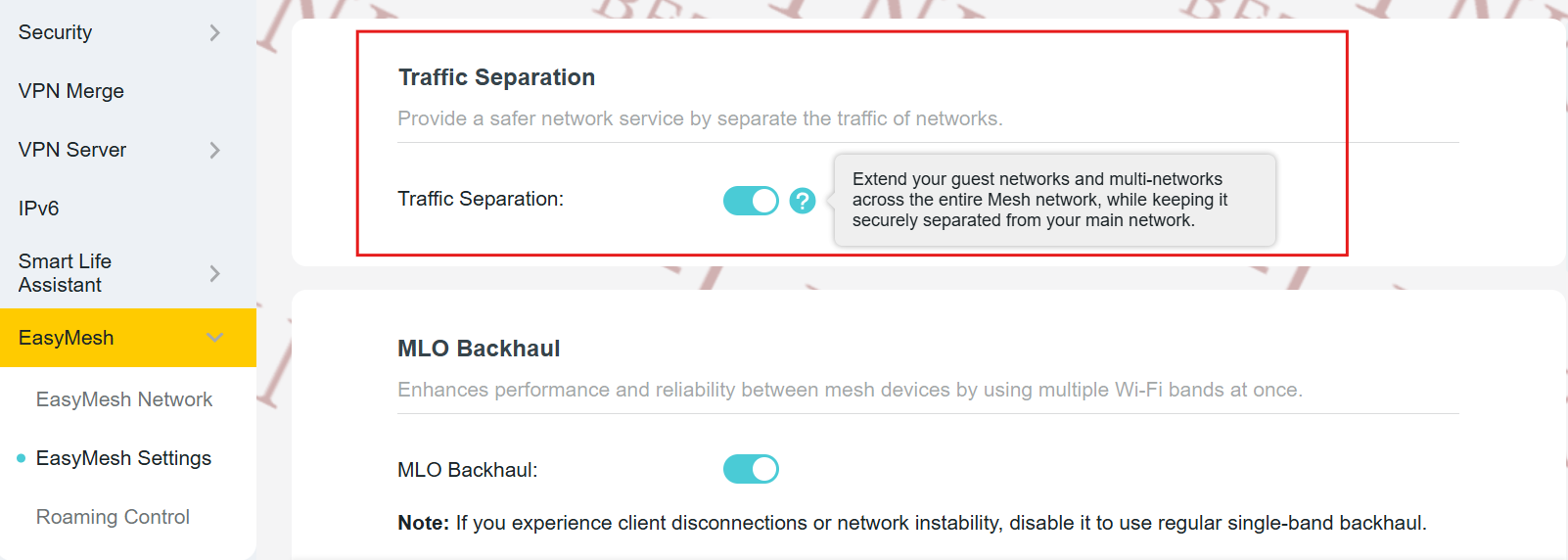
2. EasyMesh Traffic Separation: Extended Guest & Multi-Networks
Leveraging the EasyMesh R3 specification, this update introduces Traffic Separation, enabling seamless extension of the main router’s Guest Network and dedicated Multi-Network SSIDs to all compatible satellite units. This ensures logical isolation between primary, guest, and Multi-network traffic - enhancing overall network security and segmentation.
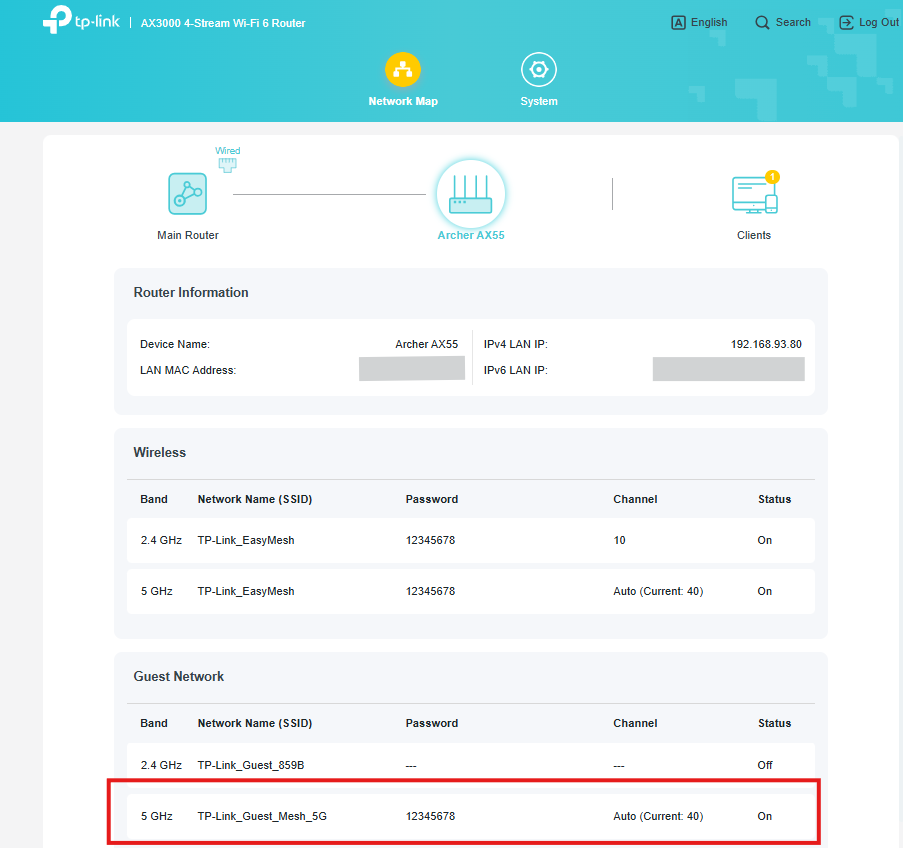
3. Synchronized Advanced Settings Across the Mesh
Critical wireless and security configurations from the main router can now be automatically synchronized to supported satellite units, ensuring consistent policy enforcement and simplified management.
(a) Wireless Network Configuration Sync
- IoT Network settings
- MLO network profiles
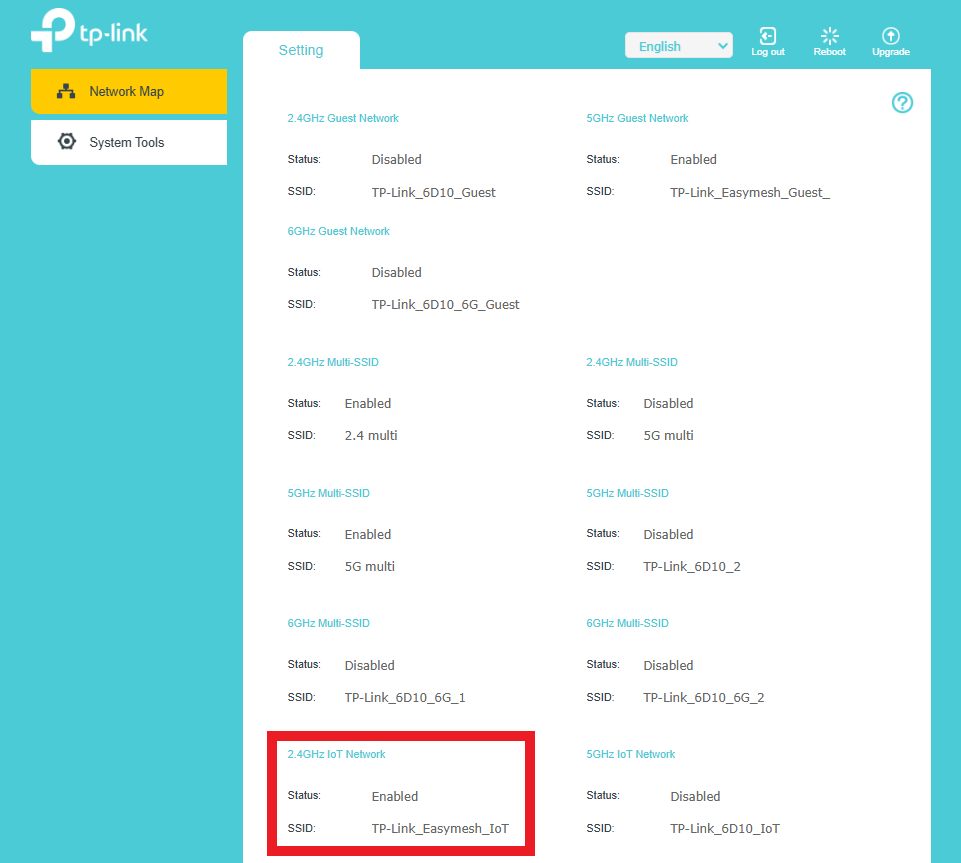
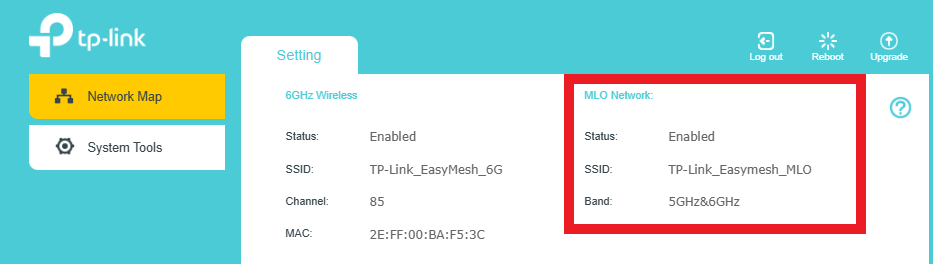
(b) Advanced Feature Sync
- ECO Mode
- Hidden SSID configuration
- Reboot Schedule
- Access Control rules
- Device Isolation
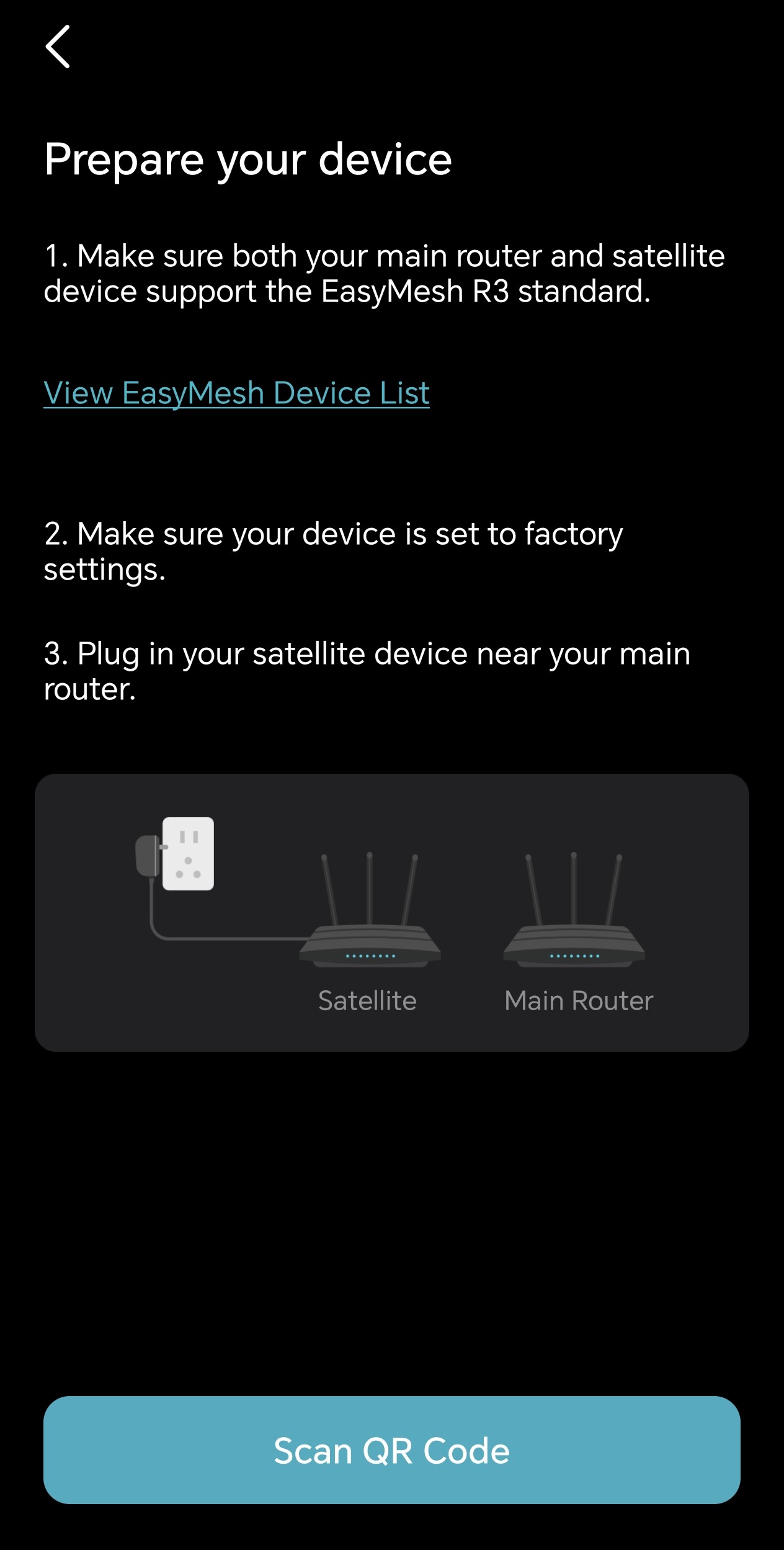
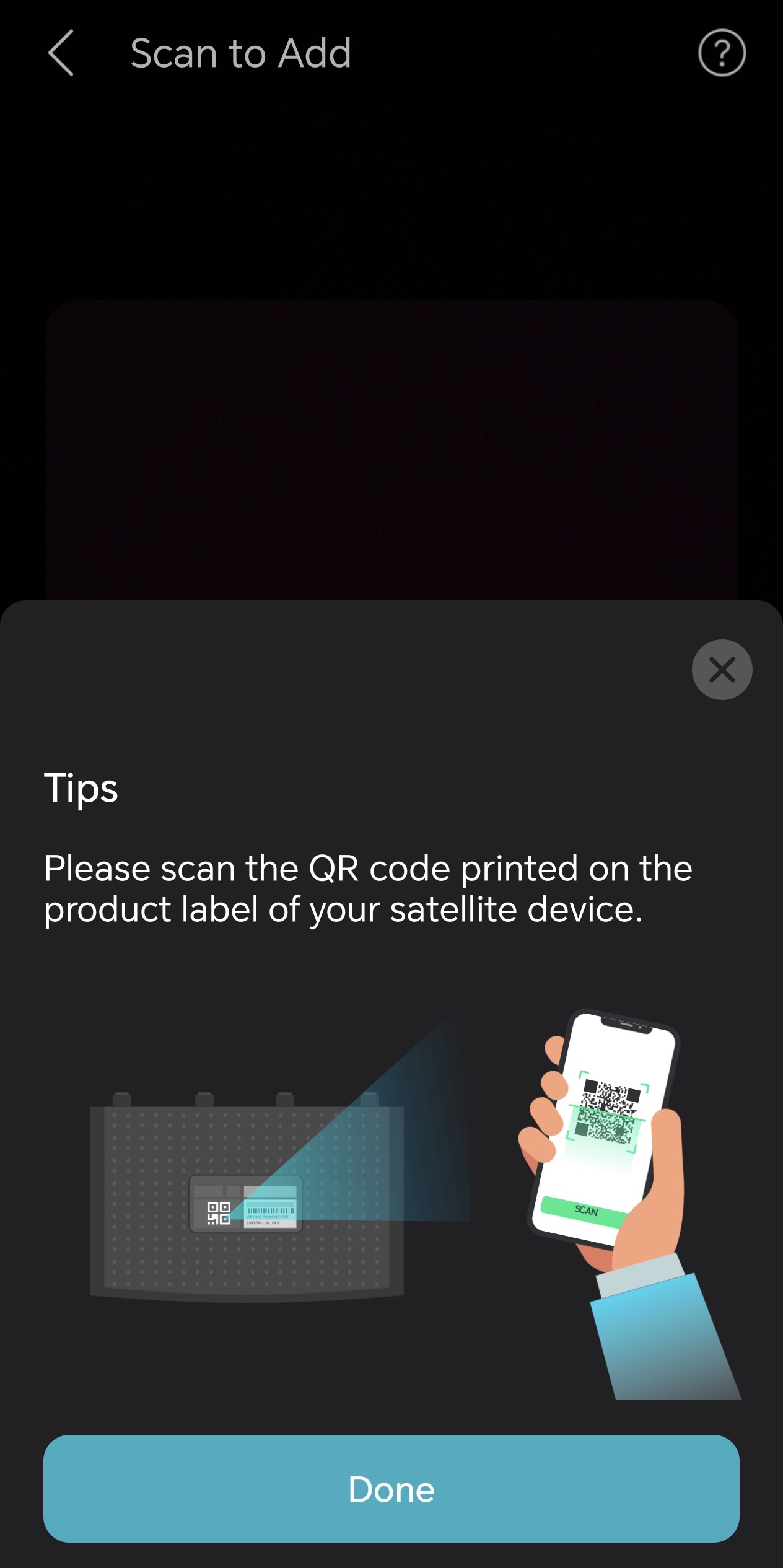
4. EasyMesh DPP (Device Provisioning Protocol) – QR Code Setup
Adding new satellites is now faster and more intuitive via EasyMesh DPP. Within the Tether app, simply scan the QR code on a compatible satellite device to securely and automatically configure it into your mesh network - eliminating manual entry and reducing setup errors.
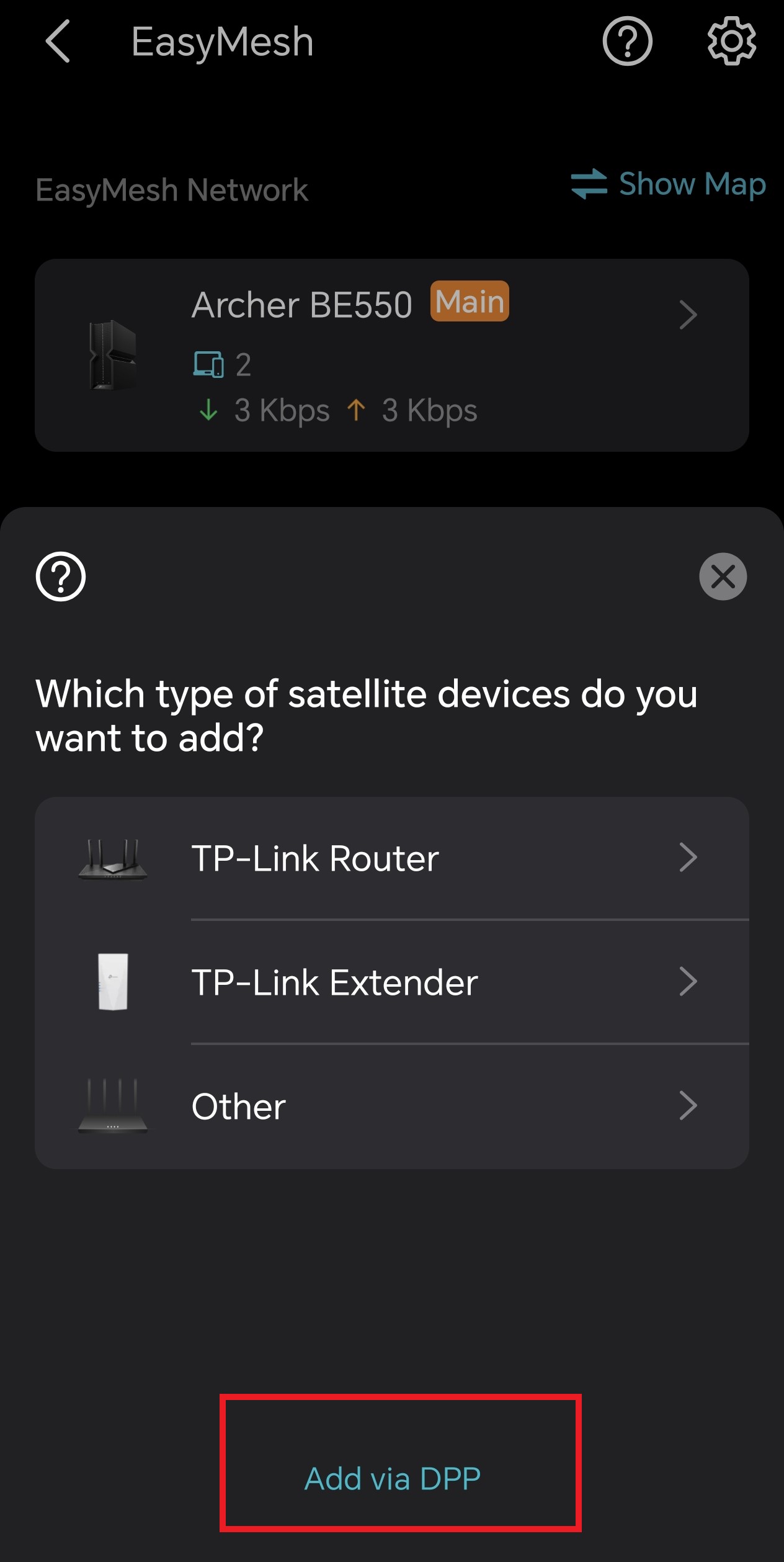
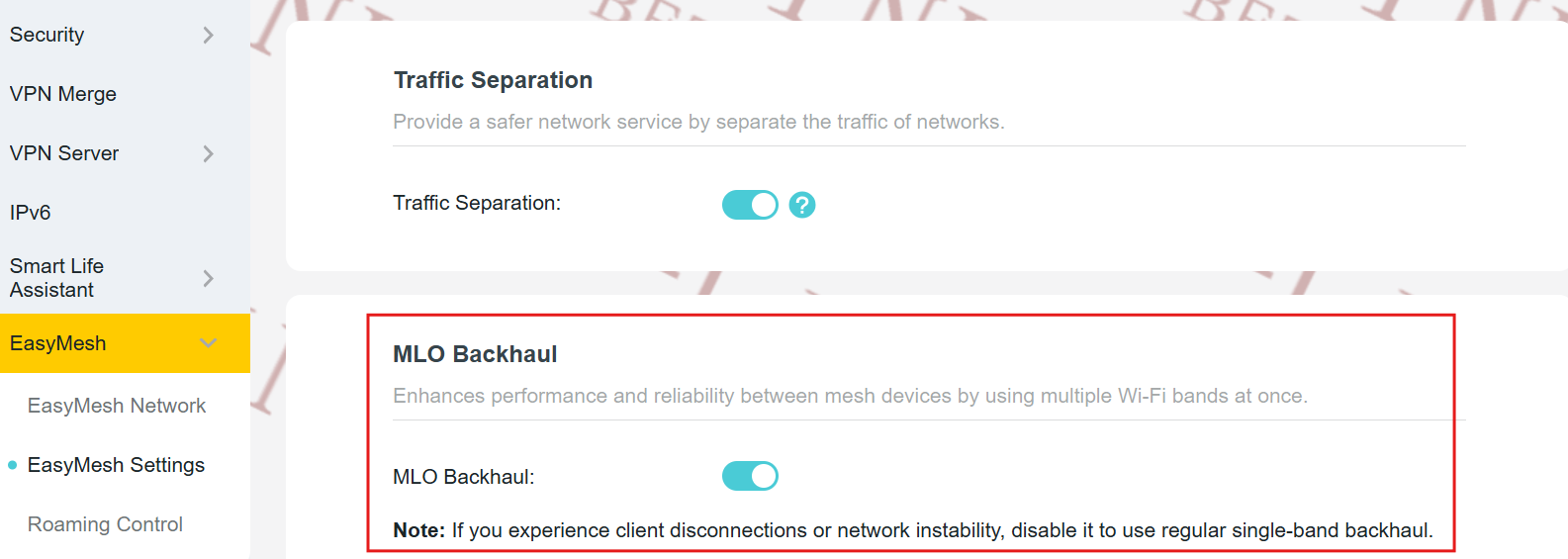
5. MLO Backhaul
This firmware introduces MLO Backhaul, allowing simultaneous use of multiple frequency bands (e.g., 5 GHz + 6 GHz) for inter-node communication. This significantly boosts backhaul throughput and resilience, especially in high-demand environments.
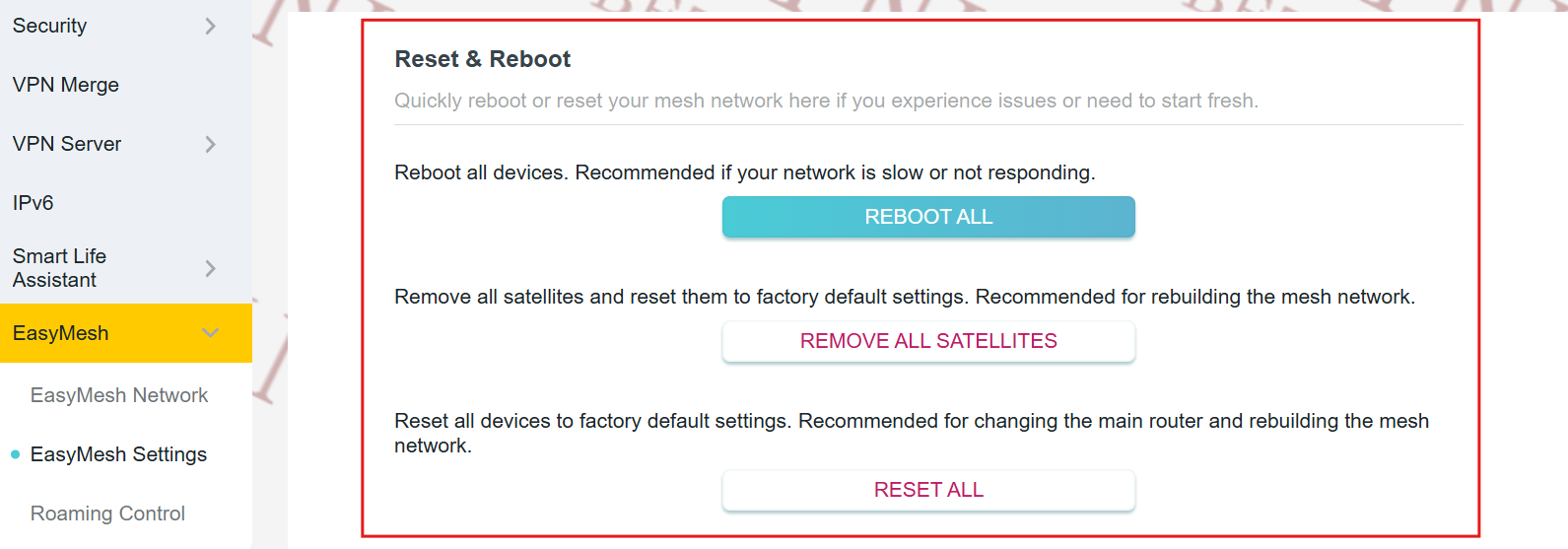
6. One-Click EasyMesh Network Reset & Reboot
Troubleshoot mesh instability with a single action: the main router now offers “Reset EasyMesh Network” and “Reboot All Nodes” options. These tools provide a quick way to refresh the entire mesh topology without physical access to individual units.
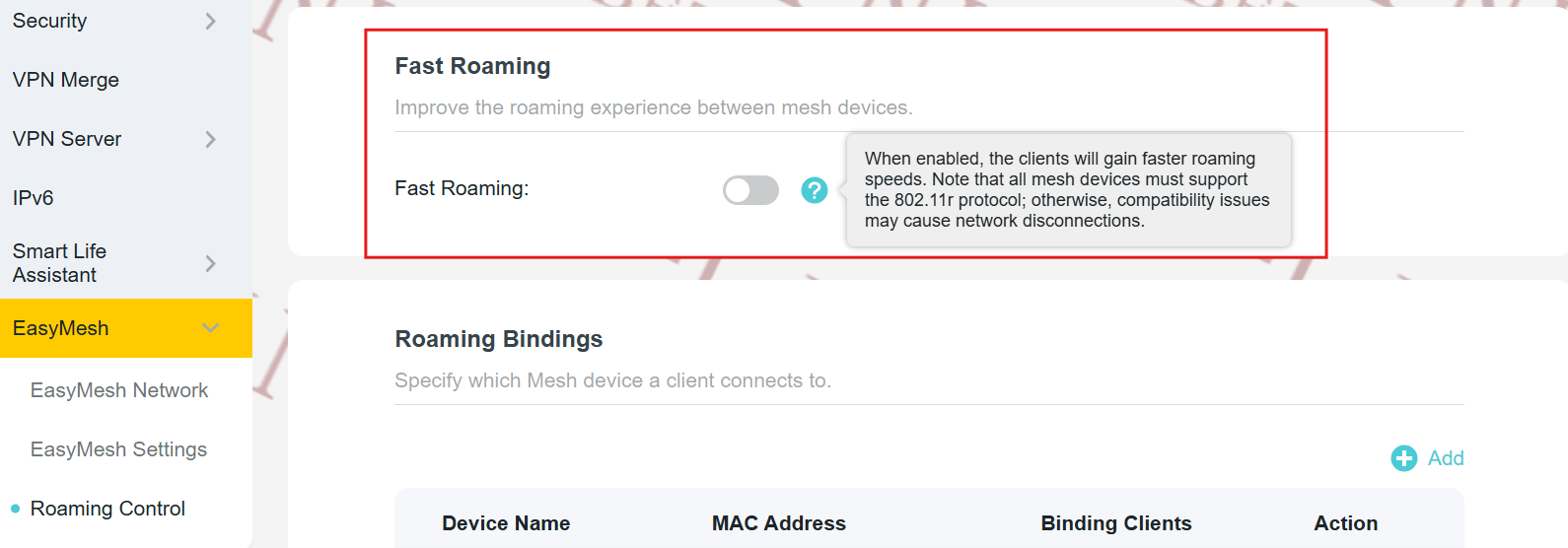
7. Fast Roaming with 802.11r Support
Seamless client roaming is enhanced through native support for the IEEE 802.11r (Fast BSS Transition) protocol across the EasyMesh network. Compatible devices will experience near-instantaneous handoffs between nodes - ideal for real-time applications like VoIP and video streaming.
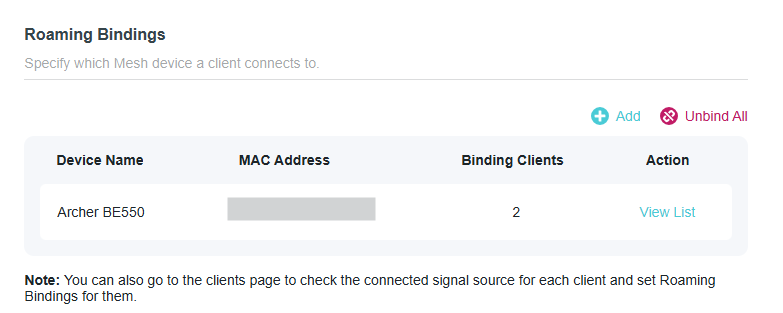
8. Roaming Bindings for Client Affinity
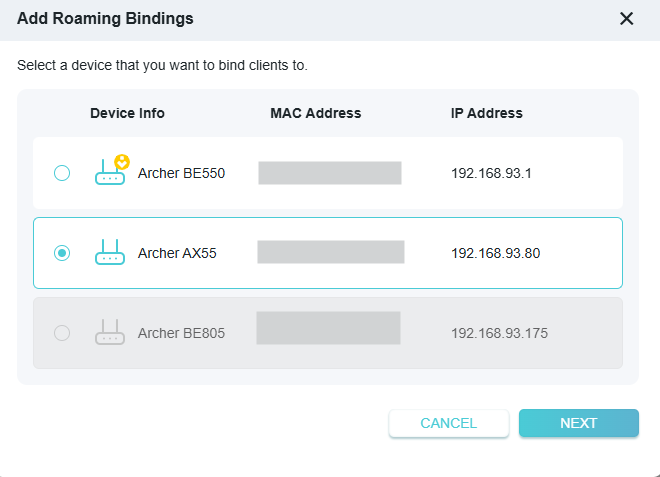
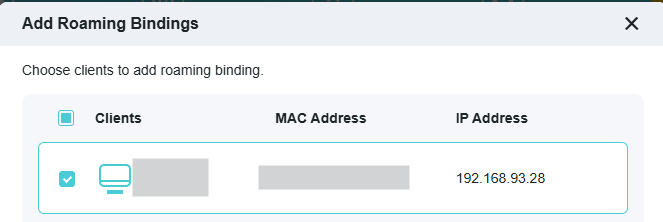
Gain granular control over client mobility with Roaming Bindings. You can now pin specific devices (e.g., smart TVs or IoT sensors) to a designated EasyMesh node, preventing unnecessary roaming and improving connection stability for latency-sensitive or stationary clients.
9. Additional EasyMesh Improvements
- IPTV Support: LAN ports on satellite units now support IPTV traffic pass-through.
- Password Synchronization: The main router’s admin password can be synced to compatible satellites for unified access control.
- UI/UX Refinements: Streamlined interface for all EasyMesh-related functions, improving navigation and readability.
10. Optimized Parental Controls Interface
The parental control dashboard has been visually and functionally refined, offering clearer scheduling options, device grouping, and usage insights - making family-friendly network management more intuitive than ever.
Upgrade today to transform your home network into a smarter, faster, and more secure ecosystem with the power of next-generation EasyMesh.
Firmware Download:
Before the Upgrade
(1) Please be sure you have read the Beta Test Agreement before upgrading the pre-release firmware!
(2) For the sake of insurance, it's always recommended to save a copy of the router's Backup Config file before upgrading or downgrading.
(3) This pre-release firmware for Archer BE550 V2 can be applied to all versions (EU/US/AU/CA/etc).
(4) You may follow the guide to upgrade the firmware of your router. How to Upgrade the Firmware on the TP-Link Wi-Fi Routers.
(5) The screenshots in this article are taken from the web GUI of Archer BE550 V2 for reference only.
(6) This version of software can't be degraded to the previous official version.
Direct Firmware Download Link
| Archer BE550_V2 | Archer BE550_V2_1.3.1 Build 20260303 (Pre-release firmware) |
Additional Information
As always, we value your feedback. If somehow you encounter an issue during or after the router firmware upgrade, please comment below with the following info. Your input helps us continue to improve and provide the best products and support.
- Provide a detailed network layout, including how the devices are connected, especially if there are EasyMesh satellite devices.
- Detailed issue description, and provide more information on the specific conditions that seem to trigger the problem.
Thank you for your continued support and for being part of our community.
Apr 15, 2026
Updated to provide a new version of pre-release firmware, which fixed the reported client list display issue.
- Copy Link
- Subscribe
- Bookmark
- Report Inappropriate Content

based on their response to me it sounds like most of the beta features aren't in this version,
- Copy Link
- Report Inappropriate Content

@Naebun
I have 1.3.1 installed (the one Kevin just sent). It seems none of the beta features exist there (he did say so up front to be fair).
I do hope that the beta will become golden soon so that we can enjoy these updates.
- Copy Link
- Report Inappropriate Content

@Gilad-A But this update doesn't have that LED indicator bug where it turns back on after every reboot, even if the toggle was turned off. For me, that’s a much bigger plus. )
- Copy Link
- Report Inappropriate Content
@kislorod
You are lucky! for me the beta caused a total reset of all settings whenever something didn't log right to the logs, then it caused a factory resets after power outages and many other issues. The led was the least of my issues with the beta :-)
I do hope the mesh stuff gets implemented as it really is bad at roaming between mesh points and the 2.4ghz for iot is "iffy" to say the least.
- Copy Link
- Report Inappropriate Content
Gilad-A wrote
@Kevin_Z Thank you so much! I've updated my main router to match.
Is there any changelog for this version?
Yes. Here is the changelog provided by the team:
This update introduces a lot of EasyMesh updates, bug fixes, and system optimizations.
New Features/Enhancements:
1. Newly upgrade the wireless driver to enhance system security and stability.
2. Newly support for EasyMesh to extend IoT networks. --- I confirmed with the team and verified that EasyMesh also supports extending the Guest Network.
3. Newly support for EasyMesh binding to specific front-end backhaul APs.
4. Newly support for client binding to specific AP nodes in EasyMesh.
5. Optimized the VPN performance.
Bug Fixes:
1. Fixed the bug that traffic statistics for specific clients were abnormal under certain circumstances.
- Copy Link
- Report Inappropriate Content
Federosario wrote
@Gilad-A just updated to the new 1.3.1 oficial release. I can't find the release notes of this new release, although the Thether app did showed to me before updating. I can't remember them but they mention updates on EasyMesh stability.
Please check my previous reply to @Gilad-A.
- Copy Link
- Report Inappropriate Content
kislorod wrote
@Gilad-A But this update doesn't have that LED indicator bug where it turns back on after every reboot, even if the toggle was turned off. For me, that’s a much bigger plus. )
Are you saying this LED issue still exists in the latest official 1.3.1 Build 20260403 rel.18661(5553) version?
Just to verify, has this reported issue been introduced in the previous pre-release version? Or did it exist on the previous 1.2.6 official version?
- Copy Link
- Report Inappropriate Content
@Kevin_Z i have this trouble on 1.3.1 Build 20260303 and now after 1.3.1 Build 20260403 trouble is gone
- Copy Link
- Report Inappropriate Content

Is it possible to get on an email notification list about firmware releases for the TP-Link Archer BE550 (BE9300) ?
I had to manually find the latest beta from march.
- Copy Link
- Report Inappropriate Content
@Kevin_Z
Finally getting around to replying, I can't be 100% sure of the timing but I had shut of the 6G network temporarily to see if roaming was cleaner without. I had the 6G set up with the same SSID as the 2.4 and 5. It seemed jumpy like that. Seeing as the 6G isn't part of the smart connect I wanted to test with it shut off. I believe I saw better results with this so I ended up turning it back on and renaming it. So far I have not seen this happen again.
Is there a reccomended set up here for 6G or a reason 6G would be excluded from smart connect? I'd assume since it is only visible to devices that support this, then the same SSID would work but it seemed unstable.
Not sure it's related to the firnware or if it is a Tether app issue, but my traffic usage report still does not load. An error just states "operation failed". Not a huge issue but figured I'd report.
cheers.
- Copy Link
- Report Inappropriate Content
Information
Helpful: 5
Views: 20683
Replies: 120
Voters 4


