
Bakchaul ethernet easymesh ax58 problem
Bakchaul ethernet easymesh ax58 problem

Hello!
I have two AX58 routers connected with Cat6 LAN cables to run EasyMesh. A few days ago, EasyMesh started malfunctioning over the wired connection; it would randomly disconnect and sync via Wi-Fi, but because it was too far away, it didn't work well. I saw on the forum that there was firmware version 1.5.2 Build 20250922 rel.22602(4555), so I installed it on both AX58 routers, but it's still malfunctioning.
The problem is that the LAN port negotiation speed drops from 1000 Mbps to 100 Mbps and then, after a while, returns to 1000 Mbps, but it seems to be happening randomly. I've changed the cables and tested them with a multimeter, and they're fine (I always use Cat6). For example, my NAS is also wired and always negotiates at 1000 Mbps, as if the main router, the AX58 (1), is randomly changing the port negotiation speed.
I've also tried changing the LAN ports, the AX58 controller, and the agent, but it still fails after a while. What else can I check? Is there a way to force a LAN port to always negotiate at 1000 Mbps?
Thanks!
- Copy Link
- Subscribe
- Bookmark
- Report Inappropriate Content
@JordiRisa Hi, I don't know why, but I've tested it for 24 hours with a brand new Cat 5e patch cable and it works perfectly, while with a brand new Cat 6 cable it's unstable. It seems surreal, but with a Cat 5e cable it never fails!
Cat 5e 100% done!
Cat 6 fail.
I understend haha
- Copy Link
- Report Inappropriate Content

You can't change the LAN negotiotion speed. What you can do as a test would be changing the ethernet cables (with CAT 5E for example) or use another router's LAN port to test the negotiation speed.
- Copy Link
- Report Inappropriate Content
@terziyski I've been using LAN4 for 6 hours now and it hasn't negotiated to 100 Mbps. Using a 10-meter Cat5e cable seems ridiculous to me; it doesn't make any sense. I wait few hours and observe.... :( bur i think that is a firmware bug
- Copy Link
- Report Inappropriate Content
It could be a FW glitch but since LAN4 doesn't behave similar it may not be the case.
Why would be ridiculous to use 10-meter CAt5E cable, I even use longer of these without any issues.- check this thread.
What's more, AX58 is a gigabit router and threre's no need to use higher category cables than CAT 5E.
- Copy Link
- Report Inappropriate Content
@terziyski I mentioned the cable because my whole house is wired with Cat 6A cable, and I've tested it with a multimeter, and everything works perfectly: PC, NAS. The only thing that negotiates speeds erratically, switching between 100 Mbps and 1000 Mbps, is the AX58 router, which acts as the main router. That's why I think it's stupid to buy a 10m Cat 5e cable just to test it. And it's really strange that it works fine on LAN4 but not on LAN1; it doesn't make sense, does it? For now... I will wait more few houres because i think in It will fail again at any moment.
- Copy Link
- Report Inappropriate Content
Nothing, at 8 hours it suddenly went from negotiating 1000 Mbps to 10 Mbps!!!! And it switched to half duplex.
Any ideas?
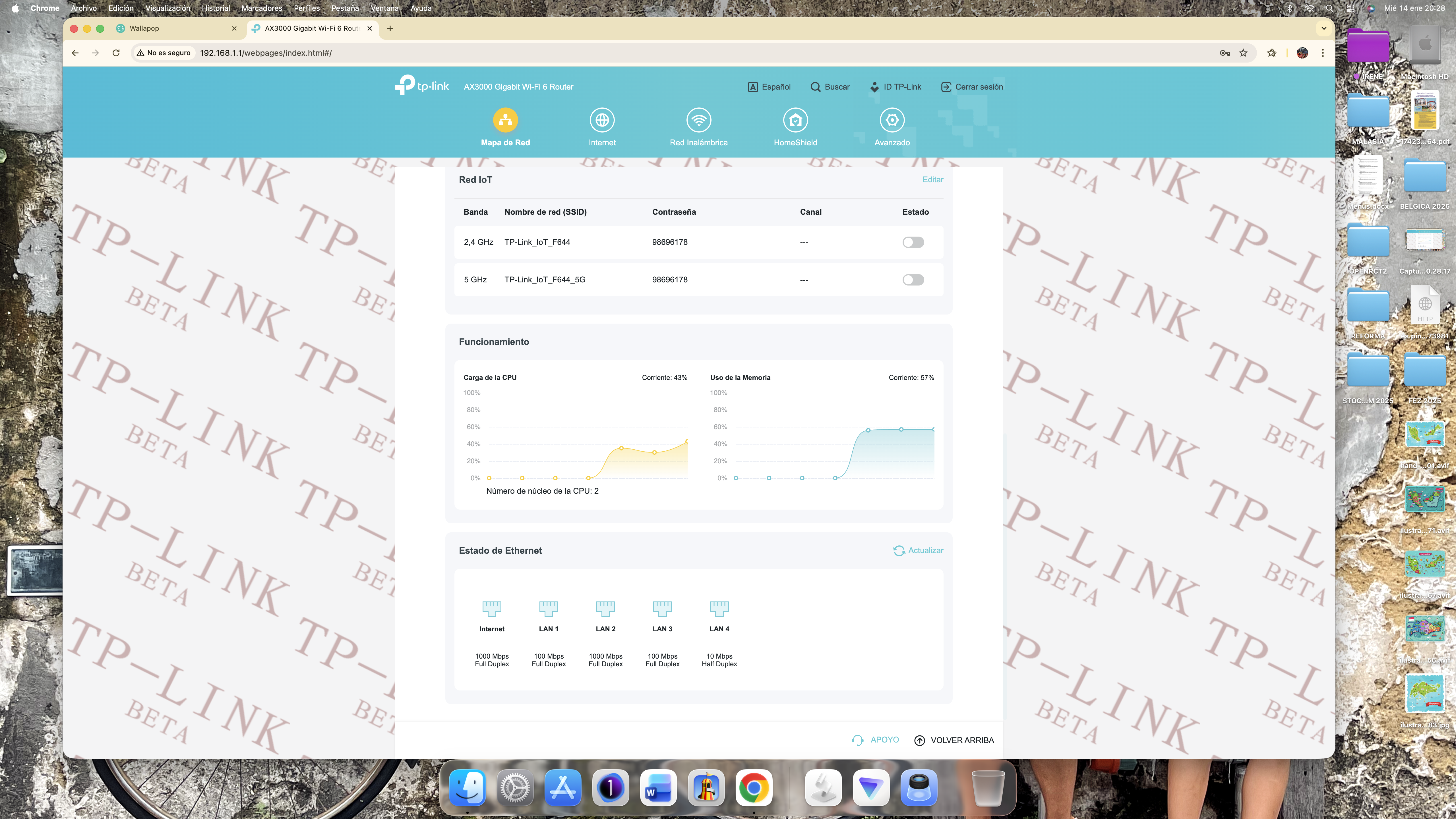
- Copy Link
- Report Inappropriate Content
Normally the connection betwen the two routers should be main AX58 LAN port <=> satellite AX58 WAN port.
Another thing you could do is to connect the two AX58 as LAN port <=> LAN port and check if there's any improvement.
- Copy Link
- Report Inappropriate Content
If I put the ax58 main LAN to the satellite in WAN it doesn't go over 100mb, but if I put it from LAN port to LAN PORT it does leave me at 1000mb although after 8 hours it drops, do I try from the main LAN to the satellite WAN?
And worst of all, I restart the ax58 satellite and it doesn't fix it, instead I restart the main ax58 router, without touching any cables and it works again at 1000mbs
- Copy Link
- Report Inappropriate Content
Grab the satellite router and put it closer to the main one.
Use the ethernet cable from its kit (it should be CAT 5E) to connect to the main router. This way you could rule out an ethernet cable issues.
- Copy Link
- Report Inappropriate Content


Hello @JordiRisa ,
Thanks for contacting our community.
Let's call the main router AX58-1, the satellite router AX58-2.
May I know if your network topology diagram is as follows:
ISP modem— AX58-1 — switch — AX58-2 )))((( client devices
(Note: — stands for wired connection,)))((( stands for wireless connection )
Is there any switch between the main router and the satellite router?
If yes, please remove the switch and connect the AX58-2 to the AX58-1 for a comparative test.
If not, would you mind resetting both Archer AX58 and setting the AX58-2 to be the main router for a comparative test?
Please check the firmware on your routers again.
- Copy Link
- Report Inappropriate Content
@Joseph-TP Hi Joseph, thanks for support.
My diagram is easy and clear:
ISP modem— AX58-1 — 10m CAT6 — AX58-2 )))((( client devices
Now I try connect ax58-1 LAN4 to wan ax58-2 and for now it seems that it always negotiates at 1000mb.
I previously had it connected from LAN port to LAN port, is that right setup? Or should I be might fail again with LAN-WAN? Do you recommend I stick with the beta firmware version for now?
- Copy Link
- Report Inappropriate Content
Information
Helpful: 3
Views: 1193
Replies: 15
Voters 1