
Early Access Deco BE65/BE63/BE11000_V2_1.3.0 Added DoH & DoT, Speed Limit and Internet Backup
 This thread has been locked for further replies. You can start a new thread to share your ideas or ask questions.

Update on May 18, 2026:
The official version for Deco BE65/BE63/BE11000_V2 has been released publicly. Users can check for updates via the Deco's web interface or through the Deco App to install the latest version manually.
How to Update TP-Link Deco Firmware
If you cannot find the latest version, please download the firmware from the link below and upgrade it manually:
1.3.2_build_26040912_rel_40631
We will manually lock this post to better focus on discussions regarding the new firmware. Please feel free to start a new thread here if you need assistance.
Best Regards
-------------------------------------
This Article Applies to:
Deco BE65(EU/US/AU/CA/UK)_V2.0
Deco BE63(US)_V2.6
Deco BE11000(US)_V2.6
Hey Everyone!
We are excited to announce a pre-release firmware update introducing DoH & DoT, Speed Limit, and Internet Backup, as well as other advanced features for Deco BE65/63/BE11000. We encourage users to install this firmware and share their feedback with us.
Firmware Modifications
New Features/Enhancements:
- Added WiFi Heatmap. (It also requires the Deco App version to be: 3.10.133 for IOS and 3.10.80 for Android.)
- Supported fixing a specific port as the WAN port.
- Added Hybrid Mesh feature.
- Added Internet Backup feature.
- Added DoH & DoT feature.
- Added Speed Limit feature for client devices.
- Optimized HomeShield feature.
- Improved System Stability.
Bug Fixes:
- Fixed the NAT Loopback issue.
- Fixed the issue where the Online List doesn't show IP addresses of connected clients when Deco is in AP mode.
- Resolved the issue where the Qos Total Bandwidth doesn't take effect as expected under certain circumstances.
- Addressed the issue where the Deco may restart automatically under certain circumstances.
Download Link:
Deco BE65/BE63/BE11000_V2.0/V2.6 |
1.3.0_build_2602261_rel_21001_Beta 2026.3.9 updated |
Update Notice:
- Please be sure you have read the Beta Test Agreement before upgrading the Pre-release firmware!
- Please make sure the Deco APP is up-to-date.
- This firmware can’t be degraded directly to the previous 1.2.10/1.2.0 version.
- How to manually update the firmware via web UI.
As always, we value your feedback. If you happen to encounter any concerns during or after the firmware upgrade, please feel free to comment below with the following information. Your input helps us continue to improve and provide the best possible products and support.
- Provide a detailed network layout, including how the devices are connected.
- Include a detailed description of the issue and as much information as possible regarding the specific conditions that seem to trigger the behavior.
Thank you for your continued support and for being part of our community.
- Copy Link
- Subscribe
- Bookmark
- Report Inappropriate Content

Thanks much for sharing the details. I am happy to work with them so I have just sent them an e-mail as you requested. In case if you do get any updates please do let us know anytime as well.
- Copy Link
- Report Inappropriate Content

I've opened a bug with the Home Assistant Plugin
https://github.com/amosyuen/ha-tplink-deco/issues/470
Problem
After upgrading to FW 1.3 for TP Link Deco 65, I'm no longer able to connect.
Reinstalling and trying to reconfigure fails.
Error message on config screen after updating password and IP address is 'unknown error occured'.
Have also registered this issue with TP Link.
Had no issues with 1.21 and earlier FW versions.
TP-Link Deco Version
1.3
Router Model
Deco BE65
Debugging Information
This error originated from a custom integration.
Logger: custom_components.tplink_deco.api
Source: custom_components/tplink_deco/api.py:467
integration: TP-Link Deco (documentation, issues)
First occurred: 8:02:44 AM (2 occurrences)
Last logged: 8:02:49 AM
Fetch keys client error: 10.66.71.1/cgi-bin/luci/;stok=/login
- Copy Link
- Report Inappropriate Content
@David-TP My Tapo DL110 door lock could not see my Wi-Fi SSID after updating to this firmware.
The way I have my Wi-Fi set up is my main network uses 5Ghz and 6Ghz and I disable 2.4 Ghz. I then have my IoT network that has 2.4 Ghz enabled and 5 Ghz disabled. The strange part is that my door lock was only able to see my SSID after I enabled 2.4 Ghz on the main network. It then started alternating between seeing the main network's 2.4Ghz SSID and the IoT SSID when I searched, sometimes it would show both briefly. When I would disable the 2.4 Ghz on the main network, the IoT SSID would also disappear. Leaving me with no network to connect to. I tried manually connecting to the IoT network when it wasn't visible, it did connect for a bit with very low signal and then disconnected shortly after.
I currently have the 2.4 Ghz, 5 Ghz, and 6Ghz networks enabled on the main network and I kept the 2.4 Ghz IoT network enabled. I ended up just connecting to the 2.4 Ghz of the main network and have left it like this for now.
Is anyone else seeing something similar?
Also, there have been complaints regarding slow or no internet (although the Wi-Fi is connected) around the house by some family members. Especially on kids' school Chromebooks.
Can you please investigate this.
- Copy Link
- Report Inappropriate Content

Yes, the engineers are paying close attention to the feedback on 1.3.0.
For the IoT network issue, did it only happen to the Tapo DL110? How about the other 2.4GHz mobile devices?
By the way, how many Deco units do you have? Are they all connected via WiFi Backhaul?
Can I have some screenshots of the network maps on the Deco App, such as:
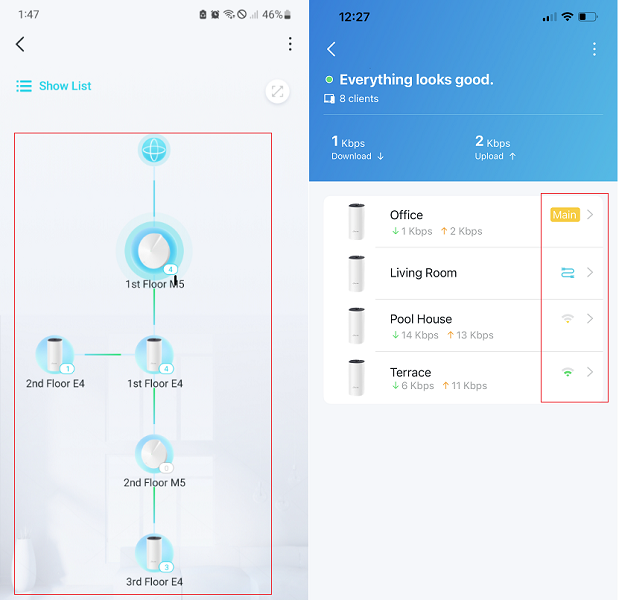
If possible, it would be highly appreciated if you could send an email to forumsupport.usa@tp-link.com
Subject: [Forum Escalation][ID 856030]Deco BE63 with Tapo DL110
Thread URL: https://community.tp-link.com/en/home/forum/topic/856030?replyId=1665820
Once sent, a ticket will be created in our support system, and a member of the team will follow up to gather more information or troubleshoot the cause.
(Please update here with the support ticket ID no after sending the email.)
Thank you very much.
Best regards.
- Copy Link
- Report Inappropriate Content

@David-TP hi there! I have been experiencing issues with BE631.2.10 Build 20251229 Rel. 42008 my 6ghz devices just simply don't want to stay connected (iPhone and OPPO phone) - constant "no internet connection" and only manual reconnect is helping for 5-10 minutes. Especially happens when moving in the house and connecting to other Deco unit
switching off 6GHZ to 5GHZ helped and it is rock solid again
is it safe to test this beta version? I really need by 6GHZ as 5GHZ is extremely polluted where I live
- Copy Link
- Report Inappropriate Content
Hi, did the issue start recently?
Can I have the model numbers of the iPhone and Oppo Phones?
-Did you purchase both 6GHz mobile devices as well as the Deco BE63 in the local market?
I think the 1.3.0 beta here is worth trying. The beta firmware is definitely safe. The only concern would be that the firmware downgrade needs a firmware recovery.
Thank you very much.
Best regards.
- Copy Link
- Report Inappropriate Content

Hi @David-TP
Still no news about be65 pro version ?
As I still have issues with 2.5GB ports with 1.2.10, it will worth a try here too.
Regards,
F.
- Copy Link
- Report Inappropriate Content

Same here with BE65.
When I have 6Ghz enabled, the connection from my satellite deco (wireless connected) is very unstable.
The satellite deco goes constantly offline.
When 6Ghz is disabled, I have no issues.
- Copy Link
- Report Inappropriate Content
Thanks for the update. Please also update the 6GHz issue with the senior engineer so he can check both issues together.
Best regards.
- Copy Link
- Report Inappropriate Content
Nice to see you again, I'm afraid so. Some feedback has not yet been located, and the engineers might wish to get it sorted before testing on other models.
Best regards.
- Copy Link
- Report Inappropriate Content
Information
Helpful: 6
Views: 52927
Replies: 312
Voters 4



