
Early Access Deco BE65/BE63/BE11000_V2_1.3.0 Added DoH & DoT, Speed Limit and Internet Backup
 This thread has been locked for further replies. You can start a new thread to share your ideas or ask questions.

Update on May 18, 2026:
The official version for Deco BE65/BE63/BE11000_V2 has been released publicly. Users can check for updates via the Deco's web interface or through the Deco App to install the latest version manually.
How to Update TP-Link Deco Firmware
If you cannot find the latest version, please download the firmware from the link below and upgrade it manually:
1.3.2_build_26040912_rel_40631
We will manually lock this post to better focus on discussions regarding the new firmware. Please feel free to start a new thread here if you need assistance.
Best Regards
-------------------------------------
This Article Applies to:
Deco BE65(EU/US/AU/CA/UK)_V2.0
Deco BE63(US)_V2.6
Deco BE11000(US)_V2.6
Hey Everyone!
We are excited to announce a pre-release firmware update introducing DoH & DoT, Speed Limit, and Internet Backup, as well as other advanced features for Deco BE65/63/BE11000. We encourage users to install this firmware and share their feedback with us.
Firmware Modifications
New Features/Enhancements:
- Added WiFi Heatmap. (It also requires the Deco App version to be: 3.10.133 for IOS and 3.10.80 for Android.)
- Supported fixing a specific port as the WAN port.
- Added Hybrid Mesh feature.
- Added Internet Backup feature.
- Added DoH & DoT feature.
- Added Speed Limit feature for client devices.
- Optimized HomeShield feature.
- Improved System Stability.
Bug Fixes:
- Fixed the NAT Loopback issue.
- Fixed the issue where the Online List doesn't show IP addresses of connected clients when Deco is in AP mode.
- Resolved the issue where the Qos Total Bandwidth doesn't take effect as expected under certain circumstances.
- Addressed the issue where the Deco may restart automatically under certain circumstances.
Download Link:
Deco BE65/BE63/BE11000_V2.0/V2.6 |
1.3.0_build_2602261_rel_21001_Beta 2026.3.9 updated |
Update Notice:
- Please be sure you have read the Beta Test Agreement before upgrading the Pre-release firmware!
- Please make sure the Deco APP is up-to-date.
- This firmware can’t be degraded directly to the previous 1.2.10/1.2.0 version.
- How to manually update the firmware via web UI.
As always, we value your feedback. If you happen to encounter any concerns during or after the firmware upgrade, please feel free to comment below with the following information. Your input helps us continue to improve and provide the best possible products and support.
- Provide a detailed network layout, including how the devices are connected.
- Include a detailed description of the issue and as much information as possible regarding the specific conditions that seem to trigger the behavior.
Thank you for your continued support and for being part of our community.
- Copy Link
- Subscribe
- Bookmark
- Report Inappropriate Content

Hi David, wanted to provide some feedback on v 1.3.0 Build 26012212 Rel. 11551
This older version is much better than the newer version which was published and removed based on the feedback I provided.
A few bugs for me have started, nothing major, just some refinements,
- Manual band and node steering doesn’t work. I have some devices that I wish to manually move to a Deco, and set connection frequency, no matter what I select, the client stays connected to its initial connection.
- DoH and DoT. Initially I set up using DoH, worked fine, recently I changed to DoT, restarted all Deco’s and upon testing, even though the Deco app indicates that DoT is set up, and manual sever tests fine, and actual test on the web indicates that DoH is working and NOT DoT, which I think Deco must be using one of the already inbuilt DoH addresses. No matter what I do, DoT doesn’t appear to work.
- Last, some wireless clients are showing up as a wired connection in the Deco app. Eg: iPhone shows as wired rather than wireless.
Thank you and I look forward to the next firmware release.
- Copy Link
- Report Inappropriate Content

Hi, were you having NAT Loopback issues on the firmware 1.3.0_build_2026012212_rel11551?
If yes, you can test the 1.3.0_26021212-rel47291 otherwise it would be better to stay on the rel11551 until the next version.
The rel47291 can't downgrade to 1.2.10 directly via web UI. A firmware recovery is needed.
(PS: you can find the rel47291 in the private message.)
Best regards.
- Copy Link
- Report Inappropriate Content

@David-TP Hi David, how do you downgrade to 1.2.10 using the web ui?
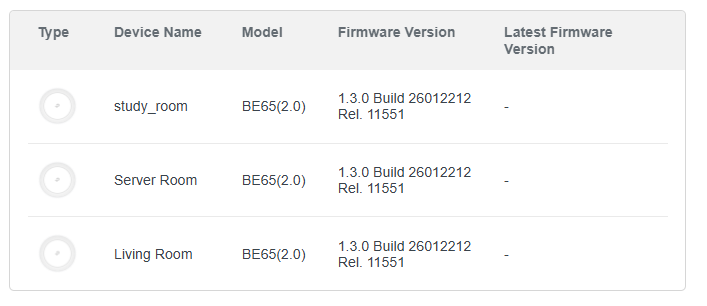
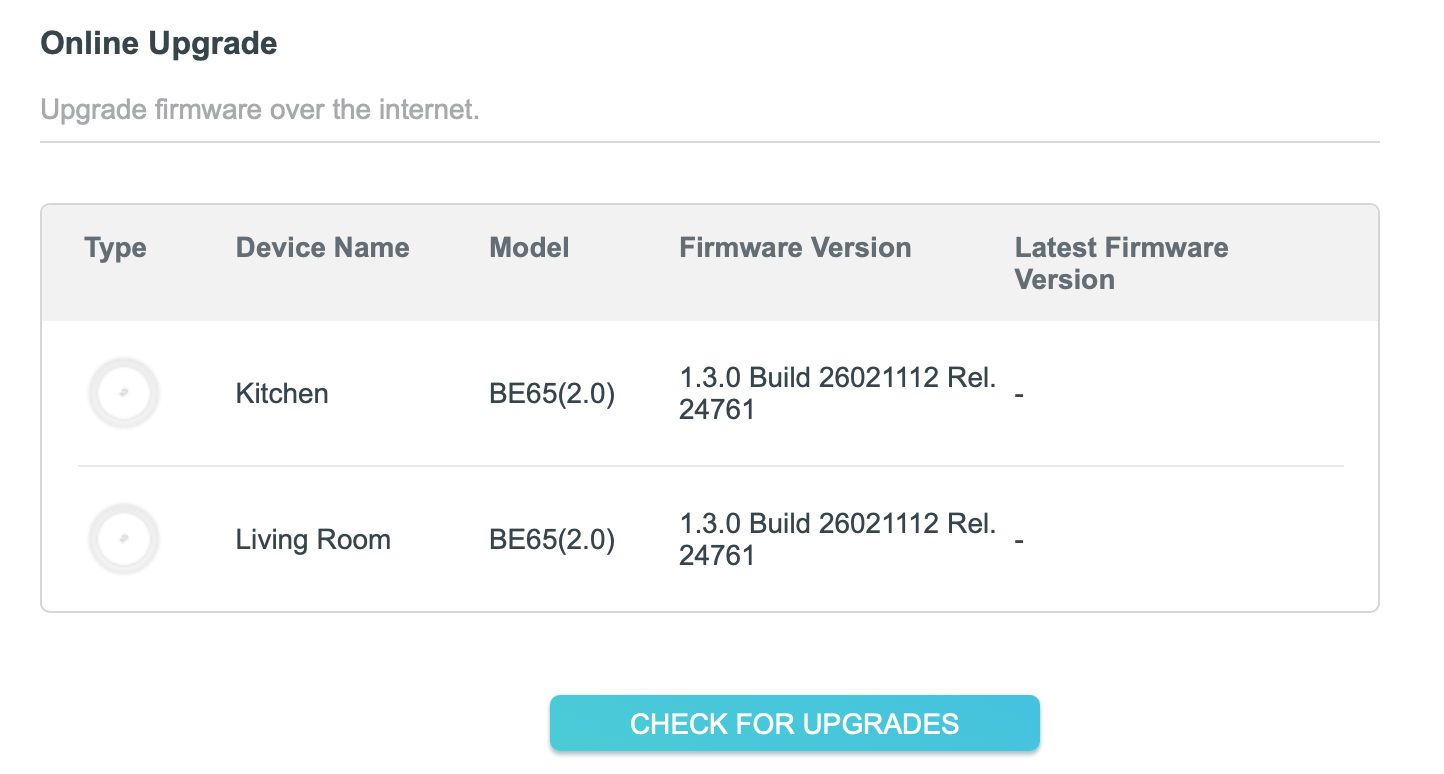
My Decos are currently in 1.3.0 Rel 11551 and the web ui always gives the "Upgrade failed. Please select the latest version of firmware to upgrade." error
- Copy Link
- Report Inappropriate Content
- Copy Link
- Report Inappropriate Content

The NAT FW looks to have fix the issue. This is great. It has also resolved the Home Assistant issues around connectivity to the TPLink DECO's. Thanks!
- Copy Link
- Report Inappropriate Content
As a long-time TP-Link user, my journey began over a decade ago with the legendary TD-W8970. It has continued through the Deco M5 system and several other models I with friends and family over the years. I have always trusted TP-Link for its balance of performance, reliability, and user-friendly design.
Recently, I upgraded to the Deco BE63 with the impressive Wi-Fi 7 hardware, and now trying this firmware:
The new features in this firmware like WAN Port, Internet Backup, and DoH & DoT are excellent additions that significantly improve the flexibility and security of the system, yet, I have noticed some critical gaps in the current firmware regarding bandwidth management. I believe these need attention to maintain the high standards of the Deco line.
Critical Issues: Speed Limit & MAC Randomization:
While the Speed Limit tool is a great concept, the current implementation feels incomplete for practical home use, particularly because of a major loophole:
- MAC Randomization Bypass: Modern devices use "Private Wi-Fi Addresses." Every time a device rotates its MAC address, the Deco identifies it as a "New Device." The Practicality Gap: While I can manually configure my family's devices to use a "Fixed MAC," this is not a practical solution for guests or family visitors who I would like to exchange and share memory with.
- The "Default to Full Speed" Problem: Because the Deco defaults all unrecognized devices to full speed, any bandwidth rules are instantly bypassed the moment a device generates a new MAC.
- Lack of Global Override: The "Global Internet Speed Limit" does not act as a master ceiling. Individual device settings or new connections can still saturate the WAN, making it difficult to ensure total usage stays within ISP data caps.
Proposed Enhancements:
- Default-Limit Policy: an option to set a "Default Speed" for all unrecognized devices. This ensures that any device is restricted to a fixed-bandwidth profile until I manually whitelist it or give a faster bandwidth.
- User-Based Authentication (Captive Portal): Expand the Captive Portal feature beyond the guest network. By tying speed limits to a Username/Password rather than a hardware MAC, the limits will follow the user regardless of which device they use, this can be extended to select how many sessions for each user. And for devices without web interface like printer and cameras a bypass can be an option.
- Global Bandwidth Ceiling: Ensure the "Global Internet Speed Limit" is a hard limit for the entire WAN input to prevent data overages across the whole network.
I know these are like a wish dream options and can be challenging to integrate, but with Deco family, I see potentials and capable hardware.
Please let me know if I missed something here, such as an existing option to make these functions work as intended, and I hope these suggestions are valid refinements to enhance and complete the excellent hardware of BE63 Turing it into a leading home network WiFi tool.
All the best all the time,
Wagdi
- Copy Link
- Report Inappropriate Content

UPDATE:
Suddenly today my Google Home Speaker Groups are back as per normal! No more being told my phone and my Google speakers are not on the same wifi, thank goodness.
- Copy Link
- Report Inappropriate Content
Hi, this is the 1.3.0 beta with WiFi heatmap . Did you run into any issues with this firmware?
Best regards.
- Copy Link
- Report Inappropriate Content
Hi, you might need to run through firmware recovery to downgrade from 1.3.0 to 1.2.10, as they are crossing firmware platforms.
How to use firmware recovery if the Deco become brick
Best regards.
- Copy Link
- Report Inappropriate Content

@David-TP is BE65 V1 discontinued? I see all of this new updates and promises that v1 hardware updates are being tested but they are never release?
As a consumer, spending the amount of money these product costs just to be left without any updates just because TP-Link decided to release a v2 but there are still v1 in the shelves, people are buying them and now we cannot get any updates.
I'm having issues with the BE65 (EU) V1 2.5G ports where I have random disconnects (port flapping) due to failed negotiation using a realtek 2.5G NIC. But still cannot get any updates for this issue.
- Copy Link
- Report Inappropriate Content
Information
Helpful: 6
Views: 53002
Replies: 312
Voters 4



