
Early Access Deco BE65/BE63/BE11000_V2_1.3.0 Added DoH & DoT, Speed Limit and Internet Backup
 This thread has been locked for further replies. You can start a new thread to share your ideas or ask questions.

Update on May 18, 2026:
The official version for Deco BE65/BE63/BE11000_V2 has been released publicly. Users can check for updates via the Deco's web interface or through the Deco App to install the latest version manually.
How to Update TP-Link Deco Firmware
If you cannot find the latest version, please download the firmware from the link below and upgrade it manually:
1.3.2_build_26040912_rel_40631
We will manually lock this post to better focus on discussions regarding the new firmware. Please feel free to start a new thread here if you need assistance.
Best Regards
-------------------------------------
This Article Applies to:
Deco BE65(EU/US/AU/CA/UK)_V2.0
Deco BE63(US)_V2.6
Deco BE11000(US)_V2.6
Hey Everyone!
We are excited to announce a pre-release firmware update introducing DoH & DoT, Speed Limit, and Internet Backup, as well as other advanced features for Deco BE65/63/BE11000. We encourage users to install this firmware and share their feedback with us.
Firmware Modifications
New Features/Enhancements:
- Added WiFi Heatmap. (It also requires the Deco App version to be: 3.10.133 for IOS and 3.10.80 for Android.)
- Supported fixing a specific port as the WAN port.
- Added Hybrid Mesh feature.
- Added Internet Backup feature.
- Added DoH & DoT feature.
- Added Speed Limit feature for client devices.
- Optimized HomeShield feature.
- Improved System Stability.
Bug Fixes:
- Fixed the NAT Loopback issue.
- Fixed the issue where the Online List doesn't show IP addresses of connected clients when Deco is in AP mode.
- Resolved the issue where the Qos Total Bandwidth doesn't take effect as expected under certain circumstances.
- Addressed the issue where the Deco may restart automatically under certain circumstances.
Download Link:
Deco BE65/BE63/BE11000_V2.0/V2.6 |
1.3.0_build_2602261_rel_21001_Beta 2026.3.9 updated |
Update Notice:
- Please be sure you have read the Beta Test Agreement before upgrading the Pre-release firmware!
- Please make sure the Deco APP is up-to-date.
- This firmware can’t be degraded directly to the previous 1.2.10/1.2.0 version.
- How to manually update the firmware via web UI.
As always, we value your feedback. If you happen to encounter any concerns during or after the firmware upgrade, please feel free to comment below with the following information. Your input helps us continue to improve and provide the best possible products and support.
- Provide a detailed network layout, including how the devices are connected.
- Include a detailed description of the issue and as much information as possible regarding the specific conditions that seem to trigger the behavior.
Thank you for your continued support and for being part of our community.
- Copy Link
- Subscribe
- Bookmark
- Report Inappropriate Content

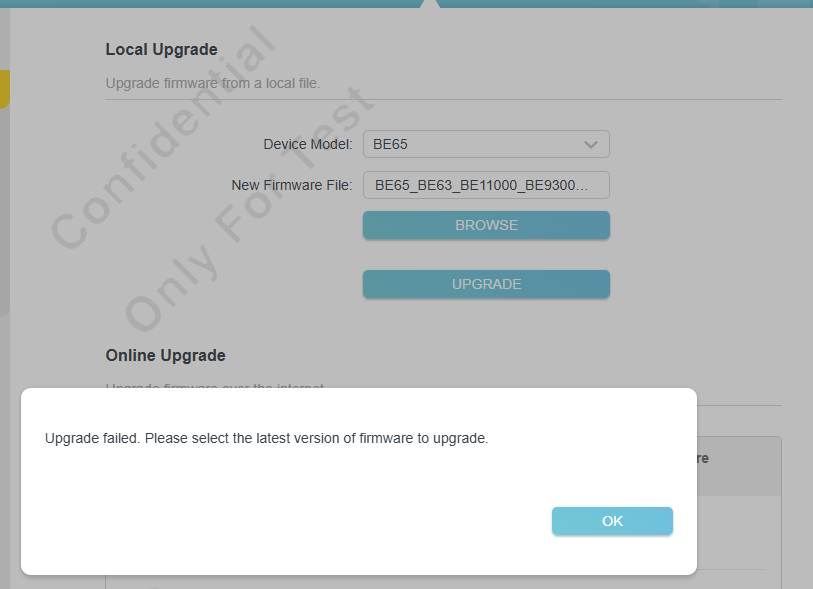
i had similar error during the firmware recovery progress
Using firmware from https://www.tp-link.com/my/support/download/deco-be65/#Firmware gives me "Wrong File" during the recovery process
Using this beta : https://static.tp-link.com/upload/beta/2026/202602/20260213/BE65V2_BE65V3_V2-ver1-3-0-P1%5B26021212-rel47291%5D.zip, also gives me the "Wrong File" during the recovery process.
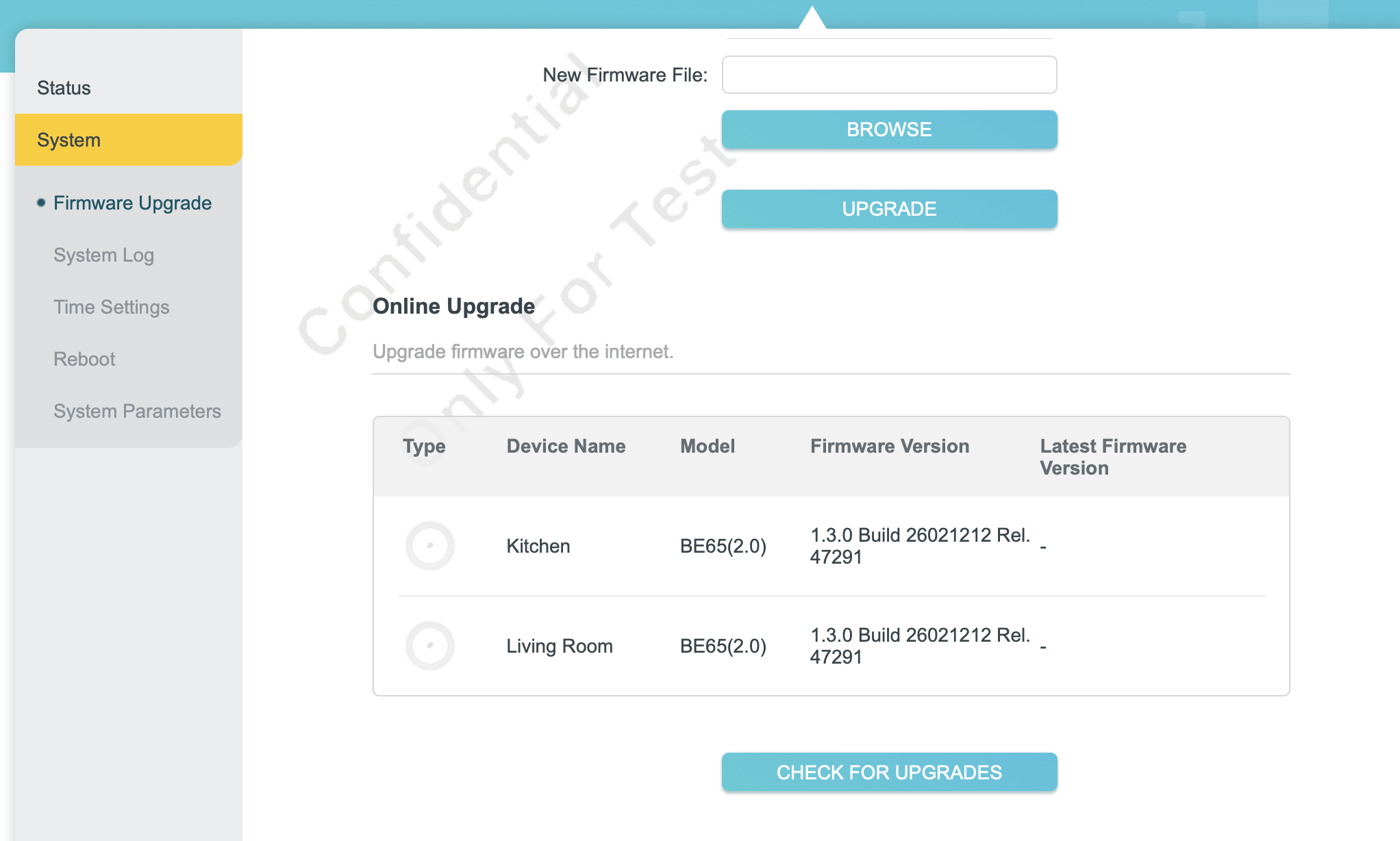
Using Local upgrade method with the Beta Rel47291 firmware also gives me this error
All of my Decos are BE65(US) 2.0
- Copy Link
- Report Inappropriate Content

- Copy Link
- Report Inappropriate Content
- Copy Link
- Report Inappropriate Content

Further to my original posts in the community forum, I wanted to provide some further feedback.
After you replied saying firmware version 1.3.0 rel 47291 only includes the NAT feedback issue, I thought I would download it and try again.
After installing, I had similar issues that I wrote about in my forum posts. I couldn’t obtain a wan IPV4 address, but this time could only receive a wan IPV6 address, which gave me part internet access. Deco app said 'everything looks good', but some clients couldn’t access internet access. Also ethernet backhaul to one Deco wouldn’t work. In the IPV4 sections of the Deco app, all data had -- beside it.
I reinstalled and went back to firmware version 1.3.0 rel 11551 which I also went back to after my community posts, and again today, and it didn’t give me any wan addresses, after a reboot, all Decos work as they should, ethernet backhaul I have to one of my Decos work again, but of course without NAT loop back fix.
Very odd behaviour. I won’t be trying rel 47291 again, and I hope newer firmware will be released soon that bundles up all your current BE65 firmware’s, which looks like 3 or 4 versions published at present. Would be great if TP Link just had one firmware for us to test, rather than the many that are floating around in the community forum.
- Copy Link
- Report Inappropriate Content
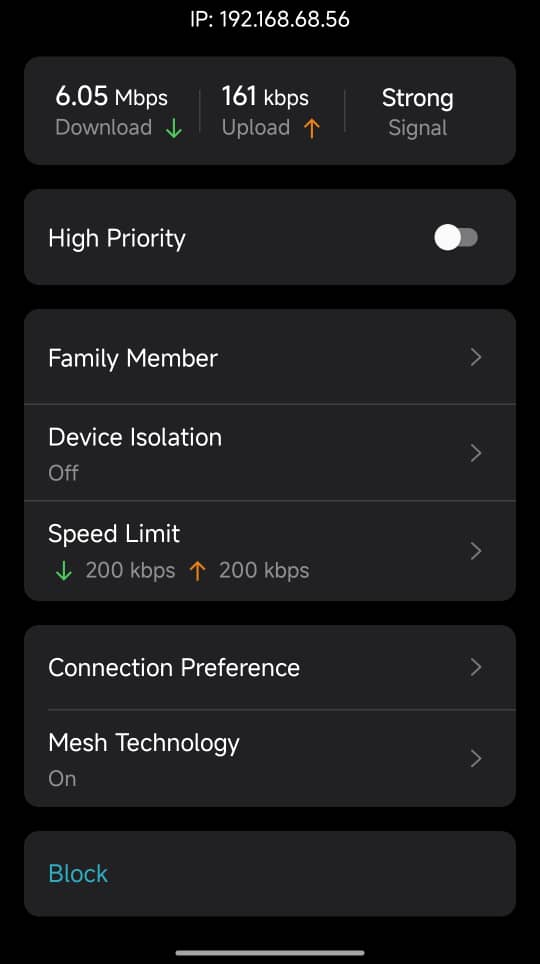
Please see attached where it shows a speed limit at 200 Kbps for download and upload, but despite that, user has access to available bandwidth speed @6.05Mbps
- Copy Link
- Report Inappropriate Content

acekme wrote
@David-TP hi there! I have been experiencing issues with BE631.2.10 Build 20251229 Rel. 42008 my 6ghz devices just simply don't want to stay connected (iPhone and OPPO phone) - constant "no internet connection" and only manual reconnect is helping for 5-10 minutes. Especially happens when moving in the house and connecting to other Deco unit
switching off 6GHZ to 5GHZ helped and it is rock solid again
is it safe to test this beta version? I really need by 6GHZ as 5GHZ is extremely polluted where I live
I have the same issue with my iPhone. I have 3 BE63 routers V2.60 hardware running 1.2.10 Build 20260212 Rel. 59811 (with the NAT forwarding fix). I had the problem on the 1.2.10 build before the NAT forwarding fix. I even manually downgraded to 1.2.0 Build 20250718 which still had the same issue.
I have an iPhone 16 Pro max bought at an Apple store in the US. It's on iOS 26.3.
When I unlock the phone (while connected to wifi), I wouldn't have an Internet connection until like 15-30 seconds later. After waiting, it would eventually work, but it would be sporadic, and seemed to correspond to when I unlock the phone or after some duration (maybe a few minutes). Within that 15-30 seconds, if I go to Settings -> Wi-Fi, it says "No Internet Connection" for my wifi network.
Turning off the "Private Wi-Fi Address" and "Limit IP Address Tracking" features on the iPhone didn't help.
I tried something similar to what @acekme suggested, and in the Deco app list of clients, found my iPhone, and changed the Connection Preference Wi-Fi band from Auto to specifically 2.4GHz only. I only recently made that change, but it seems to be more stable (not perfect though).
I'm hoping that 1.3.0 will help.
- Copy Link
- Report Inappropriate Content

Hi, have you run a speedtest on the device directly via speedtest.net, for example?
From the previous relevant feedback, I find the speed rate meter on the Deco App is usually confusing.
Wait for your reply.
Best regards.
- Copy Link
- Report Inappropriate Content
@iresLeandro
sadly. i can't upgrade to rel 47291.
however,
1. disabling DOH in rel 11551
2. choosing manual channel for 2.4Ghz and 5Ghz connection
3. disabling 6Ghz in primary WiFi
seems to solve all of my problems (temporarily). I do still use 6Ghz in MLO, fingers crossed that everything will be good.
- Copy Link
- Report Inappropriate Content
Hello @David-TP
You are absolutely right, I did use speedtest.net and the result matches the speed limit set in the Deco app.
Thank you
- Copy Link
- Report Inappropriate Content

@David-TP how can I have the last version 47....??????
- Copy Link
- Report Inappropriate Content
Information
Helpful: 6
Views: 53142
Replies: 312
Voters 4



