
Early Access Deco BE65/BE63/BE11000_V2_1.3.0 Added DoH & DoT, Speed Limit and Internet Backup
 This thread has been locked for further replies. You can start a new thread to share your ideas or ask questions.

Update on May 18, 2026:
The official version for Deco BE65/BE63/BE11000_V2 has been released publicly. Users can check for updates via the Deco's web interface or through the Deco App to install the latest version manually.
How to Update TP-Link Deco Firmware
If you cannot find the latest version, please download the firmware from the link below and upgrade it manually:
1.3.2_build_26040912_rel_40631
We will manually lock this post to better focus on discussions regarding the new firmware. Please feel free to start a new thread here if you need assistance.
Best Regards
-------------------------------------
This Article Applies to:
Deco BE65(EU/US/AU/CA/UK)_V2.0
Deco BE63(US)_V2.6
Deco BE11000(US)_V2.6
Hey Everyone!
We are excited to announce a pre-release firmware update introducing DoH & DoT, Speed Limit, and Internet Backup, as well as other advanced features for Deco BE65/63/BE11000. We encourage users to install this firmware and share their feedback with us.
Firmware Modifications
New Features/Enhancements:
- Added WiFi Heatmap. (It also requires the Deco App version to be: 3.10.133 for IOS and 3.10.80 for Android.)
- Supported fixing a specific port as the WAN port.
- Added Hybrid Mesh feature.
- Added Internet Backup feature.
- Added DoH & DoT feature.
- Added Speed Limit feature for client devices.
- Optimized HomeShield feature.
- Improved System Stability.
Bug Fixes:
- Fixed the NAT Loopback issue.
- Fixed the issue where the Online List doesn't show IP addresses of connected clients when Deco is in AP mode.
- Resolved the issue where the Qos Total Bandwidth doesn't take effect as expected under certain circumstances.
- Addressed the issue where the Deco may restart automatically under certain circumstances.
Download Link:
Deco BE65/BE63/BE11000_V2.0/V2.6 |
1.3.0_build_2602261_rel_21001_Beta 2026.3.9 updated |
Update Notice:
- Please be sure you have read the Beta Test Agreement before upgrading the Pre-release firmware!
- Please make sure the Deco APP is up-to-date.
- This firmware can’t be degraded directly to the previous 1.2.10/1.2.0 version.
- How to manually update the firmware via web UI.
As always, we value your feedback. If you happen to encounter any concerns during or after the firmware upgrade, please feel free to comment below with the following information. Your input helps us continue to improve and provide the best possible products and support.
- Provide a detailed network layout, including how the devices are connected.
- Include a detailed description of the issue and as much information as possible regarding the specific conditions that seem to trigger the behavior.
Thank you for your continued support and for being part of our community.
- Copy Link
- Subscribe
- Bookmark
- Report Inappropriate Content

Hi David
Yesterday late in the evening I had to restart the system twice more because some IoT devices (eWeLink roller shutter switches) would not connect to the network. This problem had occasionally occurred before (even with the official firmware), but this time the situation was that in the TP-Link Deco app the switch appeared as connected and had its own IP address, while in the eWeLink app it was unavailable, and the LEDs on the device were blinking, which physically confirmed the lack of connection.
Interestingly, after those two additional restarts the switches connected, and access to the main Deco via IP and domain was also restored.
At the moment everything is working, but something must be wrong with the software if this type of issue occurs.
Thank you again for your help, and for now it seems that support from the engineers will not be necessary at this stage.
- Copy Link
- Report Inappropriate Content
@David-TP Hello again,
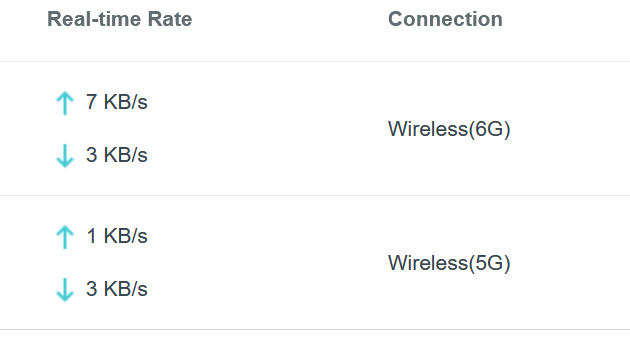
I am testing the new firmware and noticed some unusual behavior (I didn't test the previous firmware to compare the same issue). The wireless data exchange between clients doesn't appear in the Deco app or the local web interface. Also, as you can see in the screenshots below, the data transfer between the smartphone and PC (even though both devices use the 6GHz band and are about 1 meter away from the Deco B63, the speed is only around 35 MiB/s ≈ 308 Mbps). I tested the speed with MLO activated and immediately after a network optimization.
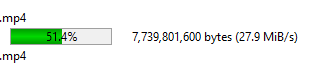
Deco web
Win11
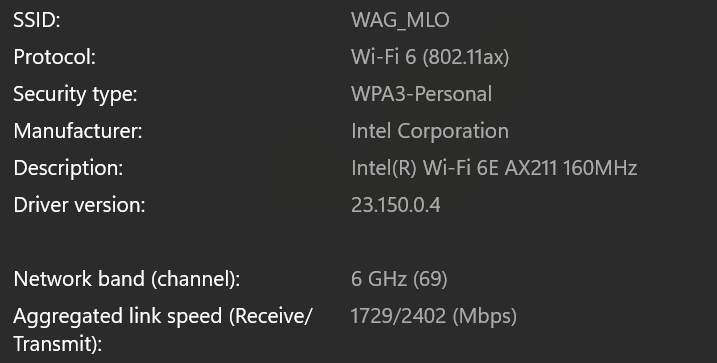
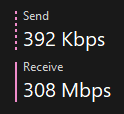
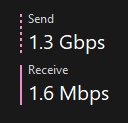
I did retest copying the same file, but changed the direction, and it shows deffrent performance as below:
Android (16) --> PC Win11 308Mbps
PC Win11 --> Android (16) 1200Mbps
so in brief:
- Data exchange between wifi clients doesnt appear in the Deco app or web interface (only internet traffic is there, I guess) and data exchange between clients doesnt appear to be affected by the speed limit, thanks God :).
- Network performance is behaivng deffrently when change the direction.
Wagdi
- Copy Link
- Report Inappropriate Content

@David-TP So after all of these beta releases and still no network or clients isolation for the IoT network??! How long do we have to wait before we can stop using the guest network for IoT devices?
- Copy Link
- Report Inappropriate Content

Really happy to see that DoH & DoT is being added. I'm a new BE65 owner and was surprised to find these key features were missing. I found the KB from 2024 for an older Deco model and so assumed assumed a newer, high end system would have the same.
https://www.tp-link.com/uk/support/faq/4254/
Aiadi wrote
@David-TP So after all of these beta releases and still no network or clients isolation for the IoT network??! How long do we have to wait before we can stop using the guest network for IoT devices?
In my setup I have some IoT which need to communicate with my Apple TV (HomeKit/Matter Hub) which sits on the main network. So total isolation wouldn't work for me. For these the ideal would be some NAC rules to provide limited access between the IoT network and the hub.
I believe you can isolate any specific client, so that works for IoT devices which only need Internet access.
- Copy Link
- Report Inappropriate Content

Hi, thank you very much for the feedback.
Do you wish to achieve:
IoT network is isolated from the Main Network just as the Guest network. But the IoT clients could still access each other?
I‘ve seen that many Smart Home hubs/Home Automation Controllers are connected to the Deco via an Ethernet cable, which would be considered as the Main Network devices. If the IOT network is isolated from the Main Network, the Home Automation Controllers might no longer be able to communicate with the IOT devices.
And, have you tried the "Device Isolation", which might be a workaround if you plan to isolate a group of smart home devices from the rest:
Guest Network vs IoT Network vs Device Isolation
Best regards.
- Copy Link
- Report Inappropriate Content

@David-TP Wish there's more option with Device isolation, like isolation group 1, group 2 etc. I have different type of devices which i would like to be isolated from each other.
- Copy Link
- Report Inappropriate Content
@David-TP So my Deco BE65v2's just crashed again. I turned on an Apple TV that connects via Wi-Fi and started to browse the app store when all three Wi-Fi networks died. Devices connected via Ethernet wouldn't work either. LEDs remained solid green. This time I just left everything alone and eventually Ethernet started working again, followed by Wi-Fi.
I have submitted my logs as requested in a previous post.
Addition 17/03/2026:
Oddly enough, just logged in to the Deck to view the logs and it's only showing logs for today's date. I haven't rebooted the the devices and they haven't at any point been removed from their power source.
- Copy Link
- Report Inappropriate Content

Hello David,
Is this firmware for be63? rel 21001? And is this the right link to download it, because it does not say be63 at all.
quote
Hi, A new firmware-1.3.0_build_2602261_rel_21001 has been updated. It has included the NAT Loopback bug fix and also adds WiFi Heatmap.
Best regards.
it shows for be65 is there one for be63 so i can update it
BE65V2_BE65V3_multi_v2_SP1_V2-up-ver1-3-0-P1[26022612-rel21001]_2026-02-26_14.44.55
https://static.tp-link.com/upload/beta/2026/202603/20260309/BE65V2_BE65V3_multi_v2_SP1_V2-up-ver1-3-0-P1%5B26022612-rel21001%5D_2026-02-26_14.44.55.bin.zip
- Copy Link
- Report Inappropriate Content

@SparkySwykowski That is the version I downloaded and installed on my BE11000 (Costco 3 pack). My understanding is BE63/BE65/BE11000 v2.6 are all using same firmware.
- Copy Link
- Report Inappropriate Content
@Larry-R Hi @Larry-R, Thanks for your help.
In the past, when I updated the firmware, the link always included "BE63," but this one does not.
I'm concerned that it won't work because it doesn't match the model number.
Here's the link: [Firmware Download](https://static.tp-link.com/upload/beta/2026/202603/20260309/BE65V2_BE65V3_multi_v2_SP1_V2-up-ver1-3-0-P1%5B26022612-rel21001%5D_2026-02-26_14.44.55.bin.zip)
I've been experiencing major issues with my BE63. The 5GHz cameras connect, but then lose their connection. The PTZ button on the cameras disappears, and the 5GHz is behaving very poorly.
I have a three-pack setup with no wired backhaul, just wireless, and all settings like beamforming and fast roaming. DoH & DoT are disabled.
My desktop is slow, especially when loading pictures, and it's becoming very annoying.
Previously, I had the XE75 Pro system, but I bought the BE63 because it has 2.5 ports.
I added one BE63 to test the speeds on my desktop. With the XE75 Pro, I was only getting about 1100 Mbps download speed, even though I have a 2 Gbps connection. However, the BE63 successfully delivered 2 Gbps. At that time, I had 4 XE75 Pro units and 1 BE63 as the main unit.
After seeing that I was getting better speeds with the BE63, I removed all the XE75 Pro units and installed 2 more BE63 units, so now I have a total of 3 BE63 devices.
When I had only 1 BE63 and 4 XE75 Pro units, the Deco BE63 received an update to version 1.3.0 Build 26012212 Rel. 11551,
which I found strange since I didn’t expect a beta update.
The other 2 BE63 units are still on version 1.2.10 Build 20251229 Rel. 42008.
This has been a nightmare for me; nothing is working properly at all. I have about 55 devices on the network.
The 2.4 GHz cameras are okay, but when I connect the 5 GHz cameras to the 2.4 GHz band, it’s still the same issue.
The PTZ (pan-tilt-zoom) functionality moves very slowly, the PTZ button disappears, or the cameras disconnect.
I dislike beta firmware. At my age, I don't want to worry about playing with settings; I just want my devices to work.
Now that I’m in my 60s, I’d rather have things run smoothly instead of troubleshooting, which I used to enjoy in my 30s and 40s.
Would appreciate any advice!
Thank you
Sparky
- Copy Link
- Report Inappropriate Content
Information
Helpful: 6
Views: 52963
Replies: 312
Voters 4



