
Beta Software Firmware 1.4.0 for Deco XE75/XE5300/XE75 Pro_V2/V3 Added Wi-Fi Access Control, WireGuard VPN & More


This Article Applies to:
Deco XE75(US/EU/AU/CA)_V2/V3
Deco XE5300(US)V2/V3
Deco WE10800(US)V2/V3
Deco XE75 Pro(US/EU/AU/CA)_V2/V3
Deco XE70 Pro(US)_V3
Vx.0=Vx.6(eg:V2.0=V2.6)
Firmware Modifications:
- Added WiFi Network Mode to enhance the overall performance of the 2.4GHz band.
- Added Camera Security.
- Added Whitelist/ Wi-Fi Access Control to support Allow List and Block List
- Supported Captive Portal for Guest Network.
- Supported Firmware Auto Update.
- Supported ECO Mode 1.0 to save power.
- Supported WireGuard VPN.
- Integrated third-party VPN services.
- Supported limiting client speeds.
- Supported fixing a specific port as the WAN port.
- Optimize client type recognition.
- Support managing new Kasa and Tapo product categories (including light strips, multi-port outlets, etc.).
Bug Fixes:
- Fixed the issue where Samsung devices could connect to the Deco WiFi but had near-zero network speeds.
Download Links
| Deco XE75/XE5300/WE10800_V2/V3 | 1.4.999_Build_20260319_rel_57690_Beta (updated 2026.3.19) |
| Deco XE75 Pro/XE70 Pro_V2/V3 | 1.4.999_Build_20260319_rel_57838__Beta (updated 2026.3.19) |
Update Notice:
- Please be sure you have read the Beta Test Agreement before upgrading the Pre-release firmware!
- Please make sure the Deco APP is up-to-date.
- The Beta firmware versions can’t be degraded directly to the previous 1.3.1/1.2.9, etc. versions.
- How to manually update the firmware via web UI.
As always, we value your feedback. If you happen to encounter any concerns during or after the firmware upgrade, please feel free to comment below with the following information. Your input helps us continue to improve and provide the best possible products and support.
- Provide a detailed network layout, including how the devices are connected.
- Include a detailed description of the issue and as much information as possible regarding the specific conditions that seem to trigger the behavior.
Thank you for your continued support and for being part of our community.
- Copy Link
- Subscribe
- Bookmark
- Report Inappropriate Content

Hi,
David-TP wrote
Could you please refer to this link to help me submit the Deco App log:
I have already sent app log this morning.
Apart from the Apple TV, what are the model numbers of the smart IoT devices?
I have not done extensive testing, but usually I notice when my Thread devices, that are connected through Aqara hub, stop working with Apple TV even when Aqara app works fine.
Pretty much every time I do Deco reboot it causes some problems and every time I have been unable to fix all of them, so I do another reboot hoping to fix everything and the cycle begins again. Had to reboot Decos this morning to get TV to work and after several hours 4 devices are still under "Other" connection type and some connected to wrong Deco. At least all wifi wired devices have switched to wireless in the app.
- Copy Link
- Report Inappropriate Content

Thanks for this @David-TP
Not the answer for me. After installing yesterday, many notifications for offline cameras overnight, and failed Home Assistant automations because of IoT devices like 2.4 GHz power plugs becoming unavailable.
Looks like I'll try to factory reset my X75 Pro V2's back to 1.2.14 (20250217) when I get a chance. Whilst it's still not the product I expected when I purchased, but at least they've been relatively stable for the past 12 months.
Look forward to the next Beta. Hope it comes soon.
- Copy Link
- Report Inappropriate Content
@OzPatricio Thank You for posting this. I was waiting to hear about the 2.4 network issues before I jumped in.
- Copy Link
- Report Inappropriate Content
Found weird thing with Connection Preference. Usually this setting does nothing, but if some devices are connected to wrong Deco or band and I try to set Preferred Deco and/or Wi-Fi Band, then they lose connection and won't reconnect until I switch back to Auto and then they connect back to wrong Deco/band. Had this with Android 11 TV (switched to wired connection because it had big connection problems with wifi), but same thing happens with PlayStation 4 also.
- Copy Link
- Report Inappropriate Content
Hi, thanks for the follow-up. Please also keep the support ticket #TKID260155558 updated so that the senior engineer can be aware of the latest status.
Best regards.
- Copy Link
- Report Inappropriate Content

@David-TP this information absolutely false and misleading.
you said "1.4.5 for V1 has already added the listed features " while the truth is I have the 1.4.5 version for XE75 V1 since it came out and it does NOT support wireguard.
this has been a feature I have been asking for more then 2 years now you can find many thread from me about the same.
I understand that OP was referring to XE5300 and not XE75 but the firmware for XE75 V1 is same as mentioned in the post and that's the latest that's available.
So please don't spread misinformation as it is TP-link has foresaken the V1 model and provided updates for cheaper models like XE55 but not XE75 V1. Don't extend that pain with false hope.
David-TP wrote
Hi, 1.4.5 Build 20241129 Rel. 44718 is for Deco XE5300_v1.6, while the firmware here is for V2.6.
1.4.5 for V1 has already added the listed features here for V2.6.
By the way, you can go to our live support service if you need urgent help:https://www.tp-link.com/us/support/contact-technical-support/#LiveChat-Support
Thank you very much.
Best regards.
- Copy Link
- Report Inappropriate Content
Hi @David-TP,
I just wanted to follow up on why this beta, Deco XE75 Pro_V2_1.4.999 Build 20260130 didn't work for me, as compared to my current setup.
As I said in my previous post, when I installed it, I started to get 2.4 Ghz devices becoming unavailable - security cameras, power plugs etc.
This also happens when I install the current official release firmware - Deco XE75 Pro_V2_1.3.1 Build 20251023.
It also happened when you released Deco XE75 Pro_V2_1.2.14 Build 20241223
However, back then, you made available a beta version - Deco XE75 Pro_V2_1.2.14 Build 20250217 at community.tp-link.com/en/home/forum/topic/790504, which you described as allowing:
"Deco units under the same Mesh network to use non-overlapping 2.4GHz channels for mobile devices, like the "High Capacity" mode".
I have used the recovery method to reset my V2 XE75 Pro's back to this beta and all devices are now well behaved and constantly available across the entire network.
Any chance this functionality will be added to the current Official Releases (1.3.1) or future beta/early access releases of 1.4/1.5 etc.?
I am very keen to use the enhanced capabilities of these new releases, and even move one of my V2's to become the Main device when it catches up to the V1 capabilities, but can't if my network is unstable.
FYI, This is my mesh network right now.
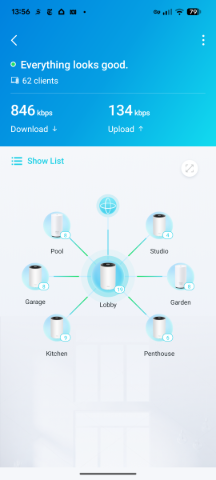
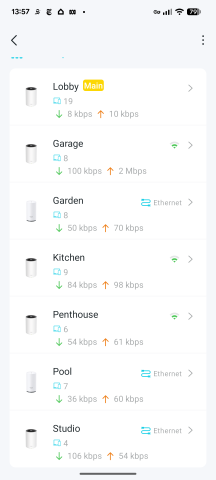
- Copy Link
- Report Inappropriate Content
@David-TP WPA3 is still not available for the IoT network. I have a number of IoT devices that support WPA3 (most of them produced by Kasa or Tapo - do these brands sound familiar?).
- Copy Link
- Report Inappropriate Content
@David-TP Since 'upgrading' to this beta firmware two smart TVs (LG and Sony) cannot connect to the internet. Any suggestions before I revert to the old firmware?
- Copy Link
- Report Inappropriate Content
@Divad Restored the previous firmware and smart TVs are working again. On the Sony TV Wifi would become unavailable after a few minutes and could not be reconnected. On the LG TV Wifi would be connected but there would be no connection to the internet. I am using XE75Pro in AP mode and the TVs were connected on the 5GHz band.
- Copy Link
- Report Inappropriate Content
Information
Helpful: 5
Views: 17696
Replies: 93
Voters 2

