
Tplink AX55 V1 firmware 1.5.11 massive bufferbloat
Tplink AX55 V1 firmware 1.5.11 massive bufferbloat

Just wanted to report an issue after updating my Archer AX55 V1 to firmware 1.5.11.
Right after the update, everything seemed fine. But once I enabled QoS, the router basically became unusable.
What I’m seeing:
-
Massive bufferbloat as soon as QoS is on
-
CPU usage spikes straight to 100%
-
RAM usage looks normal
-
Ping jumps from a stable ~49 ms to 290 ms+
-
Web UI becomes extremely slow and at times I can’t even log in to the router
Disabling QoS immediately brings things back to normal, so the issue seems directly tied to QoS behavior on 1.5.11.
This wasn’t happening on the previous firmware with the same settings and same network load.
Has anyone else on AX55 V1 experienced this on 1.5.11?
Any known fixes, or is this a confirmed firmware bug?
- Copy Link
- Subscribe
- Bookmark
- Report Inappropriate Content


Hi @AIRL ,
Thanks for contacting our community.
The latest beta firmware for Archer AX55-v1 has been released at: What Can I Do If QoS Enabled Causes BufferBloat and High Latency on My Router After Firmware Update?
As for the next official firmware update, there is no confirmed release date yet. You can check the official website for firmware updates or enable the Auto Update button.
Best Regards.
- Copy Link
- Report Inappropriate Content
Hello @Retro_0223 ,
Welcome to our community.
Besides firmware updates, have you changed any other settings?
May I know if your network topology diagram is as follows:
ISP modem—AX55)))((( client devices
(Note: — stands for wired connection,)))((( stands for wireless connection )
The tech team has been made aware of your case; they will likely reach out to you via email to continue troubleshooting. Please check your email inbox and confirm.
- Copy Link
- Report Inappropriate Content
@Joseph-TP thanks for the response.
Here’s my setup and what I’ve already tested.
Network topology
ISP router + modem combo provided by PLDT (Philippines), set to bridge mode
Archer AX55 V1 is in router mode and receives the CGNAT IP directly
Topology is: ISP modem (bridge mode) -> Archer AX55 -> client devices
WAN details
WAN type: DHCP
ISP advertised speed: 500 Mbps+ down / 500 Mbps+ up
Actual speed:
• QoS OFF: consistently 500 Mbps+ down and up, stable latency
• QoS ON (firmware 1.5.11): throughput drops anywhere between 30–310 Mbps, severe ping spikes and frequent timeouts
Behavior observed on firmware 1.5.11
• Massive bufferbloat immediately after enabling QoS
• CPU usage jumps to 100% as soon as QoS is enabled
• RAM usage remains normal
• Ping increases from a stable ~49 ms to 200–290 ms+
• Web UI becomes extremely slow and at times inaccessible
• Disabling QoS instantly restores normal performance
Troubleshooting already done
• Factory reset performed after updating to firmware 1.5.11
• Tested with default settings and only QoS enabled
• Issue occurs even with a single wired client connected
• No topology or configuration changes compared to the previous firmware
• Same network load and devices worked normally with QoS on the earlier firmware
The issue appears directly tied to QoS behavior in firmware 1.5.11 rather than configuration or topology. Everything works as expected as soon as QoS is disabled.
Let me know if you need logs, specific QoS settings screenshots, or if there’s a known regression or workaround for QoS on AX55 V1 firmware 1.5.11... Or my router is just faulty. 😵💫
Thanks.
- Copy Link
- Report Inappropriate Content
Hi @Retro_0223 ,
Please don't worry, it's likely related to the changes in version 1.5.11.
I will get back to you if there are any updates.
- Copy Link
- Report Inappropriate Content
Hello @Retro_0223 ,
Please try this firmware and see if it helps.
- Copy Link
- Report Inappropriate Content
@Joseph-TP
Testing the beta firmware now. Will be using tomorrow in my daily tasks. I'll give feedback if everything's all good. 🙌
- Copy Link
- Report Inappropriate Content
@Joseph-TP
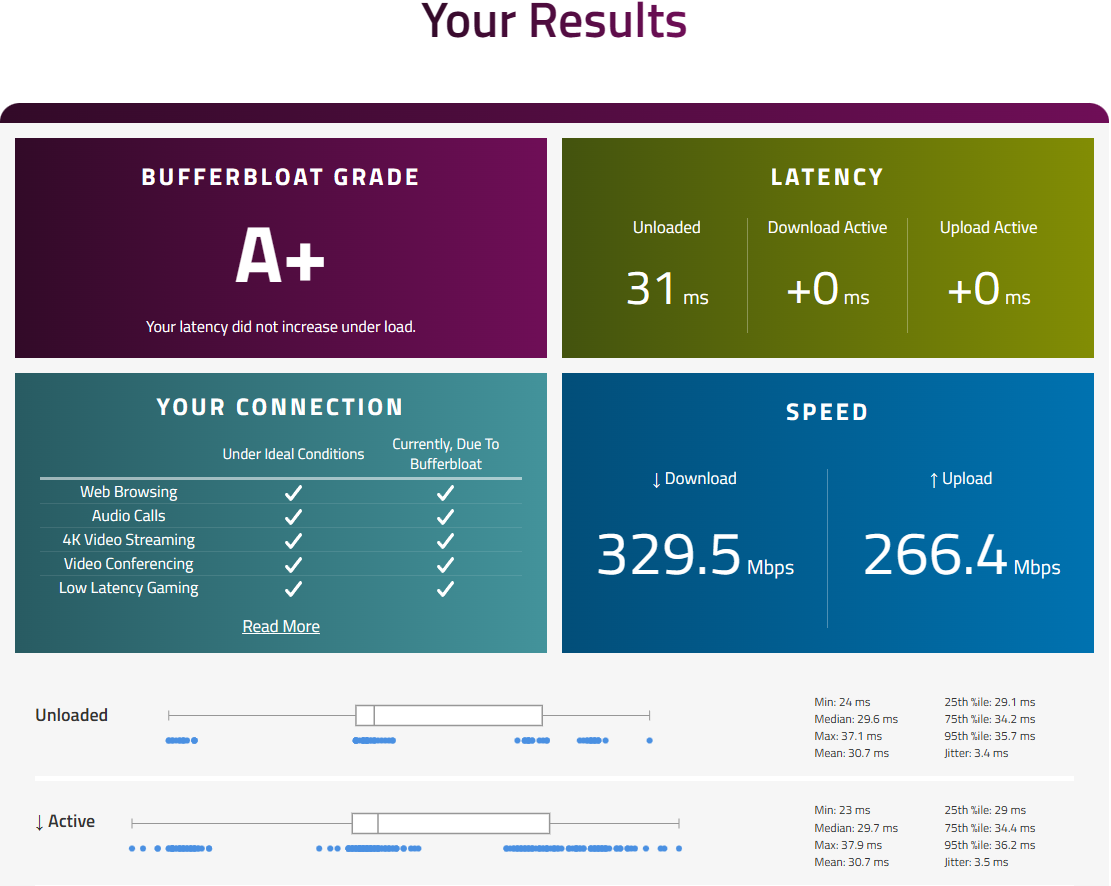
Looks like the beta firmware worked. UI is more snappy and no bufferbloats. Don't know what voodoo magic you guys did but that fixed it for now.
Will continue to monitor. Speeds are within expectation as QoS is enabled. Cheers guys!
- Copy Link
- Report Inappropriate Content
Hi @Retro_0223 ,
Sounds great~ Feel free to contact us if you have any further questions~!
- Copy Link
- Report Inappropriate Content

@Joseph-TP Hello, when will this update with the QoS fix be released to all users?
- Copy Link
- Report Inappropriate Content

AIRL wrote
@Joseph-TP Hello, when will this update with the QoS fix be released to all users?
Hi,
Joseph-TP posted a link that is accessible by all users in post #6 above.
- Copy Link
- Report Inappropriate Content
@woozle Yes, I've seen it, but it's a beta version, I'm waiting for the release.
- Copy Link
- Report Inappropriate Content
Information
Helpful: 0
Views: 2509
Replies: 18
Voters 0
No one has voted for it yet.