Technical Support - Network Slowdown when Using VIGI NVR

Technical Support - Network Slowdown when Using VIGI NVR

Technical Support - Network Slowdown when Using VIGI NVR
Yesterday
Model: Deco X50  
Hardware Version:
Firmware Version:

Good afternoon, TP-Link support team,

I am experiencing an issue with a client whose entire network infrastructure was built using TP-Link equipment, aiming for maximum compatibility and performance between devices.

Below is the full description of the environment:

Installed equipment:

  • 10 Tapo C320WS cameras connected via Wi-Fi
  • Mesh network system with 3 Deco X50 units (indoor line, connected via Ethernet cable)
  • 1 Deco X50 Outdoor unit (connected via Ethernet cable)
  • VIGI NVR1016H for video recording
  • Western Digital 6TB HDD for storage
  • TL-SG108PE managed switch for network distribution

Problem description:

During testing, we observed the following behavior:

  • With the VIGI NVR turned OFF:
    • The entire network works perfectly
    • Cameras remain stable, with no disconnections
    • Wi-Fi signal has excellent range (reaching approximately 700 meters from the Deco X50 Outdoor)
    • Normal network speed (around 300 Mbps)
  • When the VIGI NVR is turned ON:
    • The network experiences significant slowdown
    • Several cameras start losing connection (verified through the Tapo app)
    • Wi-Fi performance drops drastically
    • Even close to the Deco Outdoor unit, speed does not exceed 10 Mbps

When the NVR is turned OFF again, the entire system returns to normal operation.

Request:

I would like support from your technical team to identify the cause of this issue.
Since all devices are from the same brand, we expected stable integration, but this situation is causing dissatisfaction for the client.

If necessary, I can provide additional details, logs, or perform further tests as instructed.

I look forward to your response with possible solutions or guidance.

Sincerely,
Wellington Costa
WIK Security Systems

  0      
  0      
#1
Options
8 Reply
Re:Technical Support - Network Slowdown when Using VIGI NVR
Yesterday

  @WellingtonCosta 


Is the VIGI NVR1016H hooked up to the TL-SG108PE managed switch? Deco mesh routers do not get along with managed switches even those made by tp-link. If it is hooked to the switch I would remove it from the switch and connect it directly to a Deco that's not hooked to the switch and see if that fixes the problem.


If that fixes the problem I would swap out the switch with one that is compatible with Deco mesh routers. You can find the list of compatible switches here


If that doesn't address the issue we will need your clients Deco app log to be able to trouble shoot this for you. I have provide the instructions below on how to submit the log.


How to submit Deco APP log


Can you also submit a diagram of how the entire network is set up. 


Once the log is submitted please respond to this post with the TKID number and a member of the staff will get back to you.


@David-TP 


Need help with the Deco app, setup, Ethernet backhaul, network switch or rolling back firmware? Router or AP mode? https://community.tp-link.com/us/home/forum/topic/699816?page=1
  0  
  0  
#2
Options
Re:Technical Support - Network Slowdown when Using VIGI NVR
19 hours ago

  @AjudaFixDecoApp 
 

Hello David,

Thank you for your suggestion.

I performed the test as recommended. I disconnected the Ethernet cable that was connected to the VIGI NVR from the TL-SG108PE switch and connected it directly to a Deco unit.

However, the issue still persists. As soon as I powered on the NVR, around 4 cameras lost connection and the entire network became very slow again.

It is important to mention that I did not change the entire network structure — the other Deco units are still connected via Ethernet to the managed switch.

I have collected logs from both the Deco system and the NVR. Could you please advise the best and most secure way to send these logs for analysis?

If needed, I can also provide a full network diagram of the installation.

Looking forward to your guidance.

Best regards,
Wellington Costa
WIK Security Systems
  0  
  0  
#3
Options
Re:Technical Support - Network Slowdown when Using VIGI NVR
19 hours ago

  @WellingtonCosta 


Not sure how @David-TP will want the logs sent in he will be at work in a few hours. 


What happens if you bypass the entire switch and Deco's and go from the back of the modem directly to the NRV?


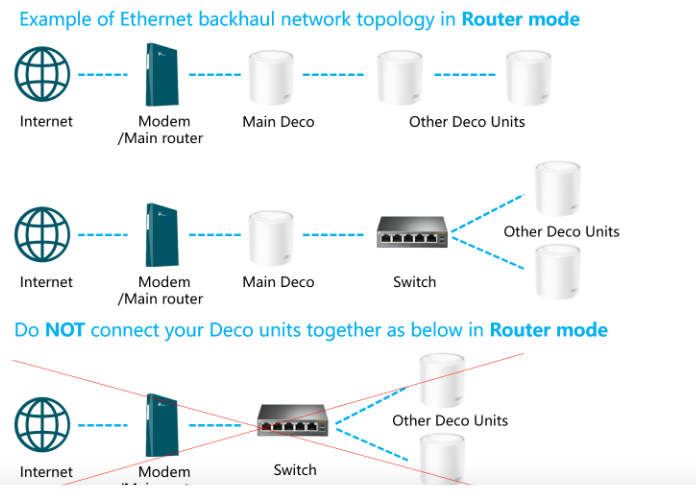
Also at least one of the Deco units needs to be connected directly into the modem then the rest are ok to hook into the switch. it should be hooked ether with option 1 or option 2 as shown below never use option 3 unless you are running the units in AP mode 


Need help with the Deco app, setup, Ethernet backhaul, network switch or rolling back firmware? Router or AP mode? https://community.tp-link.com/us/home/forum/topic/699816?page=1
  0  
  0  
#4
Options
Re:Technical Support - Network Slowdown when Using VIGI NVR
18 hours ago

Olá,

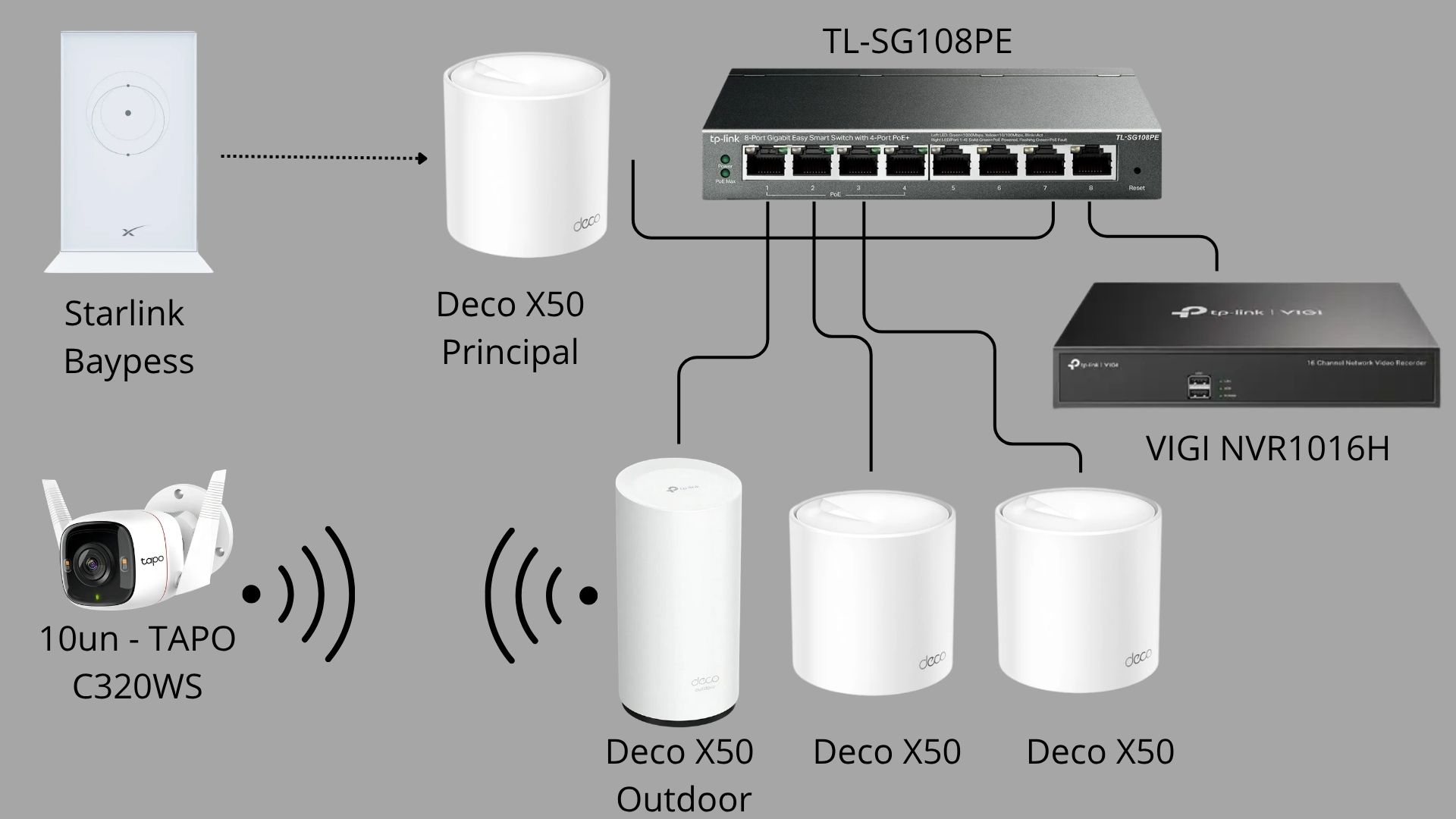
Essa é a topologia de de a rede atual que que estoou usando não no momentoo.O.

Por favor, note que as conexões de porta exatas podem não ser precisões‚, pois é não me lembro da da sequência exata das portas euadás.O.

Cumprimentos‚,
Wellington Costa
Sistemas de de de segurança WIK


@AjudaFixDecoApp 

  0  
  0  
#5
Options
Re:Technical Support - Network Slowdown when Using VIGI NVR
18 hours ago

  @WellingtonCosta 


Which of the Deco units did you directly connect the NVR too? 


Looking at the image you have it all hooked up correctly. 


My name is Bill :) - @David-TP is a member of the tp-link staff he should be on in a few hours :) 

Need help with the Deco app, setup, Ethernet backhaul, network switch or rolling back firmware? Router or AP mode? https://community.tp-link.com/us/home/forum/topic/699816?page=1
  0  
  0  
#6
Options
Re:Technical Support - Network Slowdown when Using VIGI NVR
18 hours ago
Following @David-TP's suggestion, I connected the VIGI NVR directly to the Deco main unit. Even so, the same error occurred.
  0  
  0  
#7
Options
Re:Technical Support - Network Slowdown when Using VIGI NVR
18 hours ago

  @WellingtonCosta 


Just an FYI you have been talking to me (HelpFixDecoApp) the entire time


David will get with you soon as he is at work :) 

Need help with the Deco app, setup, Ethernet backhaul, network switch or rolling back firmware? Router or AP mode? https://community.tp-link.com/us/home/forum/topic/699816?page=1
  0  
  0  
#8
Options
Re:Technical Support - Network Slowdown when Using VIGI NVR
8 hours ago

  @HelpFixDecoAppHelpFixDecoApp 

Got it! I got a bit confused there at the beginning, haha. Thanks a lot for helping me solve this. The client is really upset about the whole situation.

  0  
  0  
#9
Options