
Second Access point - Impossible to set up

I've connected the first XE75 pro using a cable to my router (BE3600), connected to its wifi, choose AP mode, and it works great.
Now I want to connect the second one. It is connected using a cable too. I turn it on, after a few minutes I can see in the Deco app that it is added as a satellite device, but then the whole network stops connecting. Same issue with the 3rd one.
This sounds like a DHCP problem - the satellite decos are NOT going into AP mode, and I can't change them because I am disconnected from the network.
What's the solution here? Sounds very common scenario.
- Copy Link
- Subscribe
- Bookmark
- Report Inappropriate Content

What about if you let the satellite connect wirelessly first? Confirm AP mode is working fine for 10mins or so then plug the satellite into the main deco with ethernet, test that for a while, then connect the satellite in its final setup.
- Copy Link
- Report Inappropriate Content
@Adam-ITComms Thanks! That worked - connecting the Mesh using wifi and not a cable.
In fact, after setting all 3 up, it is all working well. But when I plug one of them to the wall (directly to the router), everything stops working again. This is a serious problem and I hope TP Link will help me with that.
- Copy Link
- Report Inappropriate Content
What about iif you plug through cables from the satellite decos into the ports on the main deco instead of into the router?
So the cable that comes out of the wall from the satellite, and goes into the router, plug that into the main deco instead.
Does that work?
You could also turn off Smart DHCP in Advanced l, that detects if there is no DHCP on the network and forces the deco to take over dhcp services.
- Copy Link
- Report Inappropriate Content
@Adam-ITComms You are correct. I've just talked with their support and they point me to this page (that didn't come up in my research): How to Set Up Deco in Access Point Mode
Tomorrow I will try connecting a switch for all the APs.
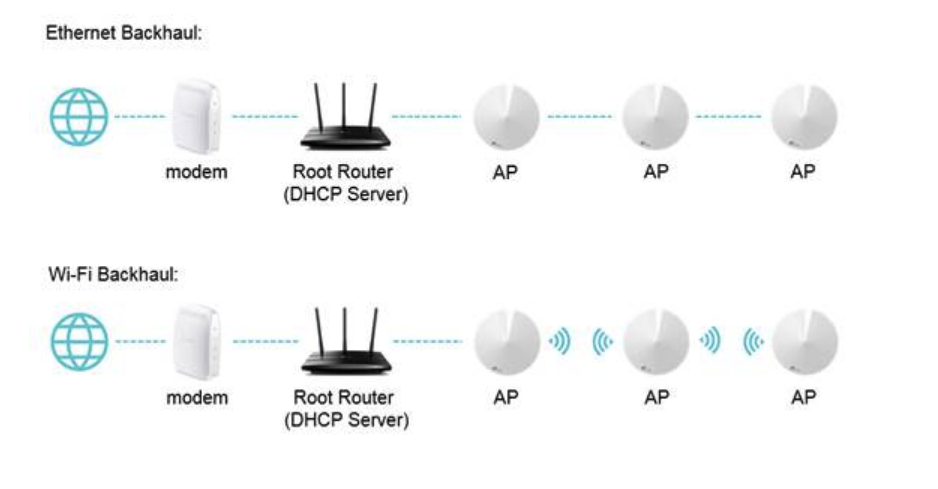
- Copy Link
- Report Inappropriate Content
Yup, a switch would work, just depends on the complexity of your setup.
I use a lot of unmanaged cheap switches from Amazon and they work fine. Its usually when you use a managed switch that it can get complicated with compatibility.
It might just work if you use the two extra 1G ports on the main deco and connect the satellite decos there.
Lots of options
- Copy Link
- Report Inappropriate Content
- Copy Link
- Report Inappropriate Content

If you do decide to add a switch to your network please keep the following in mind.
"The Deco Ethernet backhaul feature is based on the standard IEEE 1905.1 protocol. However, we find that some switches, mainly the D-Link switches, will not forward packets based on IEEE 1905.1 protocol, causing all Deco units in a network loop and becoming quite unstable, you might consider changing another switch or contacting switch’s support directly. TP-Link Switches are mostly compatible with our Deco’s Ethernet backhaul."
Taken from the following FAQ
- Copy Link
- Report Inappropriate Content
I am pleased to say now the setup works perfectly.
So the mesh devices should NOT be connected directly to the router. Instead I have a small switch connecting everything and that works well.
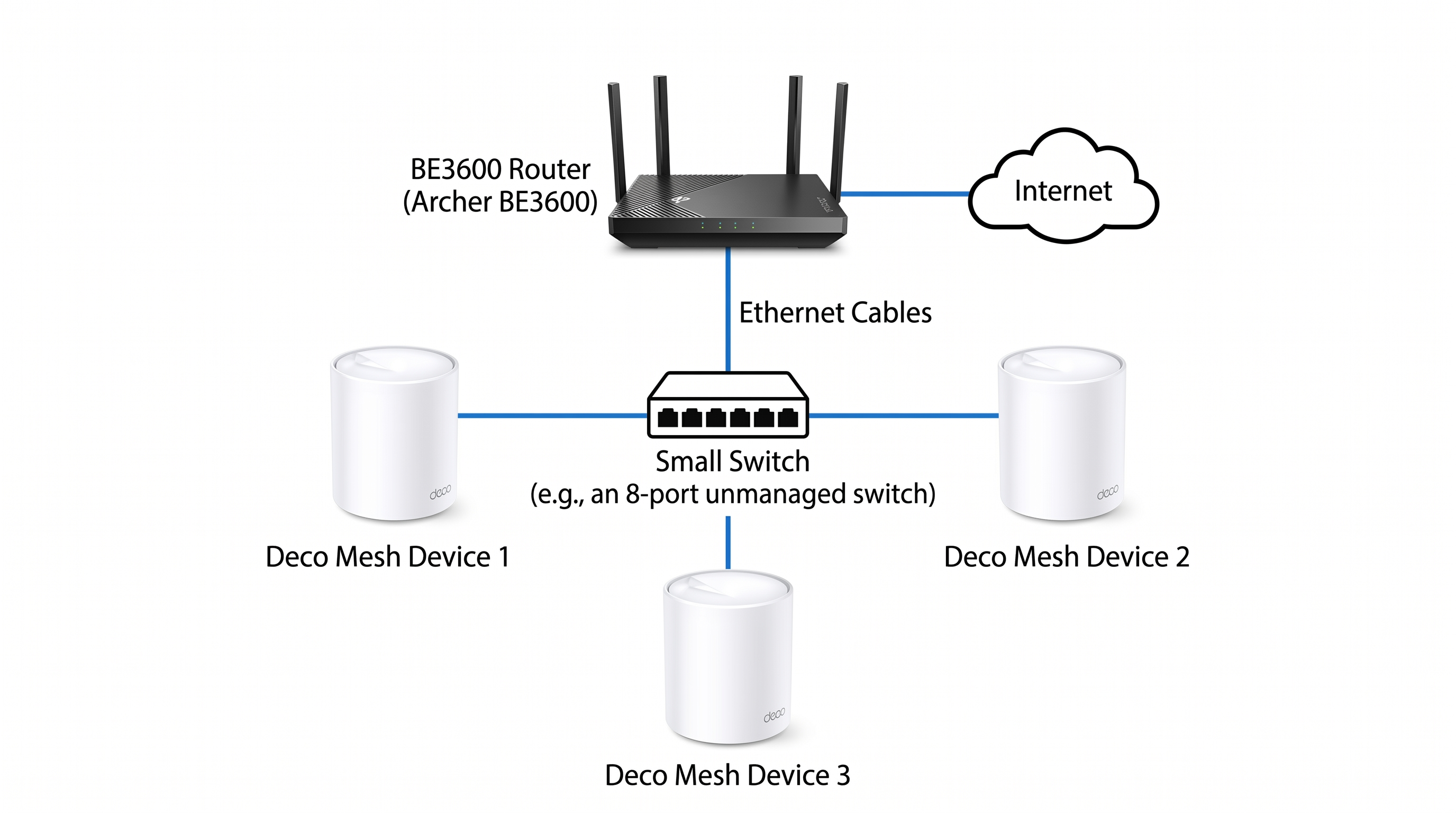
Thanks all.
- Copy Link
- Report Inappropriate Content


Hi,
Usually, there is no problem connecting all three Deco nodes to the router's LAN ports when Deco works in AP mode.
In your situation, the Deco network stops working when Deco connects to the wall port, it might be that the wall port isn't connected to the router, or there might be other devices or settings between the router's LAN port and the wall port causing the issue. If the Deco nodes are working properly now with the switch, you can maintain this topology.
Best regards.
- Copy Link
- Report Inappropriate Content
Information
Helpful: 0
Views: 203
Replies: 9
Voters 0
No one has voted for it yet.