
TP-Link DECO BE25 in AP mode causes loop
TP-Link DECO BE25 in AP mode causes loop

Hi!
I have two Deco BE25 in AP mode. As soon as I plug in the second Deco ( the secondary unit ) a loop is created and my wired connections absolutely tank and the icon indicates that it's using WIFI backhaul. The settings don't show a way of disabling this behavior which is absolutely bonkers.
How to proceed?
My setup:
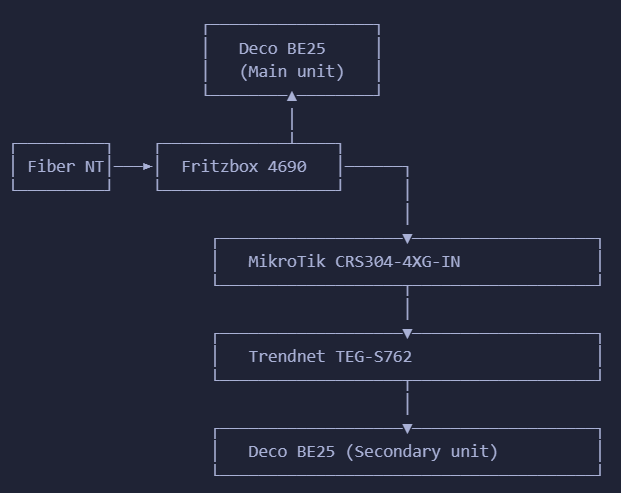
Edit: I have RSTP enabled on my Mikrotik but apparently even that is not enough.
Edit 2: When I disconnect the Trendnet switch from the MikroTik switch, then I still have wired internet for devices on the Trendnet switch via the Deco unit. Should that even be possible when router mode is disabled?!
- Copy Link
- Subscribe
- Bookmark
- Report Inappropriate Content
It's still connected via the trendnet switch to the mikrotik switch. Nothing changed on an infra level, only on deco software level.
- Copy Link
- Report Inappropriate Content


Hi,
"I factory resetted the AP, then created a separate wifi with it ( same SSID as my main deco ), still connected to that same mikrotik switch, problem solved."
Regarding the above post, please confirm the following information:
1. Is the 2nd Deco still connected to the Trendnet switch and the Trendnet switch connected to the MikroTik switch, rather than the 2nd Deco connected to the MikroTik switch directly?
2. Whether you have two Deco networks in the Deco app, and each network has a Deco node?
Best regards
- Copy Link
- Report Inappropriate Content
Information
Helpful: 0
Views: 402
Replies: 12
Voters 0
No one has voted for it yet.