
Deco M4R Bandwith Capped AT 100 Mbps

Hi everyone, need some help with my TP-Link Deco M4R setup. The box mentions AC1200 Mesh, but all 3 Deco units are only pulling around 100 Mbps, while another TP-Link router on the same main connection is getting ~300 Mbps speeds.
Is the Deco M4R capped at 100 Mbps because of the Ethernet ports or some setting issue? Also, I’m unable to connect/manage the Deco routers through the Deco app.
Any suggestions on how to fix this or improve the speeds?
- Copy Link
- Subscribe
- Bookmark
- Report Inappropriate Content

@Capmkwifi Deco M4R has 1000 Mbps ports. You can check again after using CAT6 ethernet cable.
- Copy Link
- Report Inappropriate Content


Hi,
You can try the following steps to see if the speed improves.
1. Open the Deco app, go to More > ECO Mode, and ensure that ECO Mode is disabled.
2. Go to More > QoS, and ensure QoS is disabled. If you don't see an on/off switch for QoS, set it back to standard and remove all priority devices.
3. Go to More > Advanced > NAT Forwarding, and disable SIP ALG and UPnP.
If the same phenomenon persists, please confirm the following information.
1. How many Deco nodes do you have? Are they Deco M4? Please describe your network diagram in detail.
2. What's the LED status on your Deco nodes?
3. Are your Deco nodes displaying the offline status in the Deco app so you can't manage them?
Best Regards
- Copy Link
- Report Inappropriate Content
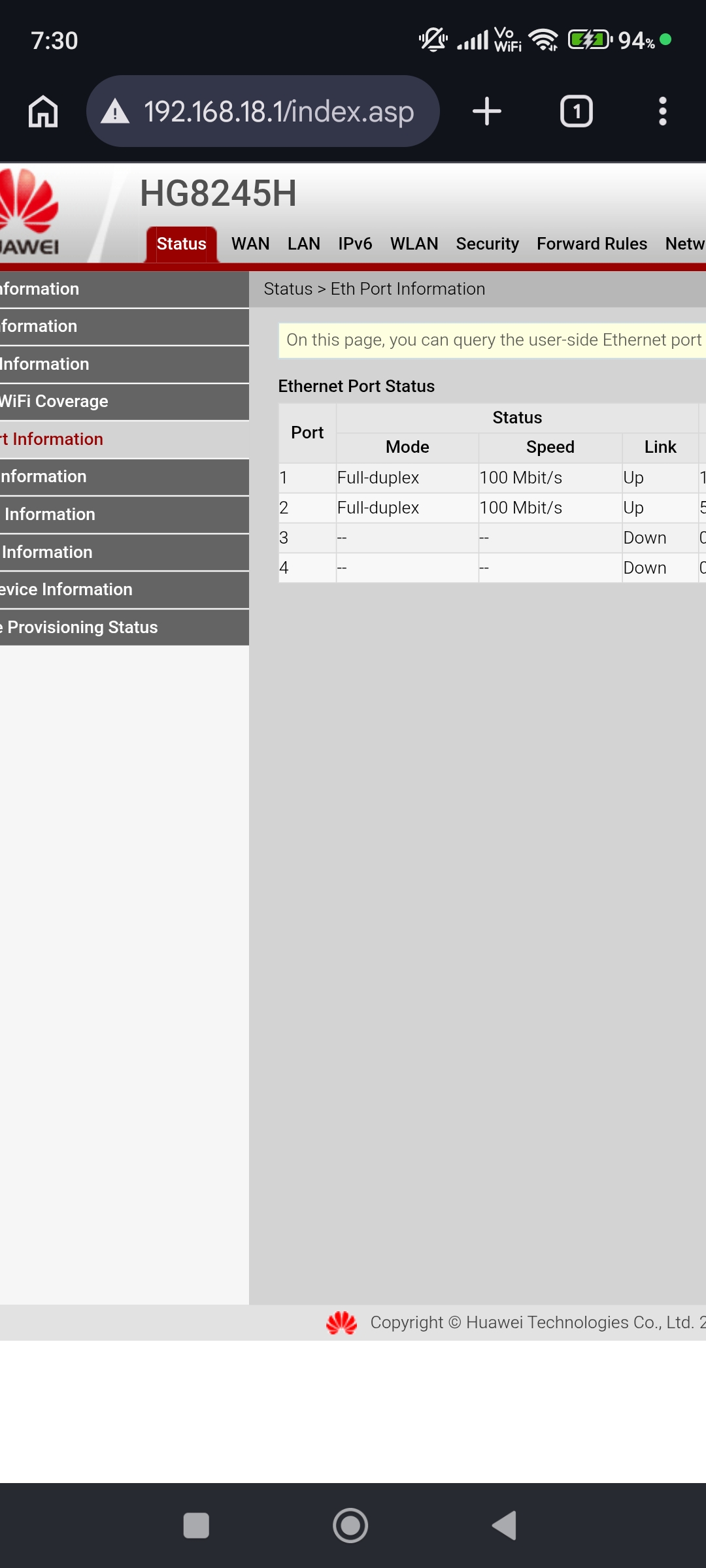
@Solla-topee My Deco M4 ethernet port also changed from 1000 Mbps to 100 Mbps after electricity came back. Everytime when electricity came back ethernet port speed changed from 1000 Mbps to 100 Mbps and i have to reboot Deco system everytime. Here is a screenshot below of my ONT. My Deco is connected on Port 1.
- Copy Link
- Report Inappropriate Content
Hi,
The two Ethernet ports on the Deco M4 are Gigabit ports. The Ethernet link speed is not only related to the Deco, but also the modem's port and the Ethernet cable.
If the link speed on your modem's page is 100 Mbps, please confirm whether the Ethernet ports on your modem are 1000 Mbps. You can try changing the modem or Deco ports and using a different Ethernet cable to see if the Ethernet link speed improves.
Best Regards
- Copy Link
- Report Inappropriate Content
@Solla-topee I'm using CAT6 cable since 4-5 years and now suddenly speed changed from 1000 Mbps to 100 Mbps on Deco M4. Do i need to change cable or do i need to change ethernet clips?
- Copy Link
- Report Inappropriate Content
Hi,
If you have a different Ethernet cable, feel free to try to change the cable between the main Deco and the Huawei ONT.
What do you mean by "ethernet clips"?
Best Regards
- Copy Link
- Report Inappropriate Content
@Solla-topee I mean RJ45 Connectors.
- Copy Link
- Report Inappropriate Content
ARGamingPK1 wrote
@Solla-topee I mean RJ45 Connectors.
@ARGamingPK1 Thank you for the update. I think you can try a different Ethernet cable between the main Deco and the Huawei ONT.
- Copy Link
- Report Inappropriate Content
@Solla-topee Okay i will and will update you after that.
- Copy Link
- Report Inappropriate Content
Information
Helpful: 0
Views: 327
Replies: 9
Voters 0
No one has voted for it yet.