
Early Access Deco X50/X50Pro/X50-PoE Pre-Release Firmware 1.7.0 Introduces DoH/DoT, Channel Selection, and More!


Hello Everyone,
We're excited to share early access to a new firmware update for the following Deco models, packed with new features and enhancements designed to elevate your Deco Mesh Home Networking experience. This firmware is currently in beta; however, your testing and feedback may help accelerate its official release!
This Article Applied to:
Deco X50/X55/X3000 V3.0
Deco X55 Pro/X50 Pro V1.0
Deco X50-PoE/HB6300-PoE V2.0
Firmware Modifications:
New Features/Enhancements:
- Added support for WireGuard VPN and third-party VPN
- Added the IoT network connection preference feature
- Added the client identification feature
- Added the LED schedule feature
- Added support for IPv6 configuration during setup
- Added the Internet Backup feature
- Added the DoH/DoT feature
- Added the Wi-Fi channel selection feature
- Improved the performance and stability of multiple Deco units operating within the network
- Enhanced the QoS performance
- Enhanced the Smart Home performance
- Enhanced the Homeshield parental control performance
- Enhanced the client list performance in the Deco APP
- Improved overall security and stability
Firmware Download Link:
| Deco X50/X55/X3000 V3.0 Deco X55 Pro/X50 Pro V1.0 Deco X50-PoE/HB6300-PoE V2.0 |
1.7.0_Build_26050812_Rel.21531(Pre-Release) |
Notes:
- Please be sure you have read the Beta Test Agreement before upgrading the Pre-release firmware!
- Please ensure your Deco app is fully up-to-date.
- This firmware cannot be reverted directly to the previous version. A Firmware Recovery Process is required to revert.
- There will be an official firmware release in the future. If you are not comfortable using beta firmware, please wait for the official release or contact our support teams for assistance.
- For detailed instructions on how to install this beta firmware on your Deco Mesh System, visit: How to manually update the firmware via web UI.
As always, we value your feedback. If you happen to encounter any concerns during or after the firmware upgrade, please feel free to comment below with the following information. Your input helps us continue to improve and provide the best possible products and support.
- Provide a detailed network layout, including how the devices are connected.
- Include a detailed description of the issue and as much information as possible regarding the specific conditions that seem to trigger the behavior.
Thank you for your continued support and for being part of our community.
- Copy Link
- Subscribe
- Bookmark
- Report Inappropriate Content
Hi,
This pre-release firmware has undergone multiple rounds of testing and generally functions well on Deco X50 Pro. If necessary, you can refer to the following instructions to downgrade to the previous version after trying the pre-released firmware.
How to Fix a Bricked TP-Link Deco Using Firmware Recovery
The pre-release firmware supports changing the device name of the connected client device and selecting the preferred Deco. Below are the instructions.
How to change the name of the client on the Deco app
Connection Preference on the Deco App: Set Your Signal Source
Best Regards
- Copy Link
- Report Inappropriate Content
Hi,
I'm consulting the relevant team on the case and will reply to you if there are any updates. Please wait patiently.
Best Regards
- Copy Link
- Report Inappropriate Content

1- The roaming function not working, on the wifi scanner dont show /r on, and in the daily use feels off.
2-I noticed a bug in iphone devices with deco x50 poe, when you connect to deco even if you are at 1m, the speed is very low (10-24Mbps), I receive 2.5gbps from the ISP and all deco is conected vía POE. In Android de ices works perfectly (700-800Mbps).
3 - Low 160Mhz speed, my desktop pc is conected vía WiFi an ont router, I receive 1300Mbps+ with ax 160mhz, in testing disabling the ont wifi and change conection to x50 in the same wifi channel, with tested 2.5gbps conection vía ethernet with port2, I receive 900mbps max.
All tested using iperf and speedtest/fast/cloudflare. And the wifi data obtained using qtinysa.
- Copy Link
- Report Inappropriate Content

See my feedback here:
https://community.tp-link.com/us/home/forum/topic/864620?replyId=1698804&utm_source=Subscription&utm_medium=email
Kind regards,
Karsten
- Copy Link
- Report Inappropriate Content
Hi,
Please see the following answers to your questions.
1. You can go to the Deco app > More > Advanced > Fast Roaming (802. 11r) to ensure it's enabled.
2. Which Wi-Fi band does your iPhone connect to, such as 2.4 GHz or 5 GHz? You can try connecting it to a different Wi-Fi band or a different Wi-Fi network, such as the IoT or Guest network on the Deco, and then check if it has a better download speed.
3. If your PC has a 900 Mbps Ethernet download speed, it seems that the wired associated speed is limited to 1000Mbps. The Deco X50-PoE has two 2.5Gbps Ethernet ports. Please check whether the wired network adapter on your PC is a 1000Mbps one. And you can refer to the instructions below to check the associated speed of your PC when connecting to Deco.
How to check the associated/link speed on a wired client
Best Regards
- Copy Link
- Report Inappropriate Content
Karstuh wrote
See my feedback here:
https://community.tp-link.com/us/home/forum/topic/864620?replyId=1698804&utm_source=Subscription&utm_medium=email
Kind regards,
Karsten
Hi,
It's recommended to refer to this post to contact our support team for further assistance. Please also refer to the instructions below to send the Deco app log to our support team if possible.
How to Get and Send Deco App Log to TP-Link Support
Best Regards
- Copy Link
- Report Inappropriate Content
@Solla-topee I know how to use my devices thank you. But im confirm the BUGS on PRE RELEASE. Im not asking why not working im confirming not working, and explaining more the bug for 802.11r when you have only one deco in network works perfectly, on network scan appear si 802.11r active. When you add a more deco units, fails completly. And I use a spectrum analyzer with qtinysa...report this bugs and if you need more technical data for fix, ask me.
And for the low speed, you dont understand, the low speed is vía WiFi not ethernet, wtf?
- Copy Link
- Report Inappropriate Content
Another bug, if you try to change the main deco unit on network, fails épic on ios deco app xD
Video: https://drive.google.com/file/d/1sB1e8MFG9_IaLI4g2NL5NO1yR9Jo5YPg/view
IOS DECO APP VERSION: 3.10.417
- Copy Link
- Report Inappropriate Content
Hi,
Deco supports IEEE 802.11k/v/r roaming protocols. The Mesh Technology option in the Deco app controls 802.11k/v, and the Fast Roaming option controls 802.11r. If Fast Roaming is enabled on the Deco app, Deco broadcasts Beacon frames with 802.11r-related information.
When you have a roaming issue on the Deco network, please describe the specific symptoms so we can better assist you.
Regarding the speed issue, is it the case that your iPhone connects to the Deco Wi-Fi at only 10–24 Mbps, while your Android device achieves 700–800 Mbps? If not, please describe the speed issue you are experiencing.
If yes, please confirm the following information:
1) Which Wi-Fi band does your iPhone connect to, such as 2.4 GHz or 5 GHz? Is it connected to the main Deco's Wi-Fi when you test the speed?
2) You can try connecting it to a different Wi-Fi band or a different Wi-Fi network, such as the IoT or Guest network on the Deco, and then check if it has a better download speed.
If you fail to change the main Deco unit on your iOS Deco app, can you successfully change the main Deco on your Android phone?
How to Change the Main Deco Unit
Best Regards
- Copy Link
- Report Inappropriate Content
Solla-topee For the third time, 802.11k/v WORKS( I see perfectly on spectrum scanner).
802.11r or /r or roaming, NOT WORKING AND DONT APPEAR /r or 802.11r feature "ON" IN SPECTRUM SCAN.
Yes on android devices the speed is above 900Mbps. On desktop he speed is Very low compared with my ISP trash ONT (Huawei WiFi 6)
the top wifi speed for Huawei is more than 1400Mbps OVER AX in Android/Desktop.
This is the conection for iphone, the distance is aprox 1.8m. and only a wood door as a obstacle. And I receive 20-25Mbps MAX. Is a Iphone 15 Pro and the same with Iphone 12, 13 Pro Max and 17 Pro, the same result. Is a focused problem with deco and apple. I tested with a Ubiquiti U6 and I receive more than 1000Mbps on all iphone or devices....
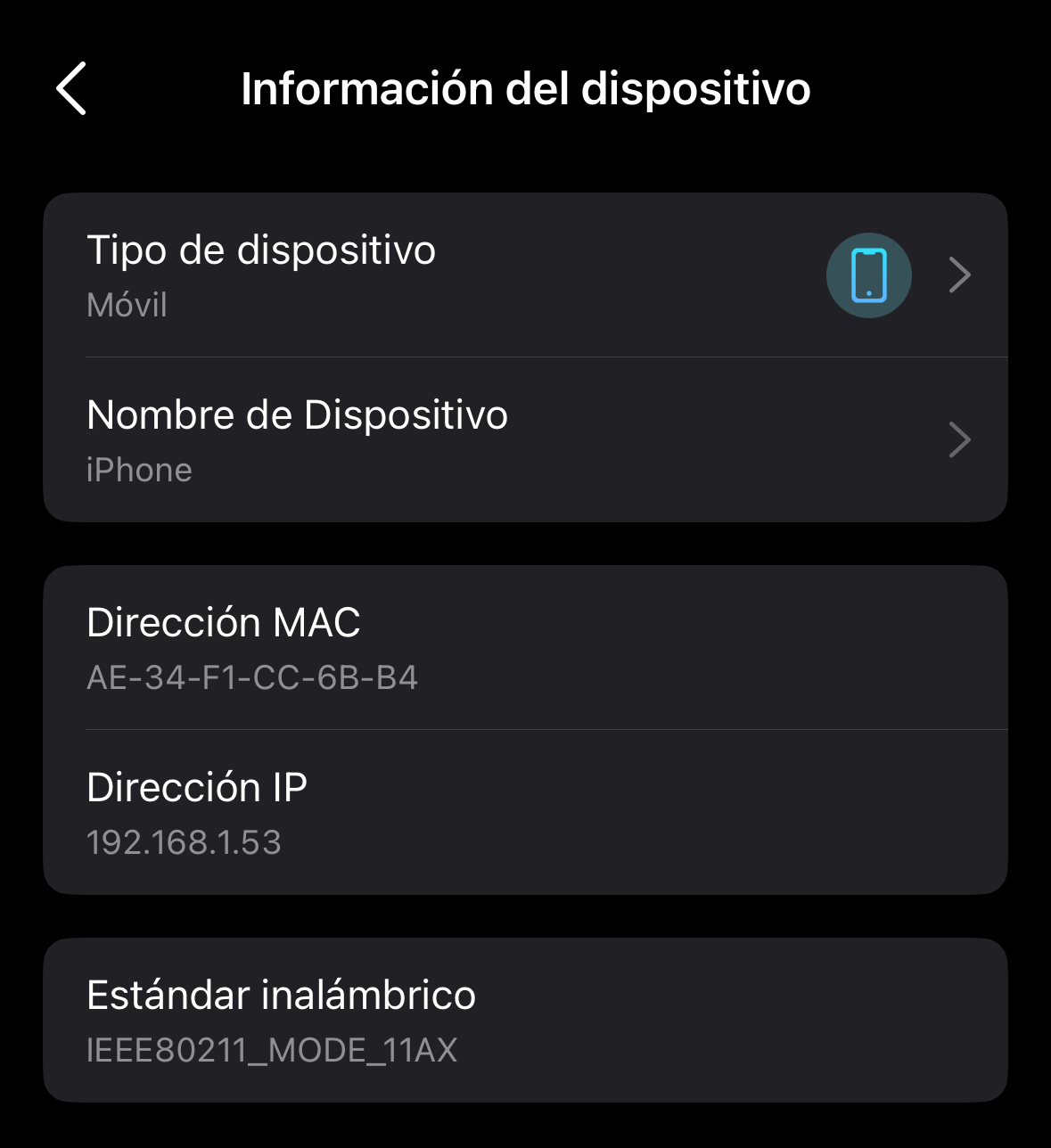
And of course im conecting to my main network, please stop insulting my inteligence. And yes, I can change the main deco on Android Deco App.
- Copy Link
- Report Inappropriate Content
Information
Helpful: 0
Views: 3700
Replies: 21
Voters 0
No one has voted for it yet.