
Cannot make my deco X50 to wired ethernet mode

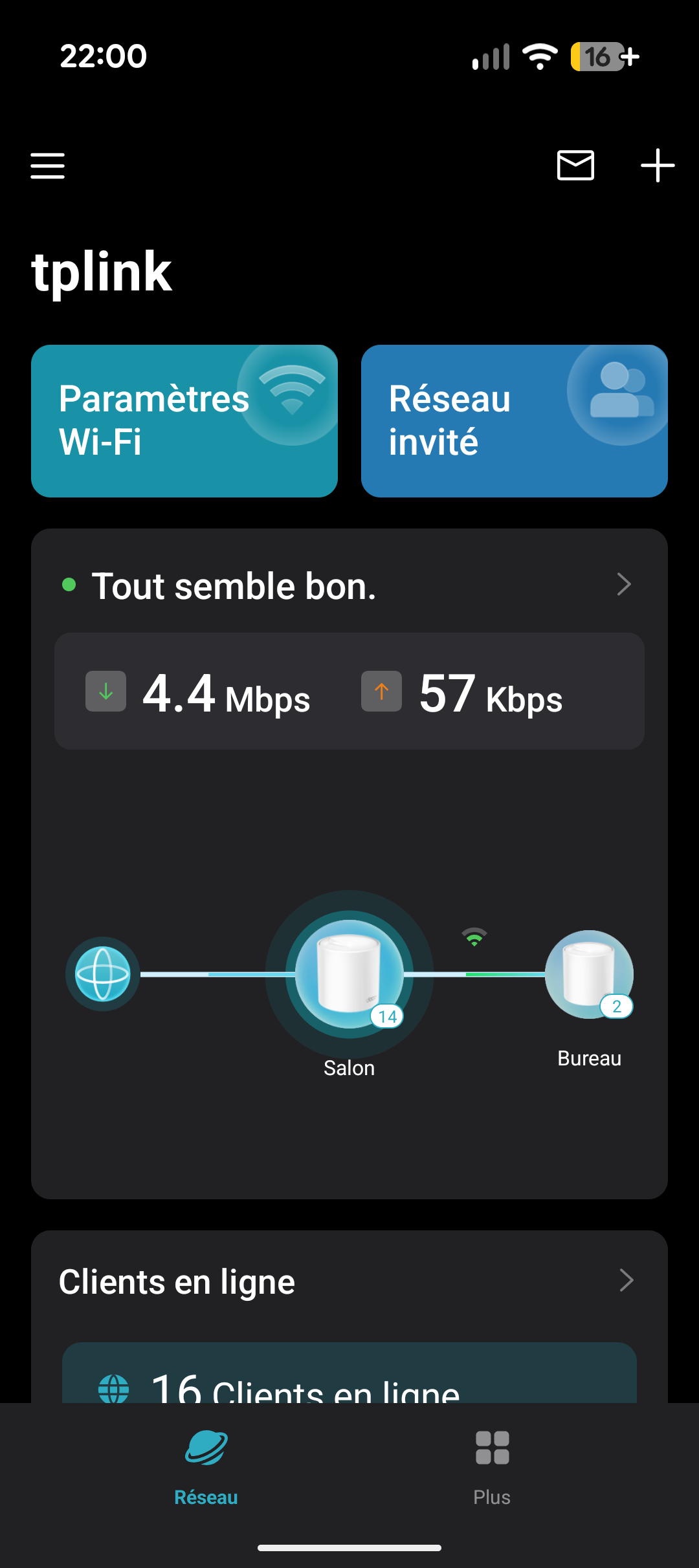
Hello my deco are connected like this and working in AP mode :
Router -----------> DECO1 living room
-----------> DECO2 office room
For months the DECO2 "Salon" was working well in wired mode but it has switch to wifi mode since few days (wifi icon on screenshot).
How to make it back to ethernet mode ? I've tried restart my router and DECO unplug and re plug the rj 45 cable but it doesnt go to ethernet mode :(
thanks in advance for help !
- Copy Link
- Subscribe
- Bookmark
- Report Inappropriate Content


Hi, welcome to the community.
When the two Deco nodes are operating in AP mode, they can connect directly to the router's LAN ports. However, the picture in your Deco app shows that the main Deco is "Salon" and is wired to the router, and the satellite Deco is "Bureau" and is wirelessly connected to "Salon". You can try the following steps and check whether the "Bureau" will be wired connected.
1. Change the Ethernet ports on the router and the "Bureau".
2. Change the Ethernet cable between the router and the "Bureau".
If the same phenomenon persists, please confirm the following information.
1. Please disconnect the "Bureau" from your router and connect a PC instead via the same Ethernet cable. Do you have internet on the PC? If so, what's the IP address on it?
How to Find Your IP Address on Windows, Mac, iPhone, Android, and More
2. Please connect the "Bureau" to the "Salon" directly via an Ethernet cable. Does the Ethernet backhaul work?
Best Regards
- Copy Link
- Report Inappropriate Content

Can you please provide the hardware version of your Deco X55. You can use the steps in the link below to find your hardware version.
How to Find the Hardware Version on Your TP-Link Device
Also see if the trouble shooting steps in the link below solve your issue.
- Copy Link
- Report Inappropriate Content

From that it shows that "Salon" is Main deco
You could try not having both Deco's plugged into the router.
Firstly, keep Salon plugged into router.
Then if possible plug Bureau into one of the network ports in Salon instead of router.
If that is not physically possible because of space or cable routing issues, then you would need a cheap switch and setup like follows:
Router -> Salon -> Switch -> Bureau
This is what I would try
- Copy Link
- Report Inappropriate Content
Hi, welcome to the community.
When the two Deco nodes are operating in AP mode, they can connect directly to the router's LAN ports. However, the picture in your Deco app shows that the main Deco is "Salon" and is wired to the router, and the satellite Deco is "Bureau" and is wirelessly connected to "Salon". You can try the following steps and check whether the "Bureau" will be wired connected.
1. Change the Ethernet ports on the router and the "Bureau".
2. Change the Ethernet cable between the router and the "Bureau".
If the same phenomenon persists, please confirm the following information.
1. Please disconnect the "Bureau" from your router and connect a PC instead via the same Ethernet cable. Do you have internet on the PC? If so, what's the IP address on it?
How to Find Your IP Address on Windows, Mac, iPhone, Android, and More
2. Please connect the "Bureau" to the "Salon" directly via an Ethernet cable. Does the Ethernet backhaul work?
Best Regards
- Copy Link
- Report Inappropriate Content
Information
Helpful: 0
Views: 156
Replies: 3
Voters 0
No one has voted for it yet.