
Deco mesh guest network problem with backhaul with swich x90 x95 m9 plus

As the same problem as i read without anwser/solution in other closed threeds
Gest network stop woking on router that is connected throue cable and switch
It works without blackhoul but when it go out to the other deco thst is backhul it can not connect guest network
I have x95 and x90 satelites connected to switch unmanged tp link sg1210p
Vlan -id 591 apperes in gest network setup menu i cant remember it was there before
- Copy Link
- Subscribe
- Bookmark
- Report Inappropriate Content


Hi,
Please confirm the following information regarding the reported phenomenon for further analysis.
1. Is your network diagram ISP modem -- Deco X95-- switch TL-SG1210P -- Deco X90? How many satellite Deco X90 do you have? Does the guest network from the Deco X90 not work?
2. Whether the guest network from the Deco X90 works when it connects to the Deco X95 via Wi-Fi?
Please try connecting the Deco X90 to the Deco X95 directly with an Ethernet cable, bypassing the switch, and check whether the guest network on the X90 is working.
Best Regards
- Copy Link
- Report Inappropriate Content
it looks like this
Internet-> router (deco m9) -> switch in port: uplink nr 2 (i have tried port1 also no diffrence)(sg1210p) -> 3x enthernet decos 1x wifi deco
See picture
Guest network works in house where m9+(i have this as router becuse its free homecare protection) and x90 + x95 as wifi AP mesh
But when it go to the apartment (backhaul wired from the unmanned switch port 2)a bit away from house only the real wifi works not guest wifi
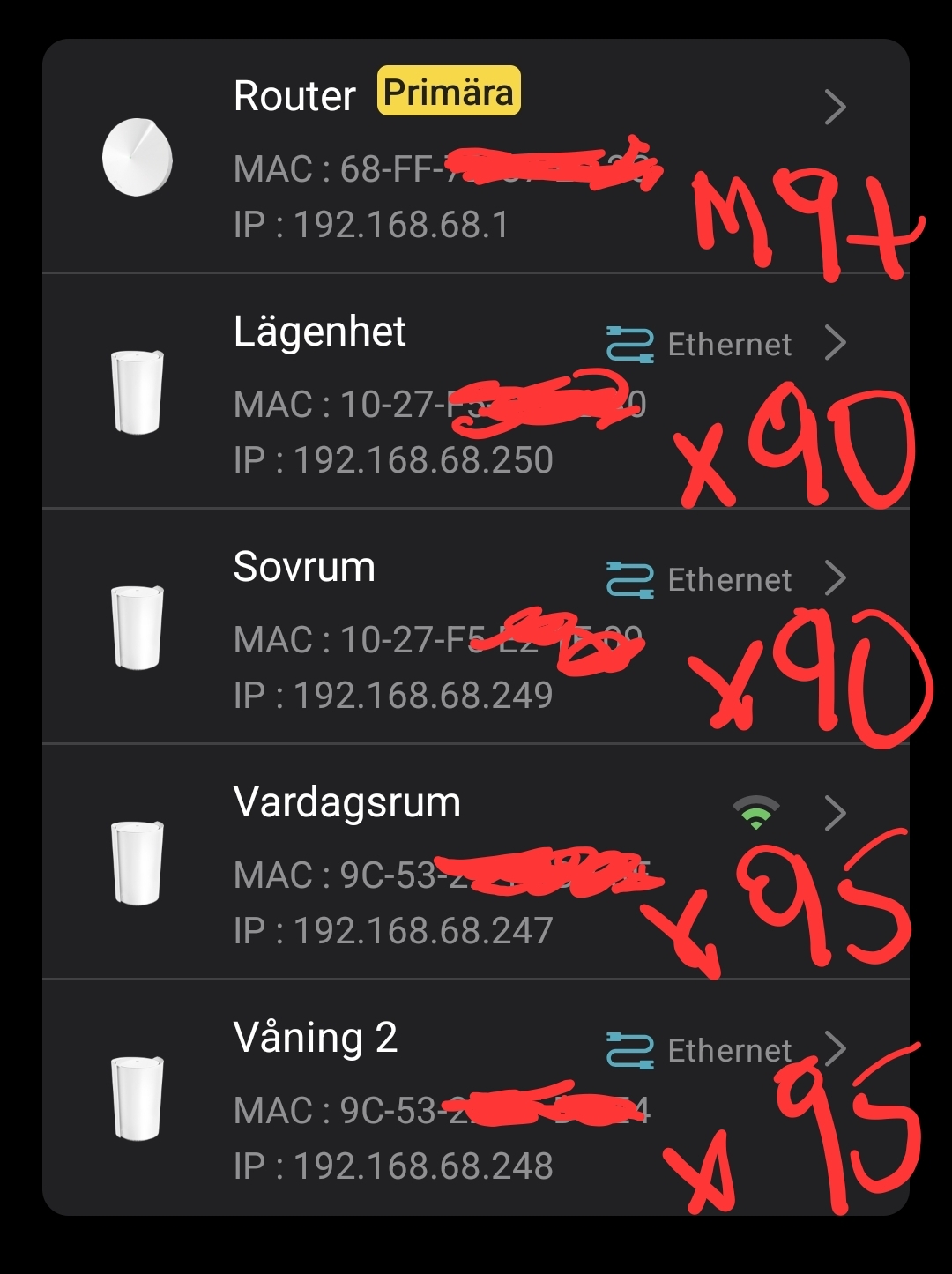
It has worked before but i cant remember when becuse the old guests in the appartment nerver told me when it stoped working
- Copy Link
- Report Inappropriate Content
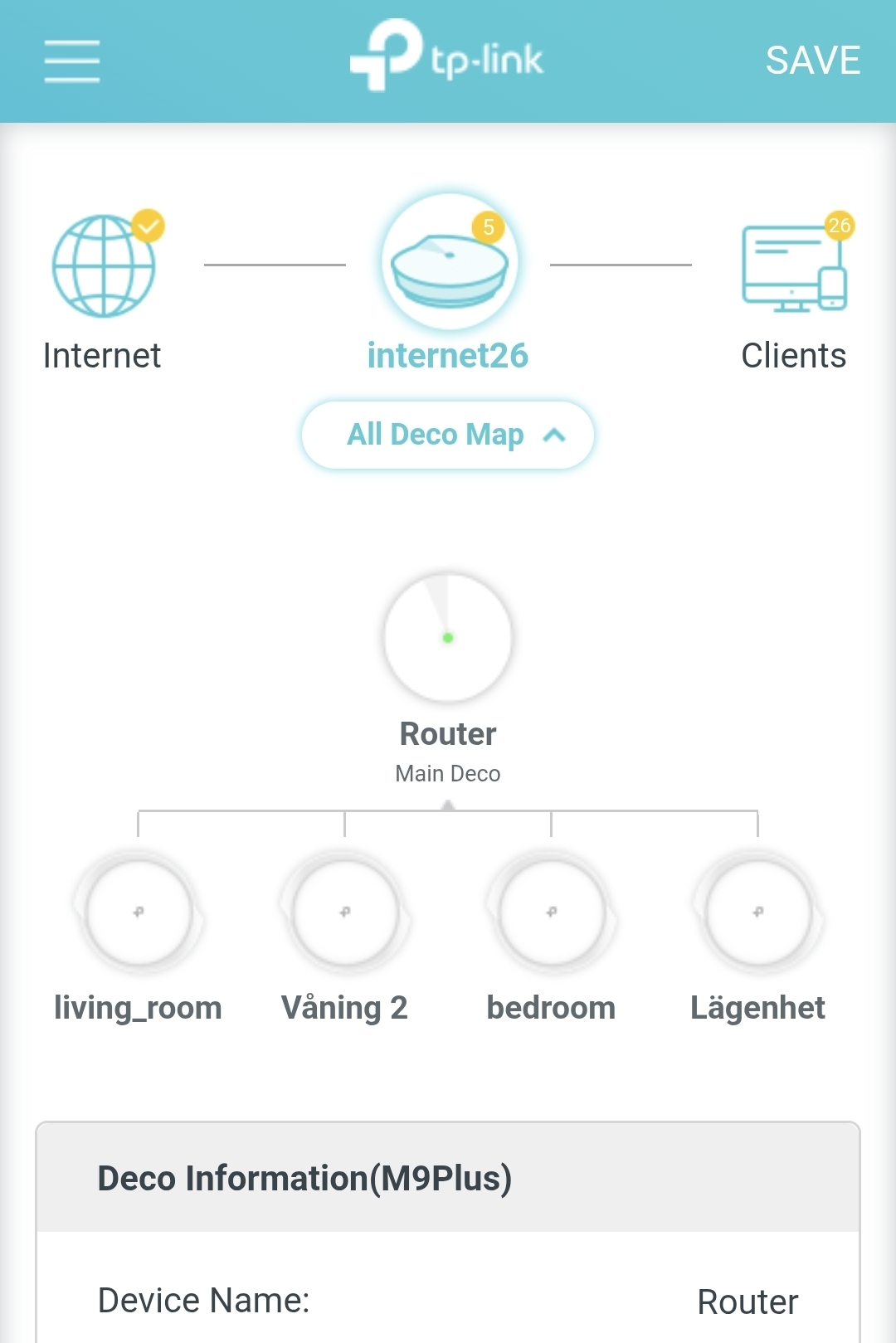
- Copy Link
- Report Inappropriate Content
Hi,
Please confirm whether the following information is correct.
1. In your house, there is a main Deco M9 Plus, an X95 connected to the main Deco wirelessly, and a wired Deco X90 connected to the switch. The guest network works even when near the Deco X90, even after turning off Wi-Fi on your phone and turning it back on to reconnect to the guest network.
2. In the apartment, there are a wired X95 and a wired X90. You can see the guest network, but can't connect successfully.
If so, when connecting a Deco X90 or X95 in the apartment to the main Deco directly via an Ethernet cable, can you connect to the guest network successfully when near the X90 and X95?
Best Regards
- Copy Link
- Report Inappropriate Content
1. Yes
Main house :
M9 plus as main router in basemnent guest work
x95 wireless livingroom guest network work
X95 wiered second floor guest network dont work here
X90 wired first floor bedroom guest dont work here
Apartment:
X90 wierd - guest network dont work here
2. No. only wired x90 ethernet
No wired connected decos can provive guest network it seams only work when im near basement and livingroom wirless
- Copy Link
- Report Inappropriate Content
Hi,
When you say the guest network doesn't work, do you mean the guest network name doesn't appear, the guest network name appears but you can't connect, or you can connect, but there's no internet connection?
Best Regards
- Copy Link
- Report Inappropriate Content
Network ssid guest appears but i cant connect in appartment (wired backhaul)
Another example:
when im in the main house and i am connected to guest network and go out to the appartment it disconnects
But in the ordenary network ssid - when i do the same it works(mesh/handover) and stays connected
I have read that if its managed switch you should put vlan 591 settings in the menu
Can it be the switch that is bad? But it has worked before ? I think it happend after an update .
I can take screenshot becuse the deco app not allow me to but it apperes vlam settings in the guest network menue becuse it feel that its wired
What do you think?
- Copy Link
- Report Inappropriate Content
Now i have tried to change the swtich to an tp-sg108
Its the same problem as above. So its not the switch
- Copy Link
- Report Inappropriate Content
Now im frustrated
I have rebuild network
I remove m9plus v1 from the setup and put x90 as router witch enable the iot feuture.
So now wifi work and iot work everywhere but guest network still dont work.
It connects to wifi but no internet
- Copy Link
- Report Inappropriate Content
Hi,
Thank you for the updates. I have escalated your case to our tech team, and they will contact you via email to assist you further. Please wait patiently.
Best Regards
- Copy Link
- Report Inappropriate Content
Information
Helpful: 0
Views: 388
Replies: 10
Voters 0
No one has voted for it yet.