
Persistent SD Card Failures in Tapo C510W Cameras
Persistent SD Card Failures in Tapo C510W Cameras

I have six Tapo C510W cameras installed—three purchased on October 9, 2024, and three more about a month later from the same shop. The first three cameras are equipped with Kingston Canvas Select Plus MicroSD cards (128GB, 100MB/s) and have been running flawlessly for over a year without any issues.
However, the other three cameras consistently damage SD cards. These are the same Kingston cards, bought on the same date from the same store, yet after running for a short period (anywhere from one week to two or three months), the cards become corrupted and unusable. Once corrupted, they cannot be formatted or recovered in any way. I have tested multiple replacement cards, but the problem persists. All cameras are powered using the original adapters.
Today, a neighbor who also owns Tapo C510W cameras reported experiencing the same issue: his SD card was rendered unusable. Notably, he also uses two cameras from another manufacturer with identical SD cards, and those work perfectly fine.
This strongly suggests that the issue lies specifically with the Tapo C510W model. It is not acceptable to replace SD cards every week, and I kindly request that this problem be investigated thoroughly.
Same issue as described here but the power supply is original power supply provided with camera. https://community.tp-link.com/en/smart-home/forum/topic/682470
- Copy Link
- Subscribe
- Bookmark
- Report Inappropriate Content


Hi,
If you have a problem after using the microSD card in the camera for a period of time, it may be related to the SD card's quality or use case. We recommend following these steps for initial troubleshooting.
1. Please use the third-party tool "H2testw" to test the SD card and send us the test results.
How to Verify Fake Micro SD Cards
2. If the SD card can't be formatted or recognized in the Tapo app, please refer to the following instructions to troubleshoot.
What should I do if the SD card cannot be formatted/recognized?
If the same phenomenon persists, please provide the following information for further analysis.
1. On the camera's Device Settings > Device Info page, please check its model number, firmware, and hardware versions.
2. Describe the phenomenon you are experiencing. Check if any error messages appear in the Tapo app when the SD card becomes unusable on the camera.
3. Confirm the model number and capacity of the SD card. Ensure the SD card is purchased from its authorized seller.
4. If your SD card is not listed in the compatibility chart. We recommend selecting an SD card from the list to work with our camera.
microSD Card Compatibility for Tapo and Kasa Security Cameras
Best Regards
- Copy Link
- Report Inappropriate Content
Hi,
Generally, the camera won't damage the inserted SD card. The SD card does not work, which may be related to its quality and usage environment. Regarding the phenomenon you reported, please confirm the following information for analysis.
1. On the camera's Device Settings > Device Info page, please check its firmware and hardware versions.
2. What error message appears in the Tapo app when the SD card becomes unusable on the camera?
3. If you cannot format the SD card, have you tried removing and reinserting it from the camera? You can try removing and reinserting it several times and see if it helps. Can the SD card be formatted on a PC?
4. Please use the third-party tool "H2testw" to test the SD card and send us the test results. You can test the SD card before use and after the reported phenomenon occurs to see if it shows any changes.
How to Verify Fake Micro SD Cards
5. Is your camera set to record video continuously? How frequently does the camera detect events? For example, how many detection video clips are saved per day?
Best Regards
- Copy Link
- Report Inappropriate Content
@Solla-topee so last card broke yesterday, message something like abnormal expansion capacity, after that SD broken can only read no write, it lasted 1 month and 1 week, from 128 gb is 78 full, write only on motion not continuous. Can not test that card as can not write.
Model c510w hardware version 1.0

- Copy Link
- Report Inappropriate Content
Hi,
1. What's the microSD card's model number and capacity you used to replace the original Kingston SD card on the Tapo C510W?
2. Have you tried removing and reinserting the SD card from the camera several times (1~3 times) and see if it helps? Can the SD card be formatted on a PC after it becomes unusable?
Best Regards
- Copy Link
- Report Inappropriate Content
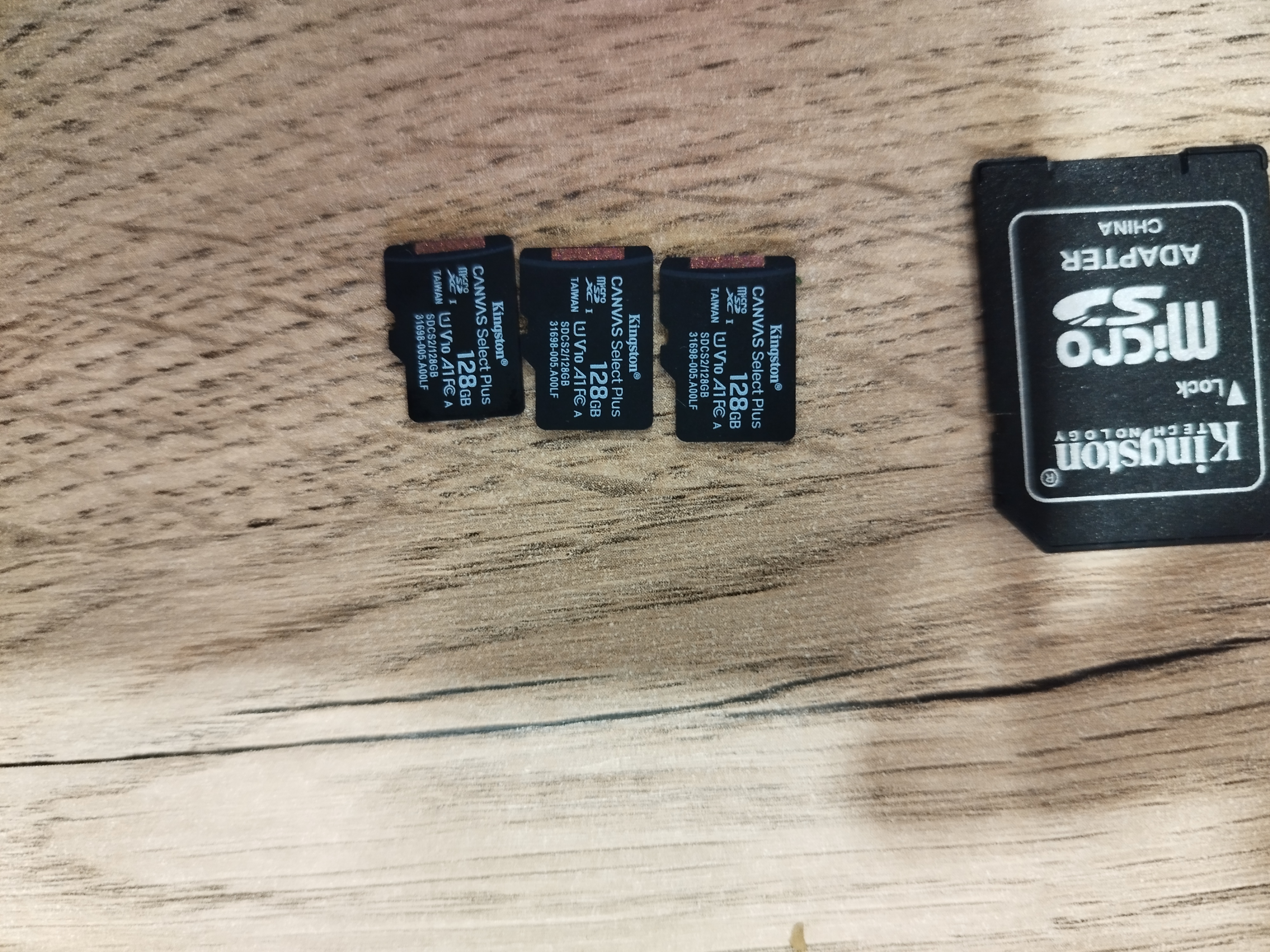 @Solla-topee this are all broken, one more is in camera itself, all are same bought same date same store, on 3 cameras running for over 1 year without issues, on other 3 breaking constantly, the cards get locked, can not be formatted on PC with any tool, only read
- Copy Link
- Report Inappropriate Content
Hi,
I have escalated your case to our tech team, and they will contact you via email to assist you further. Please wait patiently.
Best Regards
- Copy Link
- Report Inappropriate Content
@Solla-topee I have had the same experience with SD cards that worked fine for a few months and then are rendered usable because they're not looping and rewriting. They are completely filling the storage capacity of the card.The Tapo camera write protects the SD card so that they cannot be reformatted on a PC. Reformatting through the Tapo app - camera setting - does not work either. I have two cameras and both of them have corrupted SC cards and are useless for home security when they will not record.
please forward me any corrective action that the escalation team deem successful in correcting this flaw.
Many thanks !
ShuggieWee
- Copy Link
- Report Inappropriate Content
Hi,
For the reported phenomenon, please provide the following information for further analysis.
1. What's your camera's model number, firmware, and hardware version? Usually, if your camera does not have the Encrypt microSD Card feature or it is not enabled, you can format the SD card on a PC.
2. What are the brand, model number, capacity, and format of your microSD card? Where did you purchase the microSD card? If you bought it online, please send us a link to the microSD card.
3. If you can detect the microSD card on the Tapo camera, but can't format it in the Tapo app, please refer to the following instructions to troubleshoot: What should I do if the SD card cannot be formatted/recognized?
Best Regards
- Copy Link
- Report Inappropriate Content
In July 2025, I purchased two Tapo 3K 5MP Outdoor Pan/Tilt Security Wi-Fi Cameras.
1.
Firmware Version 1.3.3 Build 250923 Rel. 59794n
Model: C530WS_AB0B
Hardware Version: 2
2.
PNY P-SDU512V32100PX-GE 512GB Premier-X Class 10 U3 V30 microSDXC Flash Memory Card
Amazon (same as Tapo cameras)
https://a.co/d/00FhsaKn
3.
I had to delete and reinstall the app to clear the cache after formatting again did not work.
this message appeared when logging in to the app and opening the camera:
Failed to Initialize
This microSD card has an abnormal expansion capacity. Please try a new microSD card.
Got It Learn More
Attempted again to format. It always starts, gets 5%, stalls, jumps to 75%, then 80%, then crashes.
Error Messages is always:
Failed to format your microSD card. Please try later. OK
I hope the details of my experiences are helpful in finding a solution to what appears to be a widespread problem. The problem is not found until you go to playback and download and see that it has not been recording because it overfills and doesn't rewrite over in the leading process.
Thanks again,
ShuggieWee
- Copy Link
- Report Inappropriate Content
Hi,
Based on the phenomenon and error messages you have provided, it is possible that your microSD card is a fake one. Although it may initially function with the camera, it eventually triggers an "abnormal expansion capacity" warning after a period of use. We recommend formatting the SD card on a PC, then using the third-party tool H2testw to test your microSD card, following the instructions below.
How to Spot and Test a Fake Micro SD Card
Please refer to the following instructions to see the microSD card compatibility list and buying tips. Your microSD card is not listed in the compatibility chart. We recommend selecting a microSD card from the list to work with our camera. Additionally, microSD cards use flash memory technology, which has a limited number of write cycles. Each write operation gradually wears down the flash chips. High Endurance cards are specifically designed for continuous recording and are the recommended choice for home security cameras.
microSD Card Compatibility for Tapo and Kasa Security Cameras
Best Regards
- Copy Link
- Report Inappropriate Content
Thank you for your reply. As stated previously, the card can not be formatted on a pc, nor in the camera.
When inserted several times, the camera recognizes the card but will not format it, as described in detail previously, crashing at 80% mark.
I cannot complete the H2testw because the Tapo camera write protected it and that can not be removed. I tried.
I do not see where in the settings or elsewhere that I can change that aspect or see an option for encryption.
I have followed all the steps provided in your previous communication. I have gone through multiple attempts in Command mode on the box to remove the write protection - unsuccessfully.
I did explore the suggested as cards prior to purchase in July 2025. Perhaps, I made a mistake or there was a change.
With that said, I've never had any trouble with pny cards in other media devices and brands from digital to video, security, or game cameras to quickly name a few.
Tapo camera is the outlier.
I replaced the first SD card that failed after 1 month, in September 2025, with an Amazon Basics SD card. That card is still functioning well as of tonight.
I will reexamine the list of suggested media and proceed in replacing another rather expensive 512 card.
1. I have turned on diagnostics in the camera. Can you tell me how to share that information? The app was showing 3 recordings earlier this evening but those are not showing now. I'm hoping there may be information created in the diagnostics report.
2. Please explain why some brands are incompatible with Tapo cameras.
Also, I do not believe it is an SDcard issue as, Victor, another poster is/was using the Kingston cards with 50% failure rate.
- Copy Link
- Report Inappropriate Content
Information
Helpful: 2
Views: 2120
Replies: 20
Voters 1
